3 460989001B
Installing Jumpers
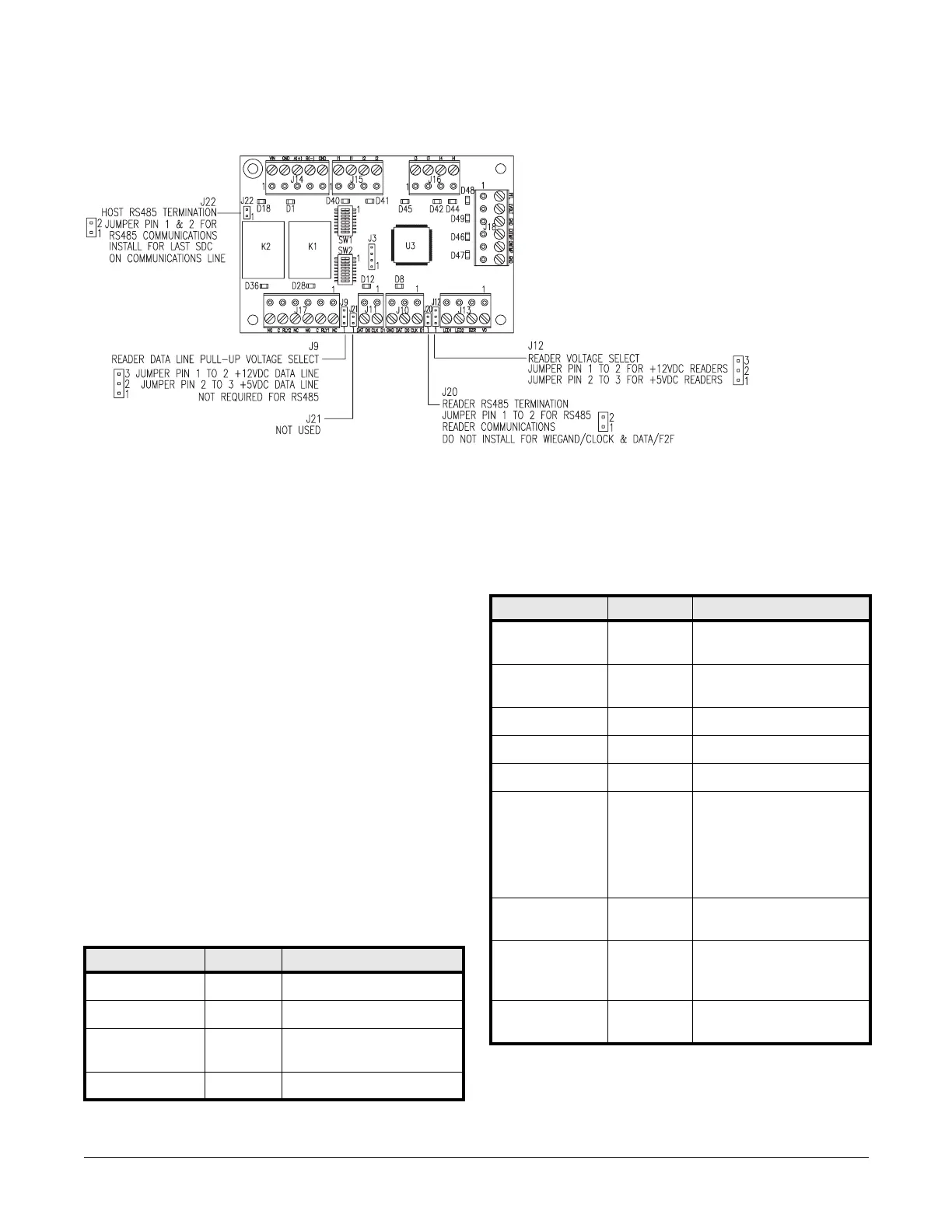
Jumper configuration
Host communications:
• Jumper J22 pins 1 & 2 for RS-485 reader communications. Install the
jumper on last the SDC on the communications line.
Reader output voltage selection:
• Jumper J12 pins 1 & 2 for +12VDC readers
• Jumper J12 pins 2 & 3 for +5VDC readers
Reader RS-485 termination:
• Jumper J20 pins 1 & 2 for RS-485 reader communications
Note: Do NOT install the jumper for Wiegand/Clock & Data/F2F
Reader Communications.
Reader data line pull-up voltage selection:
• Jumper 9 pins 1 & 2 for +12VDC data lines
• Jumper 9 pins 2 & 3 for +5VDC data lines
Notes: Some readers have data lines pulled up to +5 while the data lines
of other readers are pulled up to +12 VDC. Therefore, you need
to set these to match your reader.
NOT required for RS-485 communications.
Jumper J21 is not used.
Status LEDs
LED Table for Series 2 LNL-1300 Mode
When switch 5 is in the ON position, the LEDs behave like the series 2
LNL-1300.
LED Table for Normal Mode
When SW1 switch 5 is in the off position, the LEDs operate in Normal
Mode.
External tamper (cabinet tamper) must be open for Input LEDs to be on.
When tamper is closed (cabinet door closed) Input LEDs will be off.
Indication LED State
Power-up ALL Off
Initialization D45 Flashing
After initialization D45 Offline: 1 second rate, 20% ON
Online: 1 second rate, 80% ON
Communications D1 ON
Indication LED State
RS-485 panel
communication
D1 ON - Yellow
Reader 1 RS-485
communication
D8 ON - Yellow
Power on D18 ON - Green
Relay 1 D28 ON - Green
Relay 2 D36 ON - Green
Supervised input
I1-I2
D40, D41 Active: ON - Yellow
Inactive: ON - Green
Foreign: ON - Red
Cut: Flashing - Green
Short: Flashing - Red
Ground: Flashing - Yellow
Unsupervised I1-I2 D40, D41 Closed ON - Red,
Open - Off
CPU status D45 Offline: 1 second rate, 20% ON
Online: 1 second rate, 80% ON
Flash Green - Badge Read
External (cabinet)
tamper
D46 Open ON - Red


 To Next Page