Page 4
TO START THE CompleteHeat SYSTEM
WARNING
If you do not follow these instructions exactly, a
fire or explosion may result causing property
damage, personal injury or loss of life.
1-STOP! Read the safety information at the beĆ
ginning of this section.
2-Set both room thermostat and water temperature
dial to lowest settings.
3-Turn off all electrical power to the CompleteHeat
system (AM30 & HM30 unit). Ask your dealer to
identify the disconnect switch or circuit breaker.
4-The HM30 unit is equipped with an ignition device
which automatically lights the burner. Do not try to
light the burner by hand.
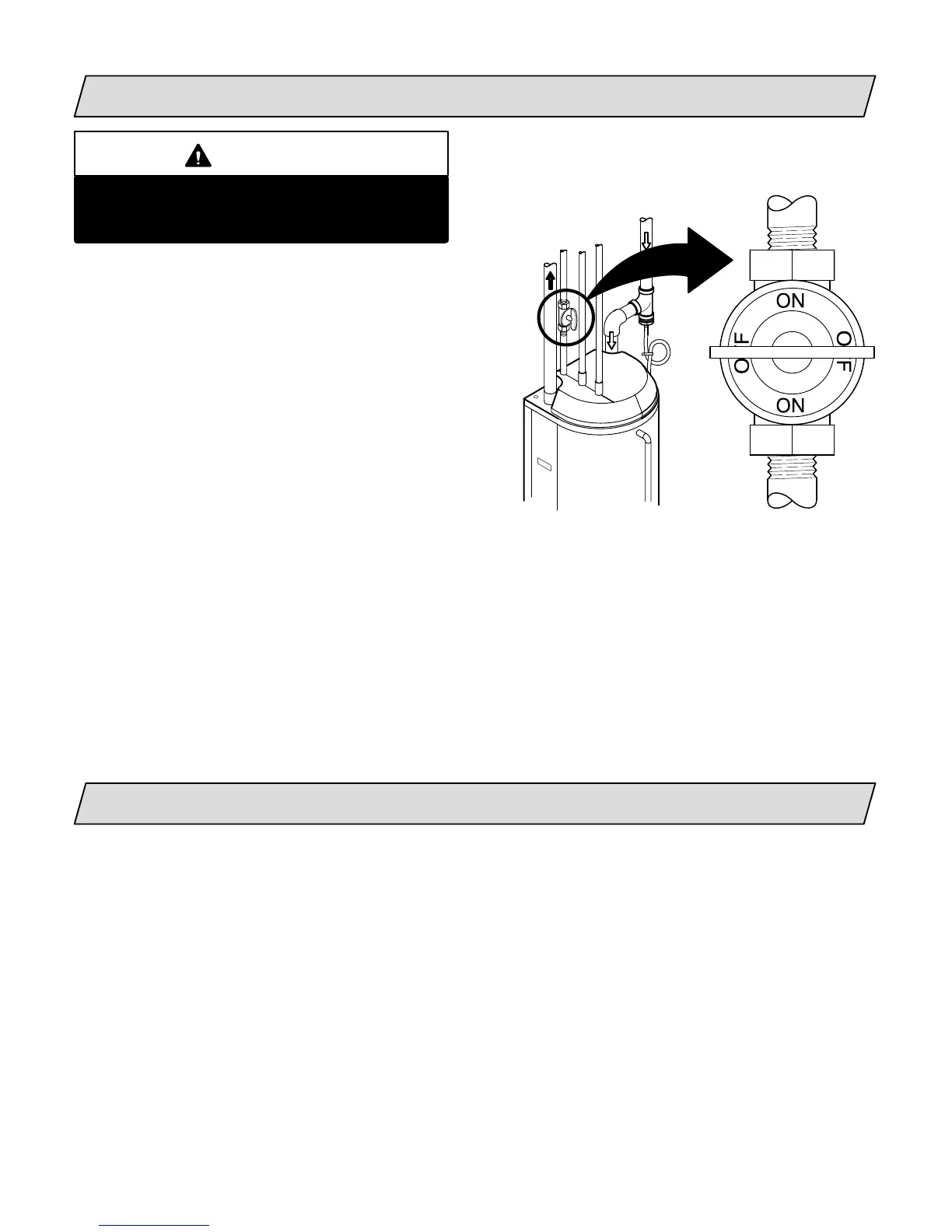
5-Turn knob on main manual shutĆoff valve 90_ counterclockwise to ON. Do not force.
6-Turn on all electrical power to system.
7-Set room thermostat and water temperature dial to desired settings.
NOTE - When unit is initially started, steps 1 through 7 may need to be repeated to purge air from gas
line. The AM30 will not supply warm air until the water temperature in the HM30 tank is within 15_F
(8.33_C) of the desired water thermostat setpoint.
8-If the HM30 module will not operate, follow the instructions To Turn Off Gas To Unit" and call your
service technician or gas supplier.
TO SHUT OFF THE CompleteHeat SYSTEM
1-Set room thermostat and water temperature dial to lowest settings.
2-Turn off all electrical power to CompleteHeat system (AM30 and HM30).
3- Turn knob on main manual shutĆoff valve 90_ clockwise to OFF. Do not force.
MAIN MANUAL SHUTĆOFF VALVE
MAIN MANUAL
SHUTĆOFF VALVE
SHOWN IN
OFF POSITION


 To Next Page