D-71Z-2444-S (1.0) 2019-10 4
Montage und Anschluss ♦ Mounting and connection
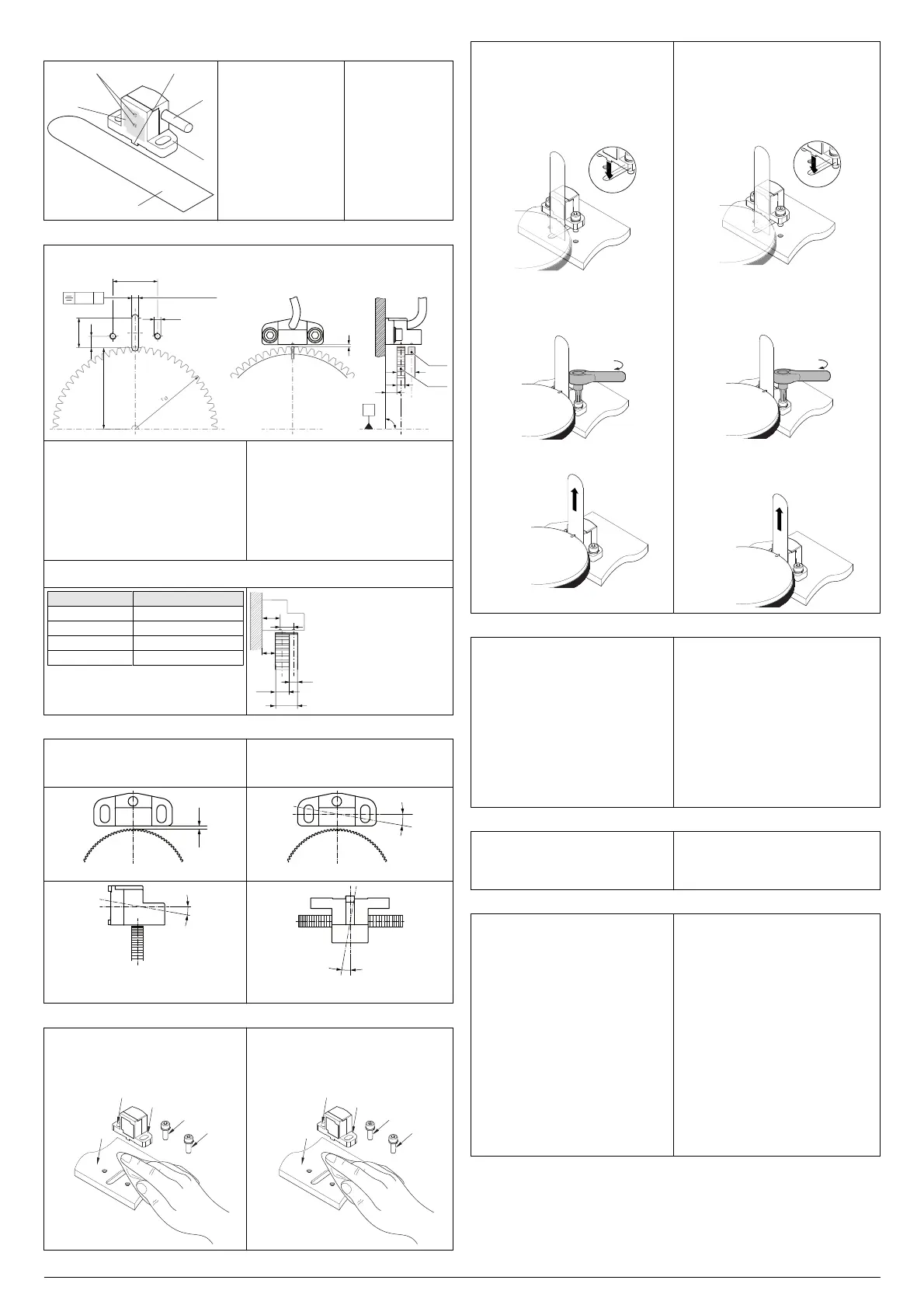
Benannte Teile ♦ Parts named
5
4
1 Messfläche
2 Sensorelemente
(unten: Signalspur,
oben: Referenzspur)
3 Führungsnase
4 Anschlusskabel
5 Montageflansch
6 Abstandslehre
(z. B. 0,2 mm)
1 Measuring surface
2 Sensor elements
(bottom: signal track,
top: reference track)
3 Guide lug
4 Connection cable
5 Mounting flange
6 Distance gauge
(e.g. 0.2 mm)
Bohrbild und Einbaumaße ♦ Hole pattern and installation dimensions
Alle Maße in mm; Allgemeintoleranz ISO 2768-mK
All dimensions stated in mm; general tolerance ISO 2768-mK
d
b
a
g
90° ± 5.7ʹ
T
Ref
T
Sig
A
A0.01
4 H7 (2 tief/deep)
27
± 0.1
18
7
M 4
r
a
- 1
a Breite der Signalspur: ≥ 4 mm
b Abstand Montagefläche zu Zahnrad: ab-
hängig von Geometrie des Messzahnrads
(z.B. Breite der Signalspur)
d Luftspalt: abhängig vom Modul (siehe
technische Daten)
g Breite des Messzahnrads
r
a
=d
a
/2 (mit d
a
= Kopfkreisdurchmesser des
Zahnrads)
T
Ref
Referenzspur
T
Sig
Signalspur
a Width of the signal track: ≥ 4 mm
b Mounting surface to tooth wheel distance:
dependent on the geometry of the target
wheel (e.g. width of the signal track)
d Air gap: dependent on the module (see
technical data)
g Width of the target wheel
r
a
=d
a
/2 (with d
a
= Outside diameter of the
tooth wheel)
T
Ref
Reference track
T
Sig
Signal track
Einbaumaße für Standard-Messzahnräder ♦
Installation dimensions for standard target wheels
Maß ♦ Dimension ZAZ
g10
a
1/2
6
a
N
4
b7.5 ± 0.5
Position der Sensorelemente ♦ Position of the
sensor elements: c
1
= 9.5 mm; c
2
= 6 mm
ZAZ
a
1/2
a
N
c
1
c
2
g
b
Mögliche Einbaufehler ♦ Possible mounting errors
Die Messfläche des MiniCODERs muss sym-
metrisch zum Messzahnrad ausgerichtet wer-
den. Eine unsymmetrische Ausrichtung führt zu
Messfehlern!
The measuring surface on the MiniCODER
must be aligned symmetrically in relation to the
target wheel. Alignment that is not symmetrical
will result in measuring errors!
Amplitudenhöhe Spuren 1/2 ♦ Amplitude tracks 1/2 Offset Spuren 1/2 ♦ Offset tracks 1/2
Amplitudenverhältnis Spur 1/2 zu Referenzspur ♦
Amplitude ratio track 1/2 in relation to reference
track
Nulllage Spur 1/2 zu Referenzspur ♦ Zero position
track 1/2 in relation to reference track
MiniCODER montieren ♦ Mounting MiniCODER
► Übereinstimmung der Moduln von
MiniCODER und Messzahnrad prüfen.
► Fräsung und Bohrungen in der Aufnahme-
vorrichtung vornehmen.
► Montagefläche und Montageschrauben
reinigen.
► Check the module of the MiniCODER and
target wheel match.
► Mill the recess and make the bores in the
mounting.
► Clean mounting surface and mounting
screws.
MiniCODER montieren ♦ Mounting MiniCODER
► Zwei Schrauben M4 (Empfehlung DIN 912
M4 × 10) mit Schraubensicherung
benetzen.
► Abstandslehre im Einbauraum auf das
Messzahnrad legen.
► MiniCODER mit den Führungsnasen in die
Führungsnut der Montagefläche einsetzen
und den MiniCODER gegen die
Abstandslehre schieben.
► MiniCODER mit Schrauben, Federringen
und Unterlegscheiben symmetrisch zum
Messzahnrad montieren.
Montageschrauben mit einem Drehmoment
von max. 2,5 Nm anziehen.
M
► Luftspalt mit Hilfe der Abstandslehre prüfen.
► Abstandslehre entfernen und aufbewahren.
► Wet two screws M4 (recommendation
DIN 912 M4 × 10) using threadlocker.
► Place the distance gauge on the target wheel
in the installation space.
► Fit the guide lugs on the MiniCODER in the
guide slot on the mounting surface and slide
MiniCODER against the distance gauge.
► Mount MiniCODER symmetrically in relation
to the target wheel using screws, spring
washers and washers. Tighten mounting
screws to a torque of max. 2.5 Nm.
M
► Check air gap with the aid of the distance
gauge.
► Remove distance gauge and store in a safe
place.
MiniCODER prüfen und konfigurieren ♦ Checking and configuring MiniCODER
MiniCODER und Netzteil an das Test- und
Programmiergerät anschließen.
„244xM“ im Menü der Web-Oberfläche aus-
wählen.
Bei Bedarf MiniCODER konfigurieren
Zähnezahl und Anwendung eingeben.
Maximale Drehzahl und Auflösung prüfen.
MiniCODER püfen
Messzahnrad drehen und Funktion von
MiniCODER
und Messzahnrad prüfen.
Bei Bedarf neuen Abgleichvorgang starten,
Luftspalt prüfen und Montage wiederholen.
Sicherstellen, dass kein Fehlercode ange-
zeigt wird.
Test- und Programmiergerät entfernen.
Connect MiniCODER and power supply unit
to the testing and programming unit.
Select „244xM“ on the menu in the web inter-
face.
Configure MiniCODER as required
Enter number of teeth and application.
Check maximum rotational speed and resolu-
tion.
Check MiniCODER
Turn target wheel and check function of
MiniCODER
and target wheel.
If necessary, start new calibration process,
check air gap and repeat mounting.
Make sure an error code is not displayed.
Remove testing and programming unit.
MiniCODER anschließen ♦ Connecting MiniCODER
MiniCODER entsprechend der
Anschlussausführung korrekt anschließen.
Kabel sicher verlegen und fixieren.
Biegeradius des Kabels und EMV-Hinweise
beachten.
Connect MiniCODER correctly as per the
connection type.
Lay cable securely and fix.
Pay attention to bending radius of the cable
and EMC instructions.
Störungsbeseitigung ♦ Troubleshooting
Störung: Kein oder fehlerhaftes Ausgangssig-
nal
Abhilfe:
Alle elektrischen Anschlüsse prüfen.
Befestigung der Montageschrauben prüfen.
Prüfen, ob die Messoberfläche oder das
Messzahnrad beschädigt ist. Auswechseln
des beschädigten Bauteils.
Lage von Signalspur und Referenzspur prü-
fen.
MiniCODER mit dem Test- und Program-
miergerät prüfen.
— Zähnezahl und Anwendung prüfen.
— Maximale Drehzahl und Auflösung prü-
fen.
— Zuordnung der Drehrichtung prüfen.
— Funktion von MiniCODER und Mess-
zahnrad prüfen. Bei Bedarf neuen Ab-
gleichvorgang starten, Luftspalt prüfen
und Montage wiederholen.
— Fehlercodes analysieren und Fehler-
ursache abstellen.
Malfunction: No output signal or erroneous out-
put signal
Remedy:
Check all electrical connections.
Check fastening of the mounting screws.
Check whether measuring surface or the tar-
get wheel is damaged. Replace the damaged
component.
Check position of signal track and reference
track.
Check MiniCODER using the testing and pro-
gramming unit.
— Check number of teeth and application.
— Check maximum rotational speed and
resolution.
— Check assignment of the direction of rota-
tion.
— Check function of MiniCODER and target
wheel. If necessary, start new calibration
process, check air gap and repeat mount-
ing.
— Analyse error codes and rectify cause.


 To Previous Page
 Loading...