Need help?
Do you have a question about the Lenovo A2010-a and is the answer not in the manual?
Information on accessing Quick Start Guide and Regulatory Notice online.
Details wireless communication specifications for the phone.
Introduction to the phone's home screen and its default apps.
Guide to customizing the home screen layout, adding widgets, and creating folders.
Instructions on how to set a new wallpaper from presets or photos.
Description of the Home, Menu, and Back buttons and their functions.
How to lock and unlock the phone screen using the On/Off button.
Steps to view, dismiss, and manage notifications on the device.
How to open and close the quick settings panel for device controls.
Using MTP mode for transferring media files like photos and videos.
Using PTP mode for transferring only photos and videos.
Enabling ADB for debugging and managing data with tools.
Instructions for dialing numbers, calling from logs, and calling contacts.
How to answer, reject, or silence incoming calls.
Available actions during an active call, like record, mute, and hold.
How to view and use the call log for quick dialing.
Steps to add new contact details to the phone.
Methods for finding contacts using scrolling or searching.
Process for removing contacts from the device.
How to transfer contacts between SIM, phone, and storage.
Guide to sending text and multimedia messages.
How to find specific messages by contact or phone number.
Steps to delete individual or multiple message threads.
Using the camera app to take photos and record videos.
Method to capture the phone's screen content.
How to browse, view, and zoom media files.
Instructions for sharing media via different channels.
Steps to remove media files from the device.
How to connect to Wi-Fi networks.
Steps to enable mobile data usage via SIM card.
Guide to sharing the phone's internet connection as a hotspot.
How to navigate and browse websites using the Chrome app.
Process for saving frequently visited web pages.
Steps to erase browsing history and data.
Adjusting date, time, and time zone settings.
Changing display language and input methods.
Setting up screen lock and enabling app installation from unknown sources.
Customizing ringtones and performing a factory data reset.
Crucial guidelines for safe product usage and handling.
Precautions for careful handling and restrictions on self-repair.
Safe methods and conditions for charging the device.
Notes on adapter usage and user responsibility for product performance.
Warnings about using the phone while driving and keeping it away from children.
Precautions for explosive atmospheres and radio frequency interference.
Information on potential interference with pacemakers and medical devices.
Guidelines for safe operating temperatures and managing device heat.
Advice on preventing data loss and protecting against malicious software.
 General
| Resolution | 480 x 854 pixels |
|---|---|
| Processor | MediaTek MT6735M |
| CPU | Quad-core 1.0 GHz Cortex-A53 |
| GPU | Mali-T720MP2 |
| RAM | 1 GB |
| Internal Storage | 8 GB |
| Expandable Storage | microSD, up to 32 GB |
| Rear Camera | 5 MP |
| Front Camera | 2 MP |
| Battery | 2000 mAh |
| Operating System | Android 5.1 (Lollipop) |
| SIM | Dual SIM (Micro-SIM, dual stand-by) |
| Network | LTE |
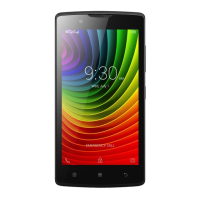
| Display | 4.5-inch (11.4 cm) FWVGA |

 To Next Page