Chapter 1. Getting to know your computer
3
Using the keyboar
d
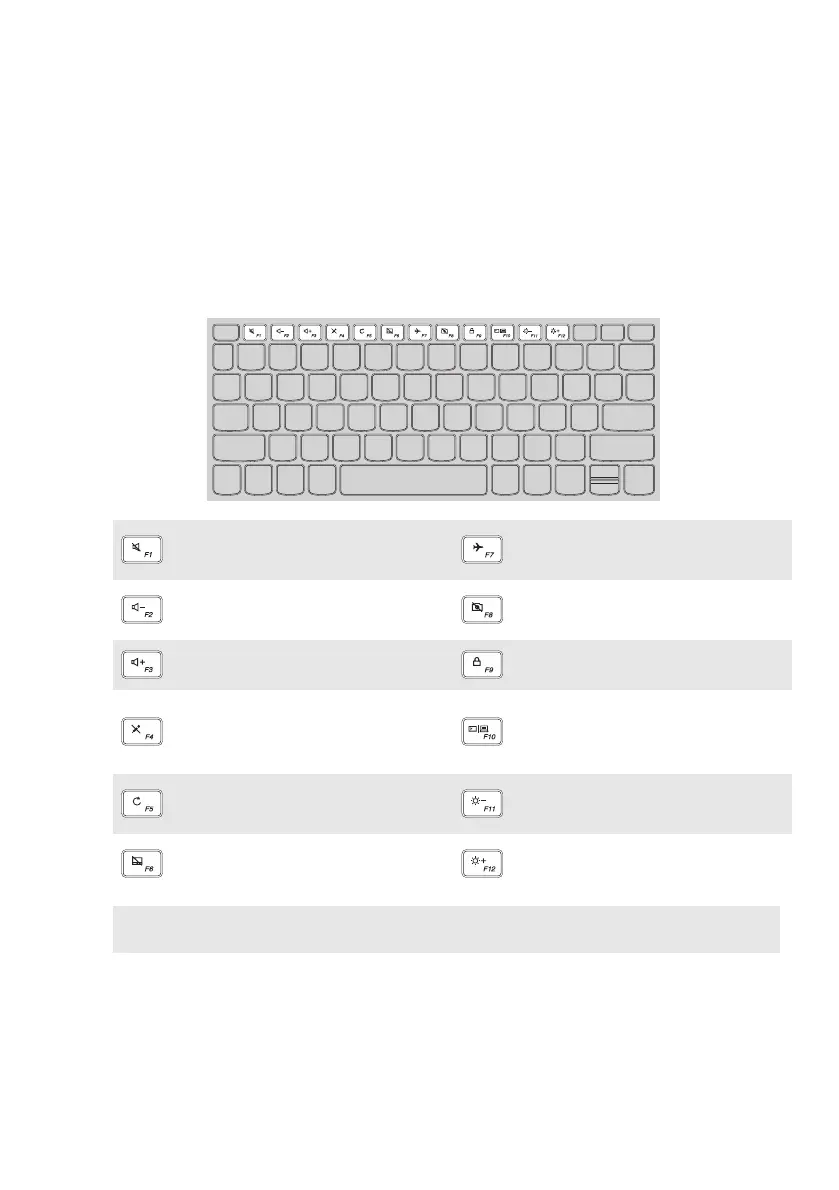
Hotkeys
You can access certain system settings quickly by pressing the appropriate
hotkeys.
:
Mutes/unmutes the sound.
:
Enables/disables airplane
mode.
:
Decreases the volume
level.
:
Enables/disables camera.
:
Increases the volume level.
:
Locks the LCD screen.
:
Enables/disables
microphone.
:
Enables the external
projector or dangles the
external display.
:
Refreshes page.
:
Decreases display
brightness.
:
Enables/disables the touch
pad.
:
Increases display
brightness.
Note: If you changed the Hotkey Mode from Enabled to Disabled in the BIOS setup utility,
you will need to press the Fn key in combination with the appropriate hotkey.


 To Next Page
 Loading...