4
Chapter 1. Getting to know your computer
Left-side view - - - - - - - - - - - - - - - - - - - - - - - - - - - - - - - - - - - - - - - - - - - - - - - - - - - - - - - - - - - - - - - - - - - - - - - - - - - - - - - - - - - - - -
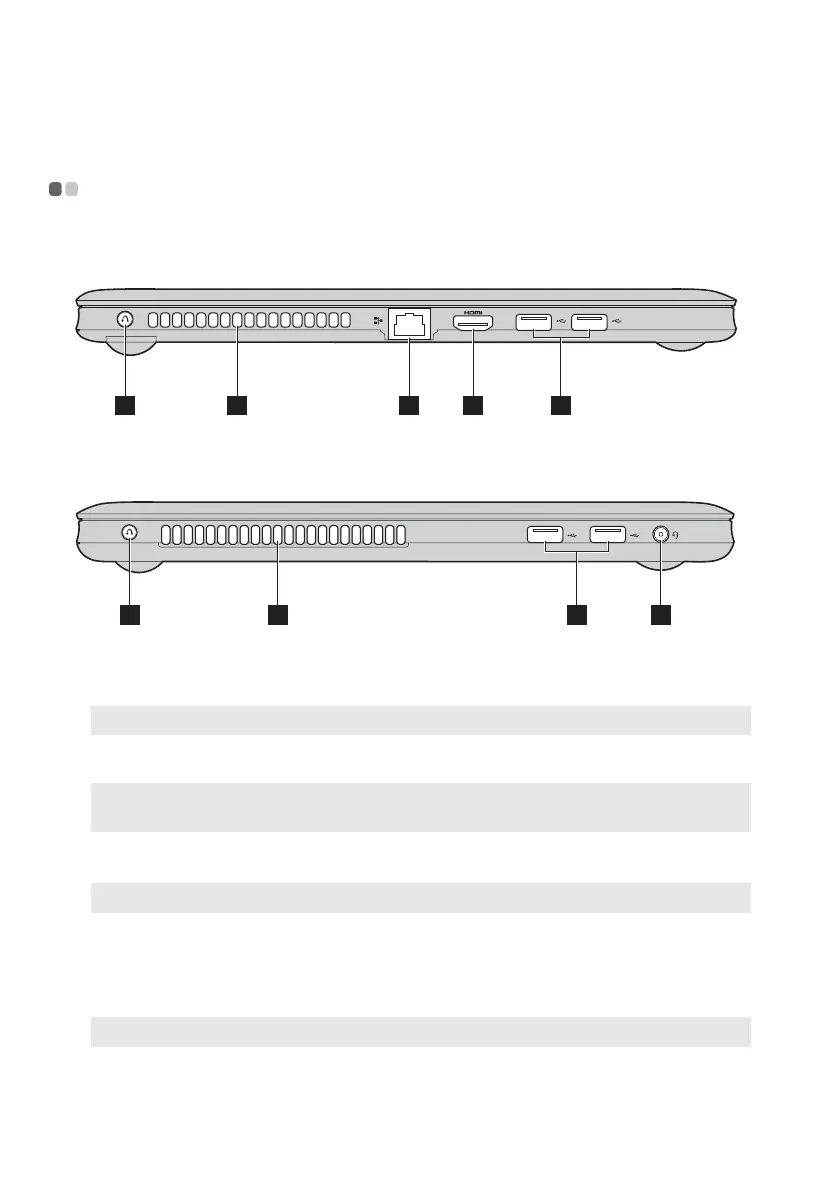
U310
U410
OneKey Rescue
system button
Press this button to open OneKey Rescue system when
the computer is powered off.
Note: For details, see “OneKey Rescue system” on page 23.
Fan louvers
Dissipate internal heat.
Note: Make sure that none of the fan louvers are blocked or else overheating of the
computer may occur.
RJ-45 port
This port connects the computer to an Ethernet network.
Note: For details, see “Wired connection” on page 19.
HDMI port
Connects to devices with HDMI input such as a TV or a
display.
USB 2.0 port
Connect to USB devices.
Note: For details, see “Connecting USB devices” on page 15.
Combo audio
jack
Connects to headphones or headsets. The combo audio
jack does not support conventional microphones.
1 3 4 52
1 52 6
a
b
c
d
e
f









 To Next Page