2
Installing the Nano-SIM & microSD cards
A Nano-SIM card provided by your carrier is required in order to use
cellular services
①
. A microSD card is required to store data.
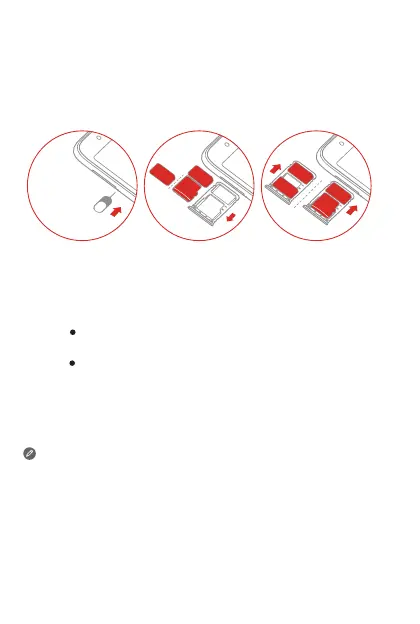
Install the Nano-SIM cards and the microSD card as shown
②
.
① Only Nano-SIM cards work with your smartphone.
② Always turn off your smartphone rst before you insert or remove a
Nano-SIM card. Insert or remove a Nano-SIM card with your
smartphone on may damage your Nano-SIM card or smartphone
permanently.
③ Both of the card slots support 4G/3G/2G data services, but you can
enable only one Nano-SIM card for data connection at a time. If you
want to change the Nano-SIM card used for data connection, go to
Settings > Network & Internet > Cellular networks & SIM.
Step 1.
Step 2.
Step 3.
Insert the eject tool that comes with your smartphone into
the hole next to the card tray.
Pull out the card tray and do one of the following:
Position a Nano-SIM card in Slot 1 and a microSD card
in Slot 2;
Position a Nano-SIM card in Slot 1 and another
Nano-SIM card in Slot 2
③
.
Carefully insert the tray with the installed cards back into the
slot.
Nano
Nano
microSD
2
1
Nano
Nano
microSD
Nano


 To Next Page