EasyManua.ls Logo

Lenovo N5901 - User Manual

Lenovo N5901
1 page
Print Icon
Loading...
CMIIT:2009DJ4900
Dongle CMIIT:2009DJ1851
Lenovo Ultraslim Wireless Keyboard China
CMIIT ID:2009DJ4195
Lenovo N30 2.4G Optical Mouse China
CMIIT ID:2009DJ1850
Lenovo N30_D Wireless Dongle China
CMIIT ID:2009DJ1851
CMIIT:2009DJ4900
Dongle CMIIT:2009DJ1851
中国制造
EC Declaration of Conformance
Product: Lenovo Mini Wireless Keyboard
Model: N5901
Trade Name: Lenovo
We, Primax Electronics Ltd., declare under sole responsibility that the above
products, manufactured by:
Phone: 886(2)2798 9008
Fax: 886(2) 8797 1565
Primax Electronics Ltd.
No. 669,Ruey Kuang Road,
Neihu ,Taipei Taiwan, R.O.C.
to which this declaration relates, is in conformity with the requirements of the following EC Directives:
Council Directive 1999/5/EC of the European Parliament and of the council on radio
equipment and telecommunications terminal equipment.
Council Directive 2006/95/EC on the harmonization of the laws of the Member States
relating to electronic equipment designed for use within certain voltage limits.
Council Directive 2004/108/EC on the approximation of the laws of the member states
relating to Electromagnetic Compatibility
Conformity with these Directives has been assessed for this product by demonstrating
compliance to the following harmonized standards:
EN 300 440-1 V1.4.1 (2008-05)
EN 300 440-2 V1.2.1 (2008-05)
EN 301 489-1 V1.8.1 (2008-04)
EN 301 489-3 V1.4.1 (2002-08)
EN 50371: 2002
EN 60950-1: 2006
Signed: Date: 2009/11/06
C.T. Huang, Director
Compliance Department
Last two digits of the year in which the CE marking was affixed: 09
Place of Issue: Taiwan
Date: November 6, 2009
Ref No: CE_DoC_09-018

Other manuals for Lenovo N5901

Question and Answer IconNeed help?

Do you have a question about the Lenovo N5901 and is the answer not in the manual?

Overview

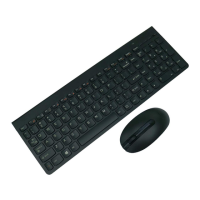
This document describes the Lenovo Mini Wireless Keyboard N5901, a compact wireless keyboard designed for use with desktop and laptop computers.

Function Description

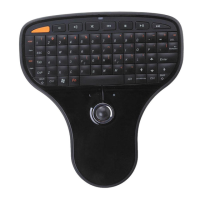
The Lenovo Mini Wireless Keyboard N5901 serves as a versatile input device, combining the functionalities of a keyboard and a mouse into a single, portable unit. It connects wirelessly to a computer via a USB dongle.

Key Features:

  • Keyboard Functionality: Includes standard keys for data entry, as well as dedicated multimedia hotkeys for controlling playback (My Computer, Decrease Volume, Increase Volume, Mute, Previous, Stop, Play/Pause, Next). It also features a "Keypad" section and the ability to use "Fn" key combinations for special characters or functions.
  • Mouse Functionality: Integrates a trackball for cursor movement and left/right mouse buttons for standard click operations.
  • Wireless Connectivity: Utilizes a USB dongle for wireless communication with the host computer.
  • Power Management: Features a power switch (ON/OFF) and an LED indicator for battery status.

Important Technical Specifications

  • Model: N5901
  • Trade Name: Lenovo
  • Power Source: Requires two AAA batteries (located in the battery compartment).
  • Wireless Technology: Operates as a transmitter, complying with FCC Part 15 rules.
  • Compliance:
    • FCC ID: EMJKN5901
    • IC: 4251A-KN5901
    • CMIIT: 2009DJ4900 (for the keyboard)
    • Dongle CMIIT: 2009DJ1851 (for the USB dongle)
    • EC Directives:
      • Council Directive 1999/5/EC (Radio Equipment and Telecommunications Terminal Equipment)
      • Council Directive 2006/95/EC (Low Voltage Directive)
      • Council Directive 2004/108/EC (Electromagnetic Compatibility)
    • Harmonized Standards:
      • EN 300 440-1 V1.4.1 (2008-05)
      • EN 300 440-2 V1.2.1 (2008-05)
      • EN 301 489-1 V1.8.1 (2008-04)
      • EN 301 489-3 V1.4.1 (2002-08)
      • EN 50371: 2002
      • EN 60950-1: 2006
    • Safety: UL Listed I.T.E. computer compatibility.
    • CE Marking: Affixed in 2009.
  • Manufacturer: Primax Electronics Ltd. (located at No. 669, Ruey Kuang Road, Neihu, Taipei, Taiwan, R.O.C.)

Usage Features

Connecting the Keyboard:

  1. Open the battery cover.
  2. Remove the USB dongle from its storage slot.
  3. Insert two AAA batteries and replace the battery cover.
  4. Plug the USB dongle into an available USB port on your desktop or laptop computer.
  5. Move the power switch (located on the back of the keyboard) to the "ON" position. The computer should automatically detect and connect to the keyboard.

LED Indicator:

  • Green Light: Indicates that the keyboard is switched on and successfully paired with the computer.
  • Red Flashing Light: Signals that the battery level is low and the batteries need to be replaced immediately.

Using the Keypad:

  • Data Entry: Use the keys for standard text and numerical input.
  • Special Characters/Functions: Press the "Fn" key in combination with other keys to access special characters or activate specific functions.
  • Multimedia Control: Utilize the dedicated multimedia hotkeys at the top of the keyboard to control media playback (e.g., play, pause, stop, volume adjustment, track navigation).

Using the Mouse:

  • Cursor Movement: Rotate the integrated trackball to move the cursor on the screen.
  • Click Operations: Use the left and right mouse buttons to perform standard left and right clicks.

Maintenance Features

Battery Replacement:

  • When the LED indicator flashes red, it signifies low battery power.
  • To replace batteries, open the battery compartment, remove the old AAA batteries, insert two new AAA batteries, and close the cover.

Disposal of Used Batteries:

  • Dispose of used batteries according to local instructions and regulations.

Important Notes and Cautions:

  • Explosion Risk: There is a risk of explosion if batteries are replaced by an incorrect type. Always use the specified battery type.
  • Transmitter Co-location: This wireless transmitter must not be co-located or operate in conjunction with any other antenna or transmitter.
  • FCC Compliance: The device complies with FCC rules, meaning it should not cause harmful interference and must accept any interference received, including that which may cause undesired operation.
  • UL Listing: This device is intended for use only with UL Listed I.T.E. (Information Technology Equipment) computers.

Lenovo N5901 Specifications

General IconGeneral
BrandLenovo
ModelN5901
CategoryKeyboard
LanguageEnglish

Related product manuals