
 Need help?
Do you have a question about the Lenovo Smart Tab M10 and is the answer not in the manual?
Device wireless communications comply with radio frequency and safety standards of any country or region.
Contact your wireless network operator for support on network services and billing.
Download publications for your device and follow on-screen instructions.
Information on Lenovo and Dolby trademarks, and limited/restricted rights.
Warning about suffocation danger from plastic bags for babies and children.
Advice to protect hearing from loud noise exposure and prevent damage.
Precautions for safe handling and use of the mobile device by children.
Details of the Lenovo Limited Warranty (LLW) version and where to read it.
How to check your device's warranty status and purchase upgrades.
Download Lenovo service tool (LMSA) and visit the support website.
Lenovo encourages responsible recycling of IT equipment and offers programs.
Information on separate collection and treatment of batteries and WEEE.
Link to recycling and disposal information specific to Japan.
Reference to the User Guide for more details on recycling components.
Information on battery recycling marks for Taiwan, US, and Canada.
Details compliance with RoHS directives for Turkey, Ukraine, India, Vietnam, EU, and Singapore.
States compliance of Lenovo TB-X606F and Lenovo HA-200 with Directive 2014/53/EU.
Lists frequency bands and maximum radio-frequency power for TB-X606FA in the EU.
This document serves as a Safety, Warranty & Quick Start Guide for the Lenovo Smart Tab M10 FHD Plus with Alexa Built-in, covering both WLAN and WLAN + LTE models (Lenovo TB-X606FA and Lenovo TB-X606XA, respectively). It provides essential information for users to safely operate, maintain, and troubleshoot their device.
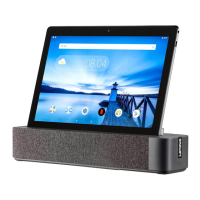
The Lenovo Smart Tab M10 FHD Plus is a versatile tablet designed for both entertainment and productivity, enhanced with Alexa Built-in functionality. This integration allows users to control smart home devices, play music, get news, and access a wide range of Alexa skills using voice commands, especially when docked. The tablet can be used independently or in conjunction with the Lenovo Smart Dock (Model HA-200), which transforms it into a smart display with enhanced audio capabilities.
The tablet features a comprehensive set of controls and connectors for user interaction. On the device itself, you'll find volume buttons, a power button, and a microphone for voice input. For connectivity, it includes a card tray (supporting microSD and Nano-SIM for the WLAN + LTE model), a USB-C connector for charging and data transfer, and a headset connector. Visual feedback is provided by an indicator light, while interaction occurs through the touch screen. Imaging capabilities are supported by a front-facing camera for video calls and a rear camera for photography. A light sensor helps adjust screen brightness automatically based on ambient light.
A key feature of this device is its Smart Connector, which allows the tablet to interface with other Lenovo accessories, most notably the Lenovo Smart Dock. When docked, the tablet automatically enters Alexa Show Mode, providing a hands-free smart display experience.
The Lenovo Smart Dock (Model HA-200) further enhances the tablet's functionality. The dock is equipped with speakers for richer audio output, a power adapter connector for charging, and a Bluetooth button for pairing. It also includes a microphone and a microphone on/off button, allowing users to control Alexa's listening capabilities. Stability support is built into the dock to securely hold the tablet.
Getting started with the device involves a few simple steps. Users need to open the stability support on the dock, plug the power adapter into the dock and a power outlet, and then carefully place the tablet into the dock, ensuring the smart connectors align. The tablet will vibrate and its display will change, indicating a successful connection.
Connecting the tablet to the dock via Bluetooth is designed to be automatic once the tablet is turned on and set up. If an automatic connection doesn't occur, users can manually enter pairing mode by pressing and holding the Bluetooth button on the dock. Once connected, Alexa Show Mode activates, and users can begin interacting with Alexa using voice commands. The guide provides examples of common Alexa commands, such as checking the weather, setting alarms, playing music, and getting information.
Proper maintenance and safe handling are emphasized throughout the guide. When installing or removing cards (microSD or Nano-SIM), it is crucial to power off the device first to prevent data corruption or damage. The WLAN version of the tablet does not have a Nano-SIM card slot, which is an important distinction for users to note.
Charging the tablet is straightforward. While it can be charged directly via its USB-C port, the primary method highlighted is through the Smart Dock. The guide indicates that the battery status icon in the notification panel will show the charging status when the tablet is powered on and charging. To prolong battery life, it is recommended to charge the battery to 30-50% capacity each time and recharge it every three months to prevent over-discharge.
The guide also includes important safety and handling information. It warns against the dangers of plastic bags for children and advises caution regarding high volume usage to protect hearing. Users are encouraged to limit headset/headphone use at high volumes, avoid turning up volume to block out noise, and lower volume if they cannot hear others speaking. If hearing discomfort occurs, users should stop listening and have their hearing checked.
Regarding the internal rechargeable battery, the guide strictly warns against attempting to replace, disassemble, or modify it due to the risk of explosion, excessive heat, or fluid leakage. Disposal of batteries must comply with local ordinances and regulations, and they should not be disposed of in municipal waste. Users are advised to keep the battery pack away from open flames, heat sources, water, rain, corrosive liquids, and extreme temperatures, and to avoid short-circuiting it. It should also be kept out of reach of small children and pets.
For eye health, the product has received TÜV Rheinland's "Low Blue Light" certification, indicating a commitment to user well-being during screen usage.
The document also covers environmental, recycling, and disposal information, encouraging responsible recycling of IT equipment. It provides specific instructions for battery and WEEE (Waste Electrical and Electronic Equipment) disposal, noting that these should be treated separately from unsorted municipal waste. Country-specific recycling information is provided for Japan, Taiwan, the United States, Canada, and the European Union.
Warranty information is provided, directing users to the Lenovo Limited Warranty (LLW) document online and offering resources to check warranty status and get support, including the Lenovo service tool (LMSA) and a general support website with QR code access. Compliance statements, including the Restriction of Hazardous Substances Directive (RoHS) for various regions and the European Union compliance statement, are also detailed. The European Union compliance statement lists the frequency bands and maximum radio-frequency power for both the tablet and the dock, ensuring transparency regarding radio equipment operation. Finally, Specific Absorption Rate (SAR) information is included, outlining the device's compliance with international guidelines for exposure to radio waves and providing SAR values for different usage scenarios.
 General
| Docking station included | Yes |
|---|---|
| Processor cores | 8 |
| Processor model | 450 |
| Processor family | Qualcomm Snapdragon |
| Processor frequency | 1.8 GHz |
| Processor architecture | ARM Cortex-A53 |
| Processor manufacturer | Qualcomm |
| Processor operating modes | 64-bit |
| Graphics card | Adreno 506 |
| Graphics card family | Adreno |
| Internal memory | 2 GB |
| Internal memory type | LPDDR3-SDRAM |
| Display diagonal | 10.1 \ |
| Touch technology | Multi-touch |
| Display brightness | 320 cd/m² |
| Display resolution | 1920 x 1200 pixels |
| Storage media | eMCP |
| Compatible memory cards | MicroSD (TransFlash) |
| Maximum memory card size | 256 GB |
| Internal storage capacity | 16 GB |
| Wi-Fi standards | 802.11a, 802.11b, 802.11g, Wi-Fi 4 (802.11n), Wi-Fi 5 (802.11ac) |
| Bluetooth version | 4.2 |
| Top Wi-Fi standard | Wi-Fi 5 (802.11ac) |
| Color name | Slate Black |
| Device type | Mobile tablet |
| Form factor | Slate |
| Product color | Black |
| Rear camera type | Single camera |
| Rear camera resolution (numeric) | 5 MP |
| Front camera resolution (numeric) | 2 MP |
| Audio system | Dolby Atmos |
| Number of built-in speakers | 2 |
| Standby time | 504 h |
| Battery capacity | 4850 mAh |
| Battery life (max) | - h |
| Battery recharge time | 3 h |
| Continuous video playback time | 8 h |
| AC adapter output current | 2 A |
| AC adapter output voltage | 12 V |
| Platform | Android |
| Operating system installed | Android 8.0 |
| Google applications | Gmail, Google Chrome, Google Maps, Google Play, YouTube |
| Ambient light sensor | - |
| HDMI ports quantity | 0 |
| USB 2.0 ports quantity | USB 2.0 ports have a data transmission speed of 480 Mbps, and are backwards compatible with USB 1.1 ports. You can connect all kinds of peripheral devices to them. |
| USB 2.0 Type-C ports quantity | 1 |
| Sustainability certificates | RoHS |
 Weight and Dimensions
| Depth | 168 mm |
|---|---|
| Width | 242 mm |
| Height | 8.1 mm |
| Weight | 480 g |




 To Next Page