This document serves as a Safety, Warranty, and Quick Start Guide for the Lenovo Tab M8 (3rd Gen) with the Smart Charging Station. It covers essential information for safe operation, device setup, and accessing support resources.
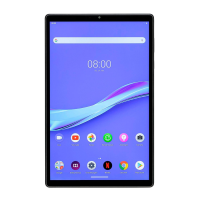
The Lenovo Tab M8 (3rd Gen) is a mobile device designed for various uses, including entertainment, communication, and productivity. It is available in two models: the Lenovo TB-8506FS (WLAN version) and the Lenovo TB-8506XS (WLAN + LTE version). The device features a range of physical components, including volume buttons, speakers, a USB-C connector, a smart connector, a light/proximity sensor, a power button, a microphone, a touch screen, a card tray, a headset connector, a front camera, and a rear camera. The WLAN + LTE model includes a Nano-SIM card slot, which is absent in the WLAN version.
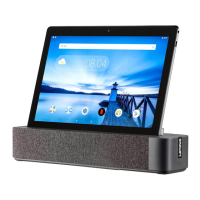
A key accessory for this device is the Smart Charging Station, identified as Lenovo CD-100. This station features a smart connector and a micro USB connector, enabling convenient charging and potentially other functionalities when the tablet is docked.
Usage Features:
- Device Setup: Before using the tablet, users need to install the necessary cards. This involves inserting a microSD card for expanded storage and, for the WLAN + LTE model, a Nano-SIM card for cellular connectivity. It is crucial to power off the device before inserting or removing any cards to prevent damage.
- Charging: The tablet can be charged in two ways. First, it can be connected directly to a power outlet using the provided USB cable and power adapter. Second, for enhanced convenience, the tablet can be placed in the Smart Charging Station. The Smart Charging Station itself needs to be connected to a power outlet using its dedicated charging USB cable and power adapter.
- Powering On: To turn on the device, users must press and hold the Power button until the Lenovo logo appears on the screen.
- Google Assistant Integration: The Lenovo Smart Tab M8 includes integrated Google Assistant for supported languages, enhancing its functionality as a smart device.
- Setting Up Google Assistant: To initiate the setup, users touch and hold the Home button, then tap "GET STARTED" and follow the on-screen prompts. This process includes teaching the Google Assistant to recognize the user's voice by saying "OK Google" and "Hey Google."
- Using Google Assistant: The tablet supports Google Voice Assistant recognition when the screen is on, allowing interaction from across the room. Users can activate the Assistant by touching and holding the Home button or by saying "OK Google" or "Hey Google." The Assistant can help with various tasks, and users can ask "What can you do?" to explore its capabilities.
- Google Assistant's Ambient Mode: This feature transforms the tablet into a digital photo frame when charging, either via the charging cable or the smart charging station. Ambient Mode also allows users to control music and smart home devices through touch and voice commands, and quickly access important updates. Google plans to release more features for Ambient Mode in the future.
- Enabling/Disabling Ambient Mode: Users can manage Ambient Mode through the device's settings: Settings > Google > Search, Assistant & Voice > Google Assistant > Assistant > Assistant Devices (Tablet) > Personalization (Ambient Mode).
- Internet Connection Requirement: The Google Assistant requires an internet connection to function and may not be available in all countries and languages. Additional information on supported languages and managing language settings can be found on the Lenovo support website.
Maintenance Features:
- Safety and Handling: The guide emphasizes crucial safety information to ensure the longevity of the device and user well-being.
- Plastic Bag Notice: Users are warned about the danger of suffocation from plastic bags, especially for babies and children.
- High Volume Usage: Prolonged exposure to loud noise can affect hearing. Users are advised to limit headset/headphone usage at high volumes, avoid turning up the volume to block noise, and turn down the volume if they cannot hear others speaking. If hearing discomfort occurs (pressure, fullness, ringing, muffled speech), users should stop listening and seek medical advice.
- Safety for Parents and Adult Supervisors: The device is not a toy. Parents allowing children to use it should caution them about potential hazards, observe precautions for electrical products, and periodically inspect the device, AC power adapter, and small parts for damage to ensure proper functioning and safety.
- Internal Rechargeable Battery Warning: The internal lithium-ion battery is not user-replaceable. Attempting to replace it with an incompatible type or disassembling/modifying the battery pack can lead to explosion, excessive heat, personal injury, or property damage. To extend battery life, it is recommended to charge the battery to 30-50% capacity each time and recharge every three months to prevent over-discharge. When disposing of the battery, users must comply with local ordinances and regulations, avoiding municipal waste. The battery pack contains harmful substances and should be kept away from open flames, heat sources, water, rain, corrosive liquids, extremely high temperatures, and low air pressure. Short-circuiting the battery pack should also be avoided. It should be kept out of reach of small children and pets.
- Eye Protection: Lenovo prioritizes user eye health. The product has received TÜV Rheinland's "Low Blue Light" certification, indicating it is designed to reduce eye strain. Further information is available on the Lenovo support website.
- Product Safety Information:
- Driving Precautions: Responsible and safe driving is paramount. Users must obey local laws and regulations and avoid using the device in a way that distracts from driving.
- Seizures, Blackouts, Eye Strain, and Discomfort: The device may display flashing images or loud sounds, which could trigger adverse reactions in susceptible individuals.
- Medical Devices: The device may interfere with pacemakers and other medical devices. Users with implantable medical devices should consult their healthcare provider and device manufacturer before using the mobile device. The FCC recommends keeping the mobile device at least 20 cm (8 inches) away from pacemakers or defibrillators and using it on the side away from the medical device to minimize interference. If interference is suspected, the mobile device should be turned off immediately.
- Extreme Heat or Cold: The device should not be used in temperatures below 0°C or above 40°C, nor stored/transported in temperatures below -20°C or above 60°C.
- Operational Warnings: Users must obey all posted signs in public areas. In potentially explosive areas (blasting areas, fueling stations, areas with flammable chemicals or particles), the device must be turned off, and batteries should not be charged. In hospitals, clinics, or healthcare facilities, wireless devices should be switched off when requested to prevent interference with sensitive medical equipment. On aircraft, wireless devices must be switched off when instructed by airport or airline staff. If the device offers a 'flight mode,' it must be enabled before boarding an aircraft.
- Environmental, Recycling, and Disposal Information: Lenovo encourages responsible recycling of IT equipment. Information on recycling programs and services is available on the Lenovo recycling website.
- Battery Recycling & WEEE Information: Products and batteries should not be disposed of with household waste. Users should refer to the User Guide or the Lenovo recycling website for further information. Specific recycling information for Japan, Taiwan, and the United States/Canada is provided.
- Restriction of Hazardous Substances Directive (RoHS): Lenovo products comply with RoHS directives in various regions, including Turkey, Ukraine, India, Vietnam, Singapore, the European Union (EU), and the United Kingdom (UK). This ensures that the devices do not contain certain hazardous substances above specified limits. Detailed information on Lenovo's RoHS compliance is available on their social responsibility website.
- Specific Absorption Rate (SAR) Information: The device meets international guidelines for exposure to radio waves. It is a radio transmitter and receiver designed not to exceed limits set by international guidelines, which include a safety margin. SAR values are measured during tests where the device transmits at its highest certified power level across all tested frequency bands. The guide provides maximum SAR values for different body positions (head, body-worn, limb) and frequency bands for both the TB-8506FS and TB-8506XS models, indicating compliance for EU countries and the UK. During normal use, actual SAR values are typically lower than stated maximums because the device automatically reduces power output when full power is not needed for data connection. Users interested in further reducing RF exposure can limit usage or use a hands-free kit to keep the device away from the head and body.

 Need help?
 General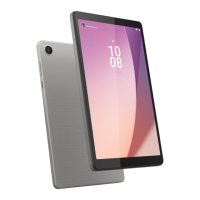






 To Next Page