Increasing memory capacity is an effective way to make programs run faster. You can increase memory
capacity by replacing or adding a memory module.
Note: The operating speed of the memory module has dependency on the system configuration. In some
conditions, the memory module in your computer might not be able to operate at the maximum speed.
Attention: Do not touch the contact edge of the memory module. Otherwise the memory module might get
damaged.
To replace the memory module, do the following:
1. Disable the built-in battery. See “Disabling the built-in battery” on page 76.
2. Ensure that the computer is turned off and disconnected from ac power and all cables.
3. Close the computer display and turn the computer over.
4. Remove the base cover assembly. See “Replacing the base cover assembly” on page 84.
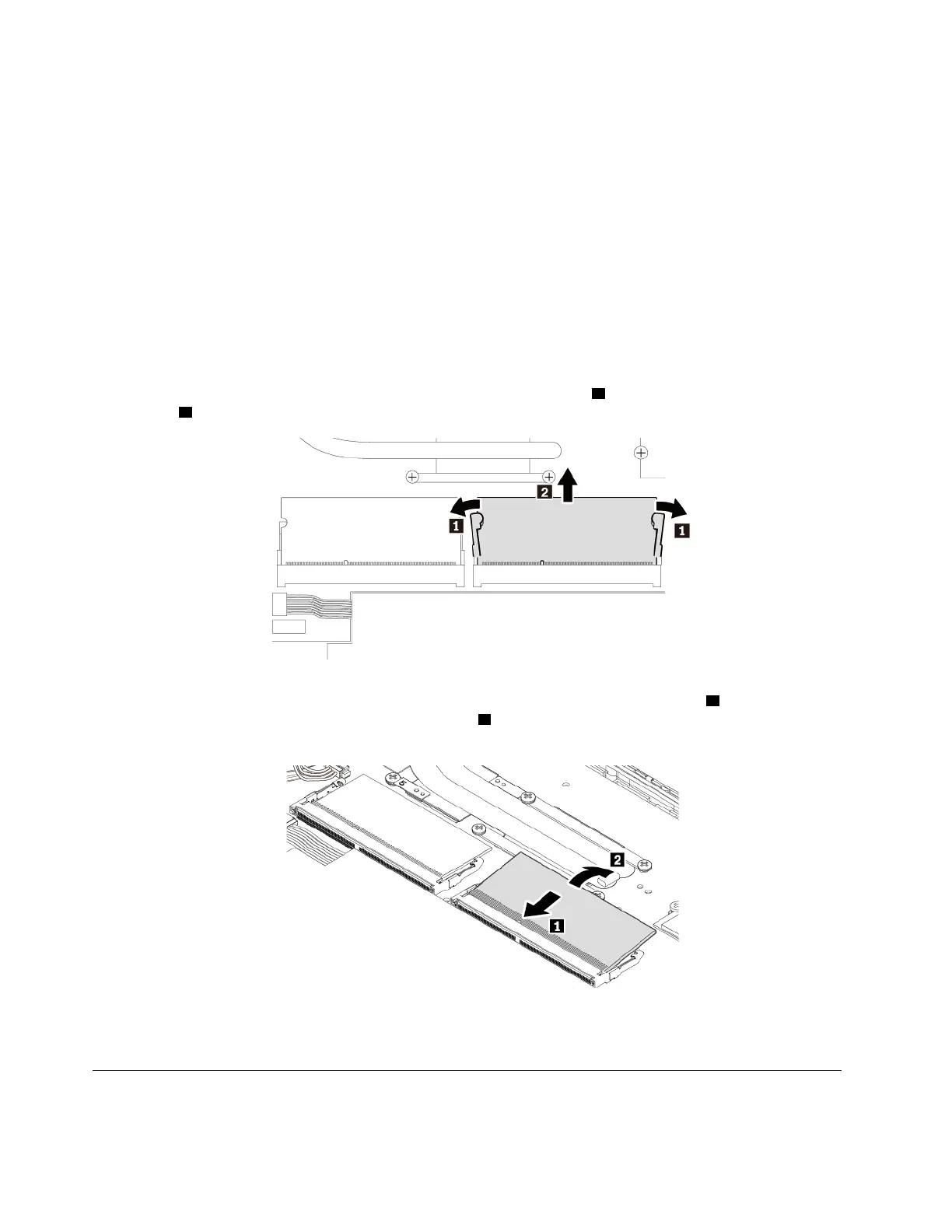
5. Open the latches on both sides of the memory slot at the same time
1 , and then remove the memory
module
2 .
6. Insert the new memory module into the memory slot at an angle of about 20 degrees 1 . Pivot the
memory module downward until it snaps into place
2 . Ensure that the memory module is firmly installed
in the memory slot and cannot be moved easily.
7. Reinstall the base cover assembly.
8. Turn the computer over. Connect the ac power adapter and all cables to the computer.
Replacing the hard disk drive
Before you start, read “Important safety information” on page iii and print the following instructions.
86
E580 User Guide














 To Next Page