This document is a user guide for the Lenovo USB-C Dock (Windows Only), ThinkPad Universal USB-C Dock, ThinkPad Universal USB-C Dock v2, and ThinkPad Universal USB-C Smart Dock.
Function Description
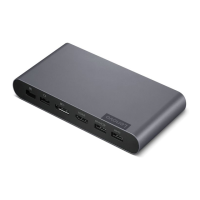
The Lenovo USB-C Dock is an enhanced and versatile docking solution designed to expand the connectivity of your computer. It allows you to connect your computer to a local area network (LAN) and multiple peripheral devices, including headsets, external displays, and Universal Serial Bus (USB) devices. The dock also supplies power to the connected computer when it is connected to an AC power source. The ThinkPad Universal USB-C Smart Dock specifically includes cloud connection status indication.
Important Technical Specifications
Included in the Box:
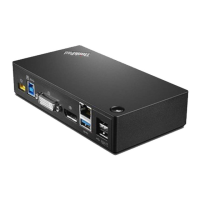
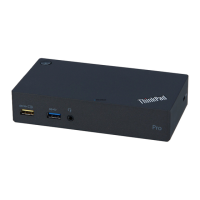
- Lenovo USB-C Dock (Windows Only) / ThinkPad Universal USB-C Dock / ThinkPad Universal USB-C Dock v2 / ThinkPad Universal USB-C Smart Dock
- 90W AC power adapter and power cord
- 1m USB-C® cable
- Documentation
Connectors and Ports:
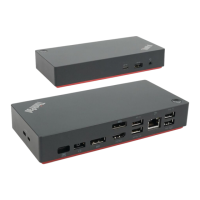
- USB-C connector (for connecting computer): Connects to your computer using the accompanying USB-C cable.
- Power connector: Connects to AC power with the accompanying AC power adapter and power cord.
- DisplayPort® connector: Connects to an external display with a DisplayPort cable. The dock features two DisplayPort connectors, supporting DisplayPort 1.4.
- USB 3.2 connector Gen 2: Connects compatible devices for data transfer at up to 10 Gbps.
- USB 2.0 connector: Connects USB devices such as a mouse or keyboard. The dock has multiple USB 2.0 connectors.
- Always On USB 3.2 connector Gen 2: Connects compatible devices for data transfer or charging with an output voltage and current of up to 5 V and 2.4 A.
- HDMI™ connector: Connects to an external display with an HDMI cable. Supports HDMI 2.0 (for Lenovo USB-C Dock, ThinkPad Universal USB-C Dock, and ThinkPad Universal USB-C Smart Dock) or HDMI 2.1 (for ThinkPad Universal USB-C Dock v2).
- Audio connector: Connects a headset or headphones with a 3.5 mm plug.
- Ethernet connector: Connects to a LAN (10 Mbps, 100 Mbps, or 1000 Mbps network) with an Ethernet cable.
Supported Resolution for External Displays:
- For Lenovo USB-C Dock (Windows Only), ThinkPad Universal USB-C Dock, and ThinkPad Universal USB-C Smart Dock:
- One / two video output connectors: up to 3840 x 2160 pixels / 60 Hz
- Three video output connectors: up to 3840 x 2160 pixels / 30 Hz
- For ThinkPad Universal USB-C Dock v2:
- One DisplayPort output connector: up to 3840 x 2160 pixels / 60 Hz
- One HDMI output connector: up to 7680 x 4320 pixels / 60 Hz
- Two video output connectors: up to 3840 x 2160 pixels / 60 Hz
- Three video output connectors: up to 3840 x 2160 pixels / 30 Hz
- Note: Maximum display resolution may vary depending on the computer's USB-C or Thunderbolt 3 connector.
Data Transfer Rates (Gbit/s):
- USB 3.2 Gen 1 / 3.1 Gen 1: 5
- USB 3.2 Gen 2 / 3.1 Gen 2: 10
- USB 3.2 Gen 2 x 2: 20
- Thunderbolt 3 connector (USB-C): 40
- Thunderbolt 4 connector (USB-C): 40
- Note: Actual transfer rates may vary depending on host processing capability, peripheral devices, file attributes, system configuration, and operating environments.
Security Features:
- Security-lock slot (Kensington / Lenovo NanoSaver®): Supports cable locks using Cleat locking technology.
- Security-lock slot (Kensington / Lenovo MicroSaver® or MiniSaver®): Supports cable locks using T-bar locking technology or Cleat™ locking technology.
Usage Features
Installation:
The dock is installed by connecting the accompanying AC power adapter, power cord, and USB-C cable. The dock supplies power to the computer when connected to AC power.
Dock Driver and Firmware:
- The dock driver and firmware are typically preinstalled on compatible computers, making the dock ready for use upon connection.
- It is recommended to update the dock driver and firmware when new versions are available to improve performance. Firmware updates are completed when the dock power button indicator turns solid white, taking effect after reconnecting the dock to the computer.
Lenovo Dock Manager:
An advanced solution for device queries, firmware installation, and firmware updates in silent mode. Silent installation allows firmware deployment and installation without user notification. Lenovo USB-C Dock (Windows Only) supports silent installation but not silent firmware updates.
Power Button Indication:
- Dock Status (when connected to AC power but not computer):
- Computer Status (when connected to both computer and AC adapter):
- Solid white: On
- Blinking white: In sleep mode
- Blinking orange: Updating firmware
- Off: Off or in hibernation mode
Cloud Indication (For ThinkPad Universal USB-C Smart Dock only):
Indicates the cloud connection status:
- Solid amber: Disconnected
- Blinking amber (1 second on/off): Connecting
- Solid green: Connected
Configuring External Displays:
The dock supports up to three external displays. Users can configure display settings such as mode (extend, mirror/duplicate, single display), orientation, brightness, resolution, and color through Windows Display settings.
Ethernet Connector Usage:
The Ethernet connector allows connection to a LAN. It has two network status indicators:
- Green indicator on: Computer is connected to a LAN.
- Yellow indicator blinks: Data is being transmitted.
Network Function Support:
Depending on the computer, the dock may support:
- Preboot execution Environment
- MAC address Pass Through
- Wake on LAN
- Wake on LAN from Dock
Compatibility for these functions can be checked on the Lenovo support website.
Maintenance Features
Troubleshooting General Issues:
- Dock not working: Ensure proper connection of AC power adapter, power cord, and USB-C cable. Verify the dock is powered, the dock driver is installed, and the computer's USB-C connector is functional.
- Wireless keyboard/mouse interruption (2.4 GHz): Connect the wireless device receiver to a USB 2.0 connector on the dock.
- Mouse/keyboard not waking computer (Always On USB 3.2 connector Gen 2): Connect the mouse/keyboard to a USB 2.0 connector on the dock.
- Slow device charging: Connect the device to the Always On USB 3.2 connector Gen 2 on the dock.
- Computer not charging: Ensure the accompanying AC power adapter, power cord, and USB-C cable are used, and the computer's USB-C connector supports AC input.
Troubleshooting Video Output Issues:
- Blank external display:
- Ensure the computer is not in sleep or hibernation mode, the dock is securely connected to power, computer, and external display, and the dock driver is installed.
- Reduce the resolution of the external display.
- If issues persist, disconnect all cables, uninstall the dock driver, then reinstall the driver and reconnect cables.
- Cannot play videos on external display (but works on computer screen): Some computers may not support High-bandwidth Digital-content Copy Protection (HDCP). To play protected videos, connect the external display directly to a DisplayPort or HDMI connector on the computer and set the display mode to extend or single-display.
- Fluttering images on external display:
- Ensure the display cable is securely connected to the dock.
- Disconnect and reconnect the display cable.
- Adjust color settings of the external display.
- Incorrect image colors: Ensure the display cable is securely connected and adjust color settings.
- Flash content playback stops when dragging window to external display and maximizing: Update Adobe Flash Player program to the latest version.
Documentation in Accessible Formats:
Lenovo provides electronic documentation in accessible formats (PDF, HTML) to ensure visually impaired users can read it via screen readers. Images include alternative text descriptions. Adobe Reader is required to view PDF files.

 Need help?
 General






 To Next Page