EasyManua.ls Logo

Lenovo USB-C - User Manual

Lenovo USB-C
8 pages
Print Icon
To Next Page IconTo Next Page
Loading...
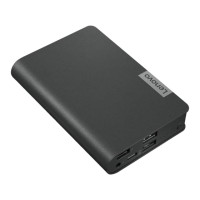
Lenovo USB-C Laptop Power Bank
User Guide

Questions and Answers

  • B
    Barbara BlairJul 28, 2025
    What to do if my Lenovo Accessories phone won't charge on the power bank?
    • S
      Samuel HallJul 28, 2025
      If your phone isn't charging when connected to the USB-C connector on the power bank, try the following: * Press the power button on the power bank. * Press the power button on your phone. * Reconnect your phone to the power bank. If the issue continues, use the USB 2.0 connector on the power bank with the USB-C to USB-A cable included with your phone.
  • K
    kzimmermanAug 12, 2025
    How to charge my Lenovo Accessories power bank?
    • A
      Amanda PatrickAug 12, 2025
      To charge the power bank, use the Lenovo power adapter that came with your Lenovo computer.

Summary

Safety Information

About the Power Bank

Parts and Locations

Charge the Power Bank

Charge Your Computer

Charging Computer via USB-C

Instructions for charging the computer using the USB-C connector on the power bank.

Charging Computer via Slim Tip

Instructions for charging the computer using the slim tip connector on the power bank.

Charge Your Mobile Device

Charge Computer, Mobile Devices, and Power Bank Simultaneously

Indicators

Troubleshooting

Phone Charging Issues via USB-C

Steps to resolve issues when a phone isn't charging via the power bank's USB-C connector.

Troubleshooting Power Bank Charging

Guidance on how to charge the power bank itself using the Lenovo computer adapter.

Specifications

Accessibility Information

Lenovo USB-C Specifications

General IconGeneral
Connector TypeUSB-C
Cable LengthVaries by model
CompatibilityUSB-C port enabled devices
Power DeliveryUp to 100W
MaterialPVC
Data Transfer SpeedUSB 3.1

Related product manuals