EasyManua.ls Logo

Lenoxx Sound CD-1492 - User Manual

Default Icon
20 pages
Print Icon
To Next Page IconTo Next Page
Loading...
®
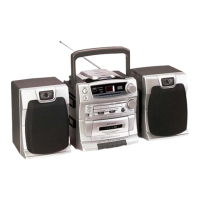
COMPACT DISC PLAYER
AM/FM STEREO CASSETTE RECORDER
WITH DETACHABLE SPEAKERS
MODEL CD-1492
PLAYS MUSIC COMPACT DISCS
FULLY PROGRAMMABLE CD PLAYER WITH REPEAT
RECEIVES AM/FM STEREO BROADCASTS
BASS BOOST SWITCH
RECORDS FROM CD, RADIO, OR BUILT-IN MICROPHONE
DETACHABLE SPEAKER SYSTEM
FM STEREO AND POWER LED INDICATORS
2 WAY POWER - AC/DC
REQUIRES 8 SIZE D BATTERIES
OPERATING INSTRUCTIONS
PLEASE READ CAREFULLY BEFORE USE
IB-CD1492(AD)-WM-E-031402
IB-CD1492(AD)-W-E-031402.p65 3/19/02, 2:16 PM1
All manuals and user guides at all-guides.com
all-guides.com
Question and Answer IconNeed help?

Do you have a question about the Lenoxx Sound CD-1492 and is the answer not in the manual?

Overview

This document outlines the operating instructions for the Lenoxx Sound Compact Disc Player, Model CD-1492, which also features an AM/FM stereo cassette recorder and detachable speakers. The manual emphasizes safety precautions, proper usage, and maintenance to ensure years of trouble-free service.

Function Description:

The Lenoxx Sound CD-1492 is a versatile audio system designed to play music compact discs, receive AM/FM stereo broadcasts, and record audio onto cassette tapes. Its core functions include:

  • CD Playback: The device features a fully programmable CD player with a repeat function, allowing users to listen to their favorite music CDs. It supports normal music CDs and CD-R discs but does not play CDRW encoded discs.
  • Radio Reception: It includes an AM/FM stereo tuner, enabling users to listen to radio broadcasts. The FM stereo indicator lights up when an FM stereo signal is received.
  • Cassette Recording and Playback: The unit incorporates a cassette recorder, capable of recording from various sources including CDs, radio, or its built-in condenser microphone. It also functions as a cassette player for pre-recorded tapes.
  • Detachable Speakers: The system comes with detachable speakers, offering flexibility in setup and sound dispersion.

Usage Features:

The CD-1492 offers a range of features designed to enhance the user experience:

  • Power System: It operates on a 2-way power system, supporting both AC (120 Volts AC 60Hz) and DC (8 size "D" batteries). The manual advises using heavy-duty alkaline batteries for optimal DC performance and warns against mixing old and new or different types of batteries. A POWER/BATT. lamp indicates battery freshness.
  • Speaker Attachment: The speakers are designed to be easily attached and detached from the main unit. They are not interchangeable, with specific right and left speaker placements. Speaker wires need to be unwound and plugged into designated jacks.
  • Bass Boost Switch: A dedicated Bass Boost switch allows users to enhance low-frequency sounds according to their preference.
  • Stereo Headphone Jack: A stereo phones jack is provided for private listening with headphones (not included), which automatically mutes the main speakers when in use.
  • Radio Operation: To play the radio, users select the RADIO function, choose the desired band (AM, FM, or FM STEREO), and tune to a station using the tuning control. The built-in AM antenna and FM telescoping antenna are directional, and users are guided to adjust them for optimal reception.
  • CD Operation:
    • Disc Handling: The manual provides detailed instructions on handling CDs, emphasizing care to prevent scratches, dirt, and warping, which can cause skipping or intermittent sound. Discs should be stored in their original cases, kept away from heat sources, and cleaned with a soft cloth from the center outwards.
    • Playing a CD: Users open the CD door, insert the disc label side up, close the door, and press the PLAY/PAUSE button. The compact disc display shows the track number and total tracks. The PLAY/PROGRAM lamp indicates active playback.
    • Pausing and Stopping: Music can be paused by pressing PLAY/PAUSE (track number flashes) and resumed by pressing it again. The CD STOP button halts playback.
    • Removing a Disc: Discs should only be removed after pressing the CD STOP button and opening the CD door. Forcing the door down during play can cause damage.
    • Skipping Tracks (Search): Users can navigate between tracks using the FORWARD SKIP/SEARCH and BACKWARD SKIP/SEARCH buttons. Holding these buttons allows for high-speed searching within a track.
    • Repeat Play: The system offers two repeat modes: single song repeat (REPEAT lamp steady on) and all songs repeat (REPEAT lamp flashing).
    • Random Play: Pressing the RANDOM button plays all songs in a random order, indicated by moving symbols on the display.
    • Programmed Memory Playback: Up to 16 tracks can be programmed to play in a specific order. This feature is accessible only in STOP mode, with the PLAY/PROGRAM lamp flashing during programming. The programmed memory is cleared if the CD door is opened or power is turned off.
  • Cassette Operation:
    • Tape Handling: The manual advises using well-known brands of normal bias cassette tapes and discourages the use of C-120 tapes due to their thinness. It also provides guidance on checking for loose tape layers and winding them with a pencil before insertion to prevent jamming.
    • Playing a Cassette: Users open the cassette door, insert the tape with the exposed tape facing downwards and the full reel on the left, close the door, set the FUNCTION switch to TAPE, and press the CASSETTE PLAY button.
    • Fast Forward and Rewind: Dedicated buttons are available for fast forwarding and rewinding tapes.
    • Pause Function: The CASSETTE PAUSE button temporarily interrupts recording or playback.
    • Automatic Stop: The tape mechanism automatically stops at the end of the tape during playback or recording.
    • Manual Stop: The CASSETTE STOP/EJECT button stops tape operation and opens the cassette door.
    • Recording Features:
      • Automatic Level Control (ALC): This circuitry automatically adjusts recording levels, eliminating the need for manual volume control during recording.
      • Recording from Radio: Users tune to a desired radio station, load a blank tape, and simultaneously press the CASSETTE RECORD and PLAY buttons.
      • Recording from Built-in Microphone: With a blank tape loaded, users press CASSETTE RECORD and PLAY simultaneously to record their voice.
      • Recording from CD: Users load a blank tape and a CD, set the FUNCTION switch to CD, press CASSETTE PAUSE, then CASSETTE RECORD and PLAY for standby, and finally press CASSETTE PLAY/PAUSE to start the CD and release CASSETTE PAUSE to begin recording.
      • Erasing a Tape: Recording new audio automatically erases previous content.
      • Record Lever Interlock: Cassette tapes have tabs that, when removed, prevent accidental erasure or recording. If the RECORD button doesn't stay down, users should check these tabs or if the tape has reached its end.

Maintenance Features:

The manual includes important information for maintaining the device and its components:

  • Battery Removal: Batteries should be removed if the set is stored for long periods or if they become exhausted to prevent damage from swelling or leaking.
  • AC Cord Disconnection: The AC power cord should be disconnected from both the wall outlet and the back of the set if it will not be used for an extended period (2 weeks or more).
  • Tape Head Cleaning: Regular cleaning of tape heads, capstan, and pinch roller is recommended to prevent muffled or distorted sound and tape jams. This can be done with a special head-cleaning cassette or a cotton swab moistened with head/pinch roller cleaner or alcohol.
  • General Cleaning: The CD player housing and enclosures can be cleaned with a soft cloth slightly moistened with water.
  • Lubrication: The CD player and cassette decks are fitted with self-lubricating bearings and should not be oiled or greased.
  • Condensation: If the CD player does not play after being moved from a cold to a warm environment, condensation may have formed on the laser lens. This will dissipate naturally over time as the mechanism warms up.
  • Tape Button Position: Avoid leaving any tape buttons depressed when the set is not in use, as this could damage the pinch roller.
  • Speaker Plugs: Always ensure both speaker plugs are securely connected to their respective jacks, whether the speakers are attached or separated from the main unit.

Lenoxx Sound CD-1492 Specifications

General IconGeneral
BrandLenoxx Sound
ModelCD-1492
CategoryCD Player
Playable MediaCD, CD-R, CD-RW
Programmable Memory20 Tracks
FeaturesLCD Display
Power SourceAC Power, Battery
OutputHeadphone Jack

Related product manuals