5. Mode: Press this button to change between the different modes on the speaker, Bluetooth,
Aux in or FM radio modes.
6. Light on/off: Press to turn all the lights off. Press again to turn all the lights on.
7. Power standby: Press to put the speaker in standby mode. Press again to take it off standby
mode.
8. Treble adjustment: Turn to adjust the treble when playing back music.
9. Mic input socket.
10. USB (2A) output: This USB socket can be used to charge a device.
11. USB input: Add a USB stick to this USB socket to playback on USB mode.
12. TF card input: Add a memory card to this socket to play back music on the card.
13. AUX input: Connect an AUX in lead to this input socket and the other end of the earphone
jack on a device (e.g.: MP3 player, phone) and playback music from the device into the
speaker. AUX in lead is not included.
14. Bass adjustment: Turn to adjust the bass when playing back music.
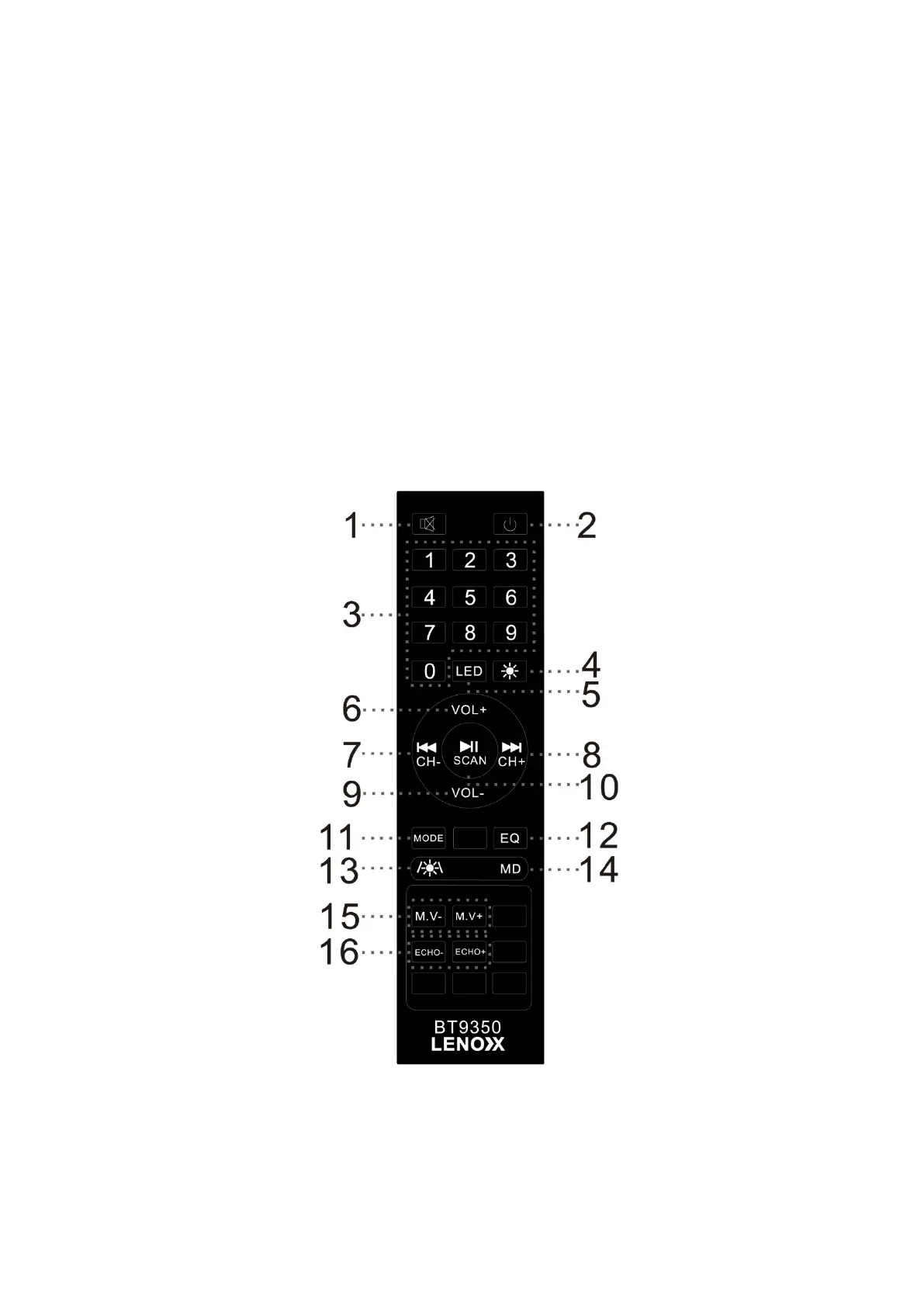
REMOTE CONTROL
1. Mute: Press to mute sound. Press again to unmute sound
2. Standby: Press to put the speaker into standby mode. Press again to take it off standby mode.


 To Next Page