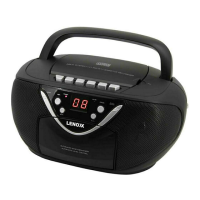
FM / FM-Stereo reception
- Set the “BAND SELECTOR” to select the MONO(FM) or STEREO(FM ST.) mode
for FM reception.
The Stereo indicator light up to show FM ST. mode when FM-Stereo reception is
available.
Cassette Operation
Playing Cassettes
1. Turn the function selector switch to the OFF/TAPE position.
2. Press the STOP/EJECT button to open the cassette compartment.
3. Insert a recorded audio cassette into the compartment with the tape opening
facing upwards and the side you wish to listen to facing the front (full spool to the
right). Then close the cassette compartment again.
4. Press the PLAY key to listen to the tape.
5. With the STOP/EJECT key you can stop play-back.
6. Wind the tape forwards or backwards in the direction of the arrow keys.
F.FWD = forwards, RWD = reverse.
7. Always press the STOP/EJECT key when changing the direction or stopping the
tape. This prevents damage to the machine and the tape.
8. If the STOP/EJECT button is pressed again the flap of the cassette compartment
opens.
9. In order to interrupt playback briefly, press the PAUSE button. Pressing again
continues playback.
Recording Cassettes
1. Insert an audio cassette with the side on which you wish to record facing forwards
(full reel on the right).
Ensure that the cassette is not copy-protected (the copy protection tab on the top
narrow side of the cassette must not have been removed).
2. Select the source from which you wish to record with the function switch and then
start playback from this source if necessary. The sound source which you are
listening to is the one from which the recording is made. The recording level is
controlled automatically. Changing the volume does not change the recording.
3. Please press the “RECORD” button (the PLAYBACK button is automatically
pressed down at the same time). Recording now begins. All previous recordings are
automatically erased.
4. The recording can be interrupted briefly using the PAUSE button or stopped by
means of the STOP/EJECT button.


 To Next Page
 Loading...