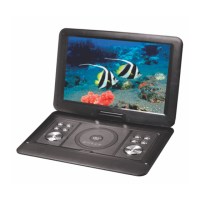
Press to turn the screen display on or off
Press to access a DVD discs menu on discs which allow this
function
For use with the copy from CD disc to flash stick function
Directional button – up. For use in menus
CH+N/A FOR THIS MODEL
Directional button – up. For use in menus
CH- N/A FOR THIS MODEL
Press to access the LCD setting menu
Press to change playback mode
When in disc playback, press to change from disc play mode to
USB/SD mode
Press to access the set up menu for the DVD player
Press to rewind in DVD playback. Press to go back a song in CD
playback
Press to fast forward in DVD playback. Press to go forward a
song in CD playback
Press to go back a chapter when playing a DVD disc which
allows for this function
Press to go forward a chapter when playing a DVD disc which
allows for this function
Press to pause playback, press again to resume playback
Switch to open lid for DVD player


 To Next Page