Need help?
Do you have a question about the Lepai LP-269FS and is the answer not in the manual?
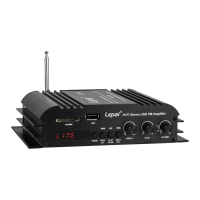
Interface for reading SD and MMC memory cards.
Interface for connecting USB storage devices.
Shows current status, track information, and radio frequency.
Receives infrared signals from the remote control.
Cycles through input sources like Bluetooth, FM, USB, SD/MMC, and Line.
Navigates to the previous track or FM channel. Also controls volume down when held.
Controls playback or initiates FM radio scan.
Navigates to the next track or FM channel. Also controls volume up when held.
Adjusts the high-frequency audio output.
Adjusts the low-frequency audio output.
Turns the amplifier on/off and adjusts the overall volume.
How to turn the amplifier on and off using the volume knob.
Engaging standby mode via the remote control.
Adjusting audio output volume using the knob or remote.
Muting all audio output using the remote control.
Adjusting bass and treble for desired sound output.
Applying preset EQ settings for different audio sources.
Cycling through and selecting audio input sources.
Playing media from USB and SD/MMC card readers.
Scanning and selecting FM radio stations.
Pairing and connecting Bluetooth-enabled devices.
Connecting audio sources via RCA or 3.5mm line inputs.
Standard playback functions for compatible sources.
Changing the input source via the remote.
Controlling the amplifier's power state remotely.
Navigating to the previous track or FM channel.
Managing playback and changing FM channels.
Decreasing the audio volume.
Adjusting EQ settings or selecting previous FM channel.
Activating repeat playback mode.
Direct input for track selection or radio tuning.
Instantly silencing the audio output.
Navigating to the next track or FM channel.
Increasing the audio volume.
Automatically searching for and tuning to FM radio stations.
Details on the FM radio tuner's performance and range.
Technical details of the audio amplifier's output and input.
The Lepai LP-269FS is a versatile Hi-Fi stereo amplifier designed to deliver a rich audio experience with a variety of input options and user-friendly controls. This compact unit serves as a central hub for your audio needs, offering both wired and wireless connectivity, along with an integrated FM radio tuner. Its primary function is to amplify audio signals for playback through connected speakers, making it suitable for a range of applications from personal listening to small-room sound systems.
At its core, the LP-269FS features Bluetooth 2.1 HiFi audio streaming, allowing users to wirelessly connect their compatible devices such as smartphones, tablets, or computers to stream music. This wireless capability provides convenience and reduces cable clutter, enabling flexible placement of your audio source. In addition to Bluetooth, the amplifier supports media playback from SD/MMC cards and USB drives, offering direct access to your digital music library without the need for an external player. This is particularly useful for playing stored audio files in formats like WMA and MP3.
For traditional radio enthusiasts, the LP-269FS includes a high-performance FM radio tuner. This tuner boasts 30 station presets, allowing users to save their favorite stations for quick access. The radio function provides a reliable way to enjoy local broadcasts, news, and music.
Connectivity extends to wired sources as well, with stereo RCA and a 3.5 mm analog audio input. These inputs enable connection to a wide array of devices, including CD players, turntables (with a pre-amp), televisions, or any other audio source with a line-level output. The amplifier is designed to intelligently handle multiple inputs; for instance, if audio is detected on both RCA and 3.5mm inputs, it will automatically mute the 3.5mm input to prioritize the RCA connection.
The LP-269FS is equipped with a 4-channel amplified output, indicating its capability to drive up to four speakers, providing a stereo soundstage or multi-zone audio in a small setup. The output is designed to be compatible with speakers having an impedance between 4 and 8 ohms.
User interaction with the amplifier is facilitated through a combination of front panel controls and a comprehensive infrared remote control with a numeric keypad. The front panel features a bright illuminated display that shows relevant information such as the current mode, radio frequency, or track number. Key controls on the front panel include a volume knob that also doubles as the power switch, mode selection, previous/next track/channel buttons, play/pause/scan, and dedicated knobs for treble and bass control. The treble and bass controls allow users to fine-tune the overall output tone to their preference, adjusting the high and low frequencies of the audio.
The remote control significantly enhances the user experience by offering a full suite of functions from a distance. It includes buttons for power on/off, mode switching, volume up/down, mute, previous/next track/channel, play/pause, repeat, scan FM, and a numeric keypad for direct track or preset selection. The remote also features a button to cycle through equalizer presets, which can be applied to Bluetooth, USB, and SD/MMC sources. The equalizer sequence includes FLAT, POP, CLASSICAL, JAZZ, ROCK, and PODCAST, allowing users to tailor the sound profile to different music genres or listening preferences.
Operating the LP-269FS is straightforward. To power on, the volume knob is turned clockwise past zero until it clicks. Turning it counterclockwise past zero powers the amplifier off. The amplifier retains the previous mode of operation when returning from standby, which can be activated via the remote's power button. Volume can be adjusted using the front panel knob or the volume buttons on the remote. Additionally, pressing and holding the "PREV CH-" and "NEXT CH+" buttons on the amplifier itself will also control the volume. The mute function, accessible via the remote, instantly silences all audio.
Source selection is managed by pressing the "MODE" button on either the amplifier or the remote. The amplifier cycles through BLUETOOTH > FM > USB > SD/MMC > FM > LINE. If power is not disconnected, the input selection is remembered when the amplifier is turned off and on again. The amplifier intelligently skips USB and SD/MMC inputs if no media is present. When media is connected to either the USB or SD/MMC reader, the LP-269FS will automatically switch inputs and begin playing audio. If media is disconnected, it defaults back to Bluetooth.
For radio operation, pressing the "PLAY/SCAN" button on the amplifier or the "PLAY/PAUSE" button on the remote initiates a scan for available radio stations, saving up to 30 detected stations as internal presets.
Bluetooth pairing is simple: switch the amplifier to Bluetooth mode, then search for "LP-269FS" in your device's Bluetooth settings. The amplifier provides audible cues to confirm successful pairing and to indicate when the connection is lost.
Playback control, including play, pause, next, and previous, is available on both the amplifier and the remote. These controls are active when the amplifier is in BLUETOOTH, USB, and SD/MMC modes, providing seamless navigation through your media.
Maintenance features are minimal, as the device is designed for user-friendly operation with no specific user-serviceable parts. The robust design and clear instructions ensure a long-lasting and enjoyable audio experience. The amplifier operates on a 12V DC input voltage, typically supplied by an external power adapter, which is a common and reliable power source for audio equipment of this type. The inclusion of an antenna connection for FM radio ensures optimal signal reception, and the Bluetooth antenna further enhances wireless connectivity. Overall, the Lepai LP-269FS is a comprehensive and user-friendly stereo amplifier that offers a wide range of audio playback options and convenient control, making it a versatile addition to any home audio setup.
 General
| Frequency Response | 20Hz - 20kHz |
|---|---|
| Input Impedance | 47k ohms |
| Signal-to-Noise Ratio | >80dB |
| Speaker Impedance | 4-8 ohms |
| FM Frequency Range | 87.5 - 108MHz |
| Remote Control | Yes |
| Input Voltage | 12V DC |
| Inputs | RCA, USB, SD Card |

 To Next Page