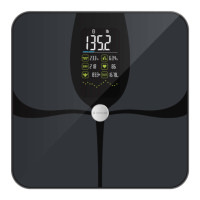
This document describes the LEPULSE Smart Body Fat Scale, a personal health assistant designed to track various body composition indicators.
Function Description
The Smart Body Fat Scale utilizes Bio-electrical Impedance Analysis (BIA) technology to provide users with data on important personal health indicators. It measures and displays:
- Body Weight: The primary function, displayed in pounds (lb), kilograms (kg), or stones (st).
- Body Mass Index (BMI): Calculated based on weight and height, indicating whether a person is underweight, healthy weight, overweight, obese, or severely obese.
- Body Fat Rate: The percentage of fat in the body.
- Body Water Rate: The percentage of water in the body.
- Muscle Mass: The total mass of muscle in the body.
- Bone Mass: The total mass of bone in the body.
- Protein: An indicator of protein levels.
- Heart Rate: Measured during the weighing process.
- Basal Metabolic Rate (BMR): The number of calories required to keep the body functioning at rest.
The scale can be used independently to display basic weight and unit information, or it can be paired with the Fitdays App for a comprehensive health tracking experience. When connected to the app, real-time data is synchronized, recorded, and can be viewed in detail, including historical trends and various body data types. The app also allows for personalized settings such as themes, targets, units, measuring sound, language, and password.
Important Technical Specifications
- Size: 27.8 x 27.8 x 2.7 CM
- Weight: 1.54 kg / 3.95 lb
- Battery: 300mAh Li-ion Battery
- Capacity: 6.6-396 lb / 3-180 kg
- Division: 0.1 lb / 0.05 kg
- Units: lb / kg / st
- Accuracy Range:
- 50kg: ± 0.3kg
- 100kg: ± 0.4kg
- 180kg: ± 0.5kg
- 110lb: ± 0.66lb
- 220lb: ± 0.88lb
- 396lb: ± 1.1lb
- Connectivity: Bluetooth 4.0 (for Android 4.3+ and iOS 8.0+ devices)
- Power: Charges with a 5V/1A charger (approximately 2 hours for full charge).
Usage Features
- Power On: Press the power button to turn on the scale.
- Unit Setting:
- Without the App: Gently touch the "UNIT" icon at the bottom of the scale to switch units.
- With the App: The unit will synchronize with the App's setting. Users can switch units in the App via [Account] - [Settings] - [Switch units].
- Calibration: Essential for accurate measurements. Place the scale on a hard, flat surface. Step on with one foot until readings appear, then step off. The scale will show "0.00" when calibrated.
- Measuring Steps:
- Gently press the scale to wake it up.
- Wait for "0.00" to appear on the screen.
- Step onto the scale barefoot, positioning feet evenly on the electrodes for maximum contact. (Note: Shoes or socks prevent body fat measurement).
- Stand still during measurement. The weight value will flash three times and lock.
- The scale will then measure body fat, heart rate, and muscle mass, displaying values and change curves.
- Measurement is complete when the heart rate icon stops flashing and "Done" is displayed.
- Automatic Shut-off: The scale automatically shuts down after 15 seconds of inactivity.
- App Integration (Fitdays App):
- Download "Fitdays" from App Store or Google Play.
- Ensure the device meets requirements (iOS 8.0+ or Android 4.3+ with Bluetooth 4.0).
- Log in or register in the App.
- Personal Profile: Users must complete a personal profile (gender, birthday, height) for accurate data.
- Pairing: Turn on Bluetooth and open the Fitdays App. Step on the scale to wake it up; the App should connect automatically. If not, go to [Account] - [Device], tap [+], select "Searching Bluetooth for pairing," step on the scale, and select the device icon when detected.
- Data Viewing: View current measurements in [Measure], historical trends in [Charts], and manage settings in [Account] - [Settings].
- User Management: The App supports multiple users, each with their own personal profile and data tracking.
Maintenance Features
- Placement: Place the scale on a hard, flat surface for accurate readings. Avoid soft surfaces like carpet or linoleum.
- Storage: For long-term storage, keep the device in a dry room, protected from extreme moisture, heat, lint, dust, and direct sunlight. Do not place heavy objects on the scale.
- Cleaning: Clean the surface with a damp cloth or glass cleaner. Do not use soap or other chemicals. The scale is not waterproof; do not immerse it in water.
- Troubleshooting: The manual provides solutions for common issues such as "Lo" (low battery), "Err" (overload), "C" (unstable measuring), inaccurate weighing, and connectivity problems with the App.
- Safety Precautions:
- Not for diagnosis or treatment of medical conditions. Consult a doctor for diet/exercise programs.
- Pregnant individuals or those with pacemakers/internal devices should not fully rely on the data. Data is for reference only.
- Check for damage before each use. Do not use if damaged.
- Do not jump or stamp on the scale. Handle carefully to avoid breakage.
- Ensure feet are dry before measuring. If readings are inaccurate due to dry feet, wash, dry, or moisturize feet and re-measure.
- For people under 16 years old, the scale can only measure body weight.


 To Next Page
 General