Pairing the Scale with the App
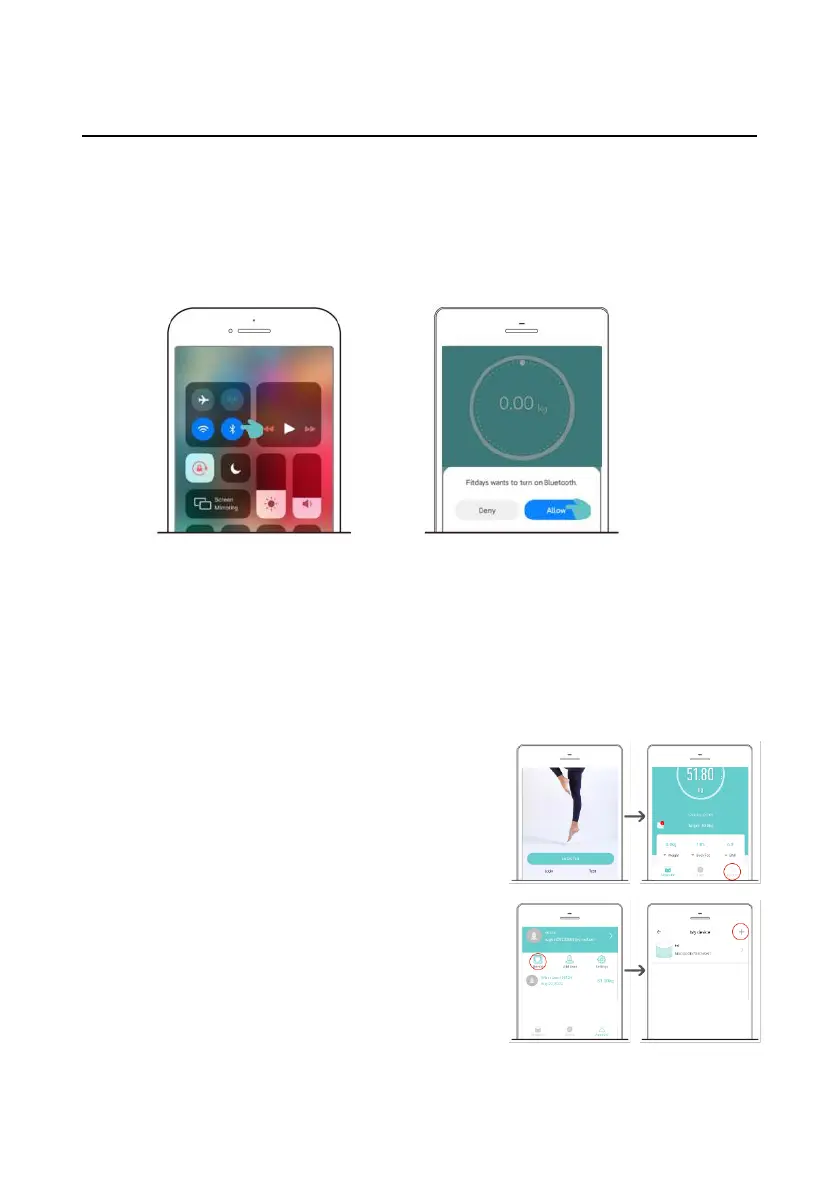
Turn on Bluetooth and open the Fitdays App on your phone.
Step onto the scale to wake it up. The App will automatically
connect with the scale. The real-time data can be synchronized to the
App and recorded when measuring on the scale.
If the App can not connect with the scale automatically, or you
want to add another one to the App:
1. Enter [Account] page and tap [Device].
2. Tap [+] in the upper right corner and
select “Searching Bluetooth for pairing”.
3. Step onto the scale to wake it up.
When the App has detected the device,
select the scale icon, then the scale is
successfully bounded.
Enable iOS Bluetooth:
Swipe down from the top of the
screen, open the control center
and click the Bluetooth icon.
Enable Android Bluetooth
and location:
Open the App, and click
“Allow” after the Bluetooth and
location prompt pops up.


 To Next Page