- 7 -
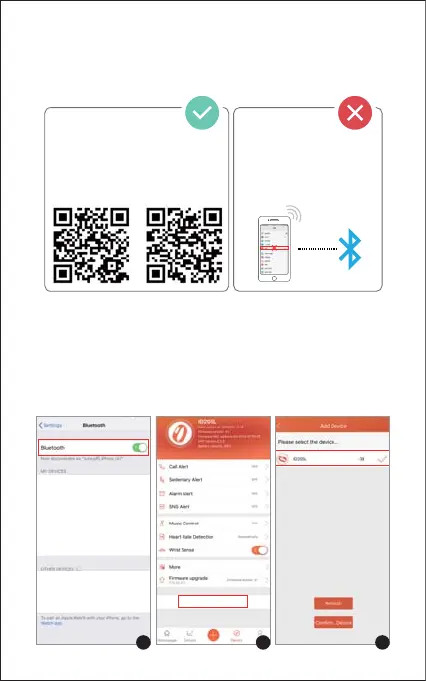
Please pair the watch with your phone in the VeryFitPro
app, NOT in the Bluetooth settings of your phone.
① Enable the Bluetooth of your smartphone.
② Open the VeryFitPro app on your smartphone and go to the
"Device" page, tap "Bind Device", then your smartphone
starts searching devices.
③ In the list of found devices that appear on your smartphone,
tap on "ID205L" to connect the watch to your smartphone. (If
your phone failed to find ID205L, please search the watch on
your smartphone again.)
Pair the watch with your
smartphone in the VeryFitPro app
Do NOT pair the watch
with your smartphone in
your phone’s Bluetooth
settings
iOS Android
Pairing the Watch with Your Phone
Bind Device
1 2 3


 To Next Page