EasyManua.ls Logo

Letscom ID205S - User Manual

Letscom ID205S
22 pages
Print Icon
To Next Page IconTo Next Page
Loading...
ID205S
Smart Watch
User Manual
Thank you for purchasing our products. This manual addresses the
safety guidelines, warranty, and operating instructions. Please
review this manual thoroughly before operating your device.
Question and Answer IconNeed help?

Do you have a question about the Letscom ID205S and is the answer not in the manual?

Summary

Getting Started

Whats in the box

Lists the items included in the product package.

Whats in this document

Explains the manual's purpose and content for user guidance.

Setting Up Your Watch

Charging Your Watch

Instructions on how to charge the smart watch using the provided cable.

Disassembling and Assembling Your Watch

Guides on how to remove and reattach the watch wristbands.

Wearing Your Watch

All-day Wear and Exercise Fit

Provides guidance on how to wear the watch for optimal comfort and heart rate tracking.

Using Your Watch

App Installation and Requirements

Details on downloading the VeryFitPro app and system requirements for smartphones.

App Interfaces

Overview of the main screens and navigation within the VeryFitPro app.

Pairing the Watch with Your Phone

Step-by-step instructions for connecting the watch to a smartphone via the app.

Getting to Know Your Watch

Touch Key and Screen Interaction

Explains the function of the touch key and screen for navigating the watch interface.

Waking and Watch Interfaces

How to wake the screen and navigate through different watch interfaces.

Function Introduction

Customize Your Home Screen

Steps to personalize the watch's main display screen.

Tracking Daily Activity Data

How the watch monitors and displays steps, calories, distance, and active minutes.

Monitoring Heart Rate

Details on how the watch tracks real-time heart rate and displays data.

Tracking Sports Modes

Instructions for tracking various outdoor activities like walking, running, and cycling.

Setting Alarms

Step-by-step guide to setting alarms on the watch.

Sleep Tracking and Reminders

How the watch monitors sleep patterns and provides sedentary reminders.

Notifications and More Functions

Explains call/message notifications, relaxation, and stopwatch features.

Basic Specifications

Technical Details

Provides technical details about the watch, including model, battery, screen, and water resistance.

FAQs

Troubleshooting Common Issues

Answers to frequently asked questions regarding pairing, connectivity, and notifications.

Warranty

Product Warranty Information

Information about the one-year warranty offered on the product.

Important Safety Instructions

Battery and Health Warnings

Specific warnings related to the device's battery and health monitoring features.

Maintenance and Care

Guidelines for cleaning and maintaining the watch to ensure longevity and prevent skin irritation.

Overview

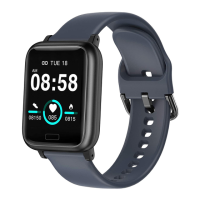
The ID205S Smart Watch is a versatile wearable device designed to track various aspects of your daily activity and provide smart notifications. It comes with a charging cable and a user manual, ensuring you have all the necessary components to get started.

Function Description:

The ID205S Smart Watch serves as a comprehensive activity tracker and notification hub. Its core functions include:
  • Daily Activity Tracking: The watch automatically records steps taken, calories burned, distance covered, and active minutes throughout the day. Detailed activity data can be viewed on the VeryFitPro app, which also allows users to set sports targets and receive vibration reminders upon achievement.
  • Heart Rate Monitoring: It continuously and automatically monitors your real-time heart rate. Users can view detailed heart rate data within the VeryFitPro app. For accurate readings, it's recommended to wear the watch slightly higher and tighter on the wrist during exercise. Automatic heart rate monitoring is enabled by default but can be toggled in the app.
  • Sports Tracking: The watch supports tracking for various outdoor sports, including walking, running, and cycling. Users can start and stop tracking by holding the touch key and view exercise data by tapping the touch key during activity. The VeryFitPro app allows customization of up to three sports modes to be displayed on the watch screen from a selection of 11. Data for exercises less than 1 minute will not be saved.
  • GPS Tracking (via phone): For outdoor activities like walks, hikes, runs, or rides, the watch can utilize your phone's GPS to track pace, distance, and map your route. This feature is accessed through the VeryFitPro app, where users can enter running mode directly or choose other sports modes.
  • Sleep Tracking: The ID205S automatically tracks sleep duration, categorizing it into Deep Sleep, Light Sleep, and Awake Hours. It provides a comprehensive analysis of sleep quality data, helping users understand sleep trends and improve their routines. Detailed sleep data is available in the app.
  • Alarm Setting: Users can set alarms through the VeryFitPro app, specifying alarm type, repeat type, and time. The watch vibrates to alert you, and the alarm can be turned off by holding the touch key. Alarm alerts are displayed on the watch screen only when enabled in the app.
  • Relax Mode: This function guides users through relaxation exercises. It's accessed via the "More" interface on the watch.
  • Stopwatch: A built-in stopwatch function is available for timing activities, accessible through the "More" interface.
  • Call Notification: When an incoming call is received, the watch vibrates and displays the caller ID. Calls can be rejected by holding the touch key. This feature requires "Call alert" to be enabled in the VeryFitPro app.
  • Message Notification: The watch vibrates and displays content for incoming messages from platforms like Facebook, Twitter, and Instagram. This feature is active when "SNS Alert" is enabled in the app.
  • Sedentary Reminder: The watch vibrates to remind users to move around after prolonged periods of sitting. This function can be enabled and configured with a remind interval in the VeryFitPro app.

Important Technical Specifications:

  • Model No.: ID205S
  • Sync: Bluetooth 4.2
  • Screen: 1.3" TFT LCD (non-touch screen, operated via touch key)
  • Battery Capacity: 210mAh
  • Working Voltage: 3.8V
  • Working Temperature: -10 °C to 40 °C
  • Weight: 1.09oz (31g)
  • Waterproof Rating: IP68
  • Working Time: Approximately 10 days
  • Charging Time: Approximately 2 hours
  • Charger Requirement: DC USB port (5V-500mA)
  • Smartphone System Requirements: iOS 8.0 & above, Android 4.4 & above, Bluetooth 4.0 & above.
  • App Compatibility: VeryFitPro app (only compatible with smartphones, not tablets or PCs).

Usage Features:

  • Charging: The watch charges magnetically via a USB cable. It's recommended to fully charge before initial use. A battery progress bar is displayed during charging, and the battery level can be checked by tapping the touch key.
  • Wristband Assembly/Disassembly: Wristbands are easily removable and reattachable using a quick-release lever mechanism.
  • Wearing: For all-day wear, the device should be worn horizontally, a finger's width below the wrist bone. For optimized heart rate tracking during exercise, wearing it slightly higher and snugger on the wrist is recommended. Avoid wearing it too tight to prevent restricting blood flow.
  • Navigation: The watch features a touch key for navigation. Tapping the touch key switches between different interfaces, while holding it enters a selected function. The screen is non-touch.
  • Waking Screen: To conserve power, the screen dims. It can be woken by turning the wrist towards you or by tapping the touch key.
  • Home Screen Customization: Users can customize the home screen by tapping and holding the touch key to choose from available options.
  • Pairing: The watch must be paired with the smartphone via the VeryFitPro app, not directly through the phone's Bluetooth settings. Ensure Bluetooth is enabled on the smartphone and the watch is within 0.5 meters during pairing. The watch can only pair with one smartphone at a time. If unbound from the app, watch data will be reset.
  • Notifications: Call and message notifications are only active when enabled in the VeryFitPro app. "Non disturb mode" in the app will prevent notifications from being displayed on the watch during its active period.

Maintenance Features:

  • Cleaning: Regularly clean your wrist and the smart watch, especially after sweating or exposure to substances like soap or detergent. Do not use household cleansers; instead, use soapless detergent, rinse thoroughly, and wipe with a soft towel.
  • Dryness: Ensure your wrist and the watch bands are dry before wearing, especially after sweating or showering, to prevent skin irritation.
  • Environmental Care: Avoid exposing the watch to liquids, moisture, humidity, or rain while charging. Do not charge when wet. Keep the device clean and dry. Do not expose it to extremely high or low temperatures or open flames.
  • Durability: Do not abuse, crush, open, repair, or disassemble the device, as this will void the warranty and may pose a safety hazard. Avoid contact with sharp objects to prevent scratches.
  • Color Transfer: For light-colored arm bands, minimize direct contact with dark-colored clothing to prevent color transfer.

Safety Guidelines:

  • Consult a doctor before use if you have pre-existing conditions that might be affected by the device.
  • Discontinue use and consult a doctor if the device feels hot, warm, or causes skin irritation/discomfort.
  • The device is not a toy; keep it out of reach of children and pets to prevent choking hazards from small parts.
  • The lithium-ion battery should not be disassembled, modified, punctured, or exposed to fire/explosion hazards.
  • Heart rate monitor: Consult a physician if you have a pacemaker, epilepsy, or are sensitive to flashing lights. Heart rate readings are for reference only and not for medical purposes.
  • Avoid checking notifications or GPS information on the display while driving or in situations where distractions could cause injury.
  • Do not use the device in a sauna or steam room.
  • Dispose of the device, battery, and packaging according to local regulations.

Letscom ID205S Specifications

General IconGeneral
BrandLetscom
ModelID205S
CategoryWatch
LanguageEnglish

Related product manuals