- 9 -
Function Introduction
1. Customize Your Home Screen
You can customize the home screen by
following the steps below:
1) Tap and hold the touch key.
Waking a Dimmed Screen
To conserve power, the watch has a standby mode in which the
screen turns off. To wake the screen, please follow the following
steps:
● Turn your wrist towards you, and the screen will display time.
● Tap the touch key, and the watch will display the main screen.
Watch Interfaces
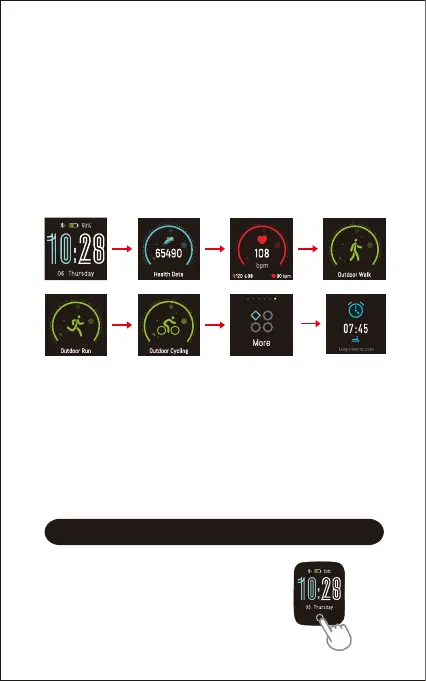
Tap the touch key to look through different interfaces / go to
different functions:
※1: "Outdoor Walk", "Outdoor Run" and "Outdoor Cycling" are
displayed on the device screen by default. You can set up
to 3 different sports modes from 11 sports modes to
display on the device screen (Go to "VeryFitPro" APP →
"Device" → "More"→ "Activity display").
※2: "Alarm Mode" is displayed on the watch screen only when
alarm alert(s) is / are added and enabled in the app
("Device" page → "Alarm Alert").


 To Next Page