Need help?
Do you have a question about the Leupold PinCaddie 2 and is the answer not in the manual?
General warnings and safety advice for using the PinCaddie 2 laser rangefinder.
Precautions regarding laser beam exposure and eye safety.
Understanding the battery indicator bar and its meaning.
How to turn the rangefinder on and off and its operation.
Instructions for cleaning the rangefinder lens and body.
Details on the warranty coverage for Leupold Electronics.
Information on how to obtain service or repair for your product.
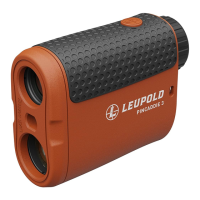
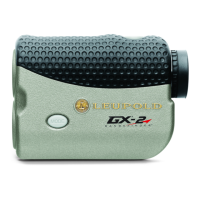
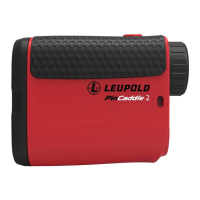
The Leupold PinCaddie 2 Digital Laser Rangefinder is a sophisticated optical instrument designed to provide accurate distance measurements for golf and other outdoor activities. It functions as a 6x20mm monocular, allowing users to view objects with clarity while simultaneously measuring their distance. The device emits invisible, infrared laser pulses that reflect off a selected target and return to the optical unit. Advanced circuitry then calculates the distance based on the time it takes for these pulses to travel to the object and back. This technology enables the rangefinder to measure distances to a pin from 5 to 300 yards, to inanimate objects from 5 to 600 yards, and to reflective targets from 5 to 650 yards.
For optimal performance and safety, users should be aware of several precautions. The PinCaddie 2 employs an eye-safe FDA Class 1 and IEC Class 3R laser. When the device is active, an audible click will confirm that the invisible laser is emitting. Users should avoid depressing the POWER button while aiming at a human eye or looking into the optics from the objective side. The rangefinder should be kept out of reach of small children, and users should never attempt to disassemble the product, as it contains a self-protection device that could cause an electric shock. Only a 3V Lithium CR2 battery should be used, as the device is designed to prevent access to other external power sources. It is crucial to read the entire instruction manual before using the rangefinder to ensure proper operation and to avoid impairing the protection provided by the equipment.
Operating the PinCaddie 2 is straightforward. To measure distance, simply view the object through the monocular, depress the POWER button to power up the unit, align the reticle over the object, and then depress the POWER button again to activate the laser. The measured distance will be displayed in the image field. For continuous measurement, or "Scan Mode," users can hold down the POWER button after the initial measurement. The distance will automatically update as long as the button is continuously depressed, allowing users to range multiple objects by moving the reticle from one target to another. The last distance obtained does not need to be cleared before ranging a new object; simply aim at the new target, depress the POWER button, and hold until the new range reading is displayed.
The PinCaddie 2 includes a battery power status indicator. When the battery is between full and half power, no indicator will be shown. A half-full bar indicates that the battery has reached half-capacity. If the battery bar is empty and no data is displayed, the battery is dead and needs replacement. The battery status bar will flash, and the unit will shut down when no power remains. To insert a new battery, remove the battery cover, take out the old battery, and insert a new CR-2 battery, negative terminal first, into the compartment before closing the cover. To focus the digital laser rangefinder, turn the eyepiece left or right until a crisp focus is achieved, indicated by a clicking sound. The PinCaddie 2 is equipped with a lanyard attachment for added security.
The device's ranging performance can be influenced by various factors. Surface texture, color, size, and shape of the target all affect reflectivity, with brightly colored and shiny targets being more reflective than darker or dull surfaces. Larger targets are generally easier to range than smaller ones. Environmental conditions such as light, haze, fog, and rain can also impact performance, as any factor that degrades air clarity will reduce the maximum effective range. Additionally, infrared energy from the sun can degrade ranging performance in bright conditions or when ranging towards the sun.
The PinCaddie 2 can display distances in either yards or meters. To change the unit of measure, with the device powered OFF, push and hold the power button for approximately 10 seconds. The unit of measure will toggle between yards and meters. To switch back, allow the rangefinder to power OFF and repeat the step. Note that the reticle will not be displayed during unit selection.
Maintenance of the PinCaddie 2 involves simple steps to ensure its longevity. Dust and debris on the lenses should be blown away or removed with a soft lens brush. For fingerprints, water spots, or tougher dirt, a soft cotton cloth or the cleaning end of a Leupold LensPen can be used. A lens tissue with lens cleaning fluid can be used for more stubborn dirt, but the fluid should always be applied to the cloth, never directly to the lens. The PinCaddie 2 is weatherproof, providing durability in various conditions.
The Leupold Electronics Warranty covers defects in materials and workmanship for two years from the date of purchase. For service or repair needs, users can contact Leupold Product Service.
 General
| Type | Laser Rangefinder |
|---|---|
| Range | 5-800 yards |
| Accuracy | ± 1 yard |
| Magnification | 6x |
| Objective Lens Diameter | 22 mm |
| Battery | CR2 Lithium |
| Display Type | LCD |
| Waterproof | Yes |
| Eye Relief | 16 mm |
| Fogproof | Yes |
| Reticle | Plus Point |

 To Next Page