6
WINDSCREEN WIPERS
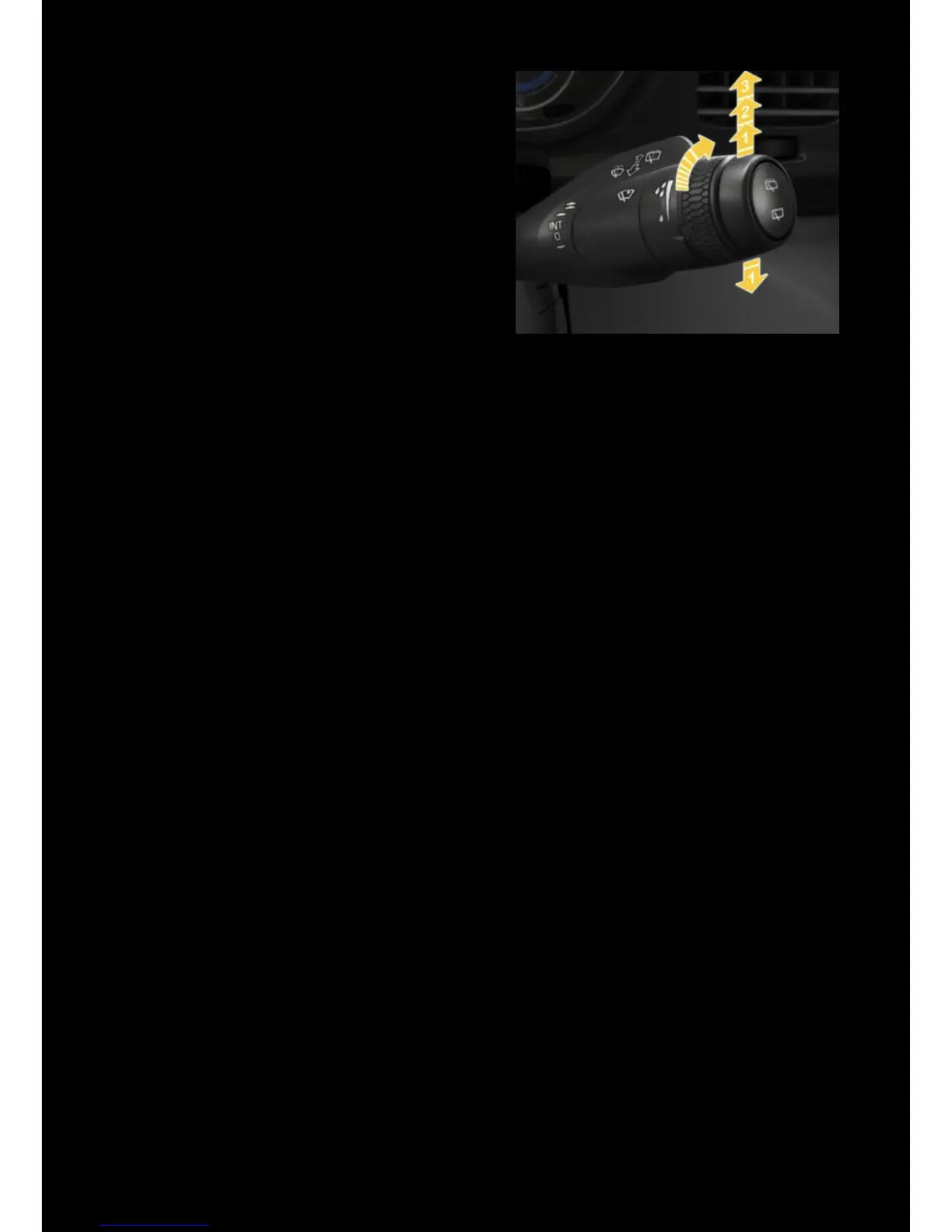
TX is equipped with automatic windscreen
wipers.
• Press the wiper button on the front
of the stalk to activate the automatic
function
• The sensitivity can be adjusted by
rotating the stalk
• Manual control can be selected by
pushing the stalk upwards
• The rear wiper is activated using the
button on the end of the stalk
TOUCHSCREEN
The touchscreen is used to control the infotainment, vehicle settings and heating
and ventilation controls.
• Press the button at the base of the screen to return to the home screen
• Swipe left to right to access the infotainment and driver performance shortcuts
(applications)
• Swipe right to left to access the vehicle function shortcuts
• Swipe from downwards from the top edge to access the settings menu and
Operator’s Manual
HEATING AND VENTILATION (HVAC)
DRIVER
To open the HVAC controls, select the fan icon at the bottom of the touchscreen:
• Adjust the temperature by selecting the current value
• Adjust the fan speed, or choose ‘AUTO’
• Turn o the ventilation system by turning the fan speed to ‘OFF’
PASSENGER
To access the passenger compartment HVAC controls, swipe the HVAC screen from
right to left. Here you can view or override the current setting
! The driver HVAC system must be active in order for the passenger compartment
HVAC to operate.



 To Next Page