Network Camera User’s Manual
22/56
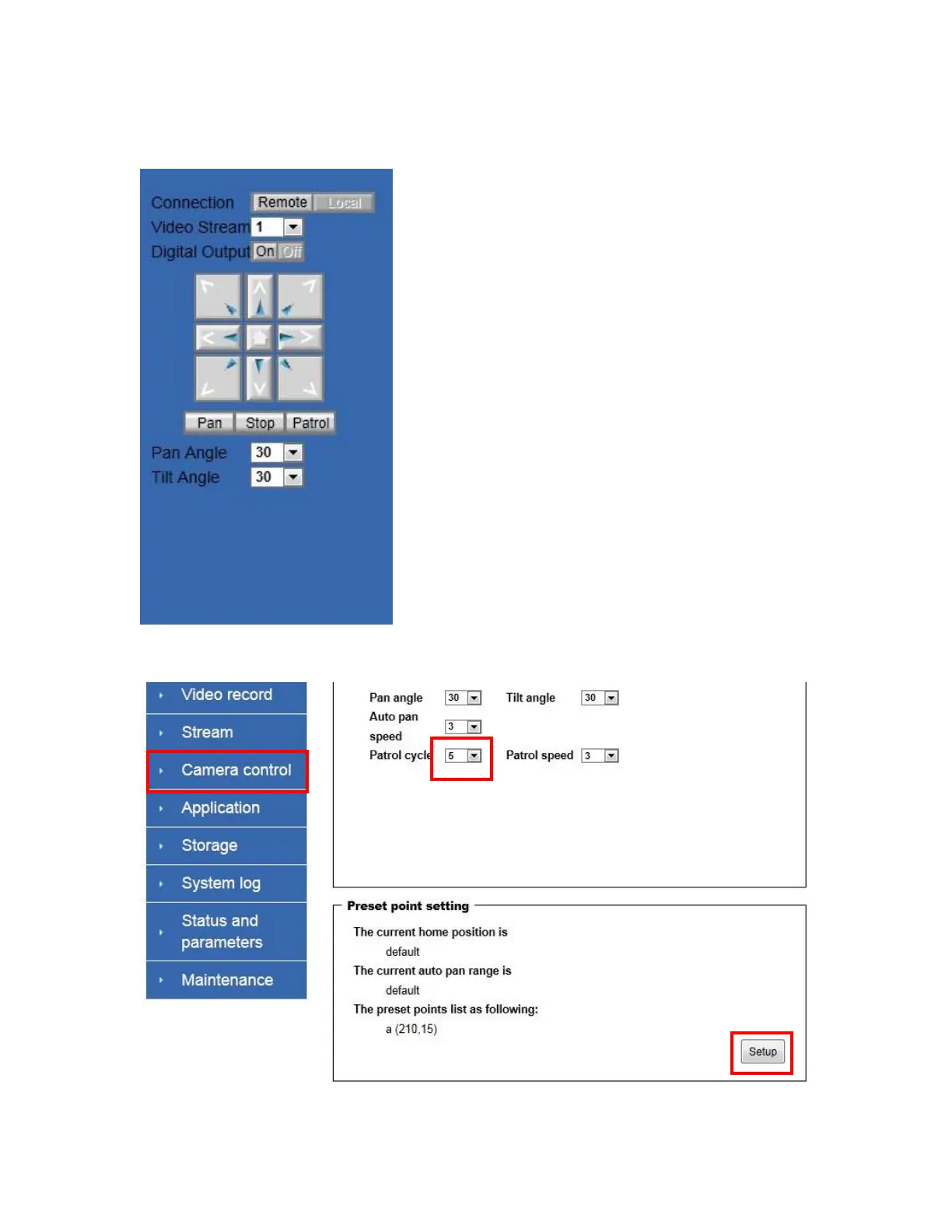
Pan/Tilt & connection control buttons:
1. Connection: User can choose Remote or
Local mode for best connection quality.
2. Video Stream: User can choose stream1 or
stream2.
3. Digital Output: Clicking on the ―On‖ or ―Off‖
button turns the digital output to either on or off
status.
4. Control Buttons: ―Left‖, ―Right‖, ―Up‖,
―Down‖, ―Cross Angles‖, and ―Home‖. Camera
returns to center when click ―Home‖ button
5. Pan Angle: User can choose the angles when
the camera moves left and right each time.
6. Tilt Angle: User can choose the angles when
the camera moves up and down each time.
7. Pan: The camera will move from right side to
left side continuously when click the button.
8. Stop: User can stop the movement of camera,
such as Auto pan, Auto Patrol, and etc., by
clicking the button.
9. Patrol: The button directs the camera to patrol
among the preset positions in the patrol list,
which can be modified on the “Camera control
page”. The cycle of patrol is from 1 to 5.


 To Next Page