G
N
L
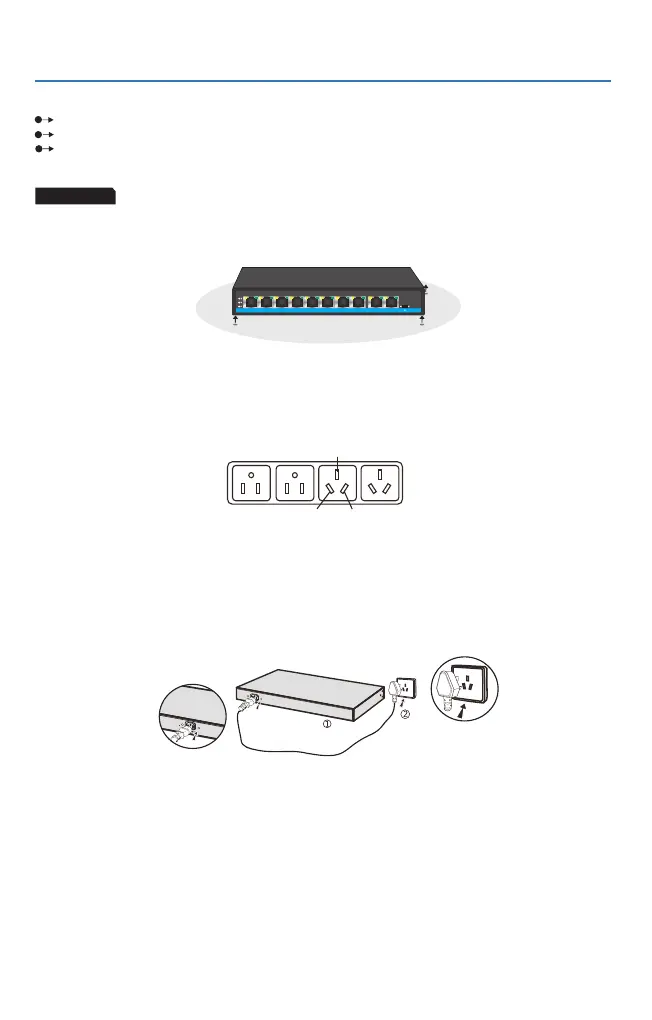
Figure1.2.1 three-pin power socket(Single-phase)
Check up the power cable securely wrapped and connected to the AC power adapter connector or not.
Ensure the adequate space for heat dissipation and ventilation around the switch.
Do not stack heavy objects on the switch.
Connection of the Power Cable
1. Check up that the power supply is consistent with the marked requirements on the switch or not ;
2. The built-in power adapter is not needed, and it can be directly connected to AC100~240V and
50~60Hz;see Fig.1.2.2.
Specification of power socket
The inspection after installation
3
Installation and attentions
Desktop
When installing the switch on the desktop, the device must be placed flat on the table to keep it stable.
Please leave aside enough space between the device and other surrounding objects for good ventilation.
For the safe installation operation of switch, suggestions are as follows:
The switch adopts single-phase three-pin power socket, the middle one is the G wire,
the left one is the N wire, and the right one is the L wire. Please check before operation.
Please check up the following items after installation:
1. Enough space around the switch for heat dissipation and smooth ventilation or not.
2. The s
3. The power supply, switch, frame and other equipments are properly grounded;
upplying power of the power socket conformed to the specification of the switch.
Fig 1.1.2 Power connection schematic diagram
PoE Link
8FE PoE+2GE UP8FE PoE+2GE UP
Hybrid PoE SwitchHybrid PoE Switch
1
2
3 4 9-UP 10-UP
5
6
7 8



 To Next Page