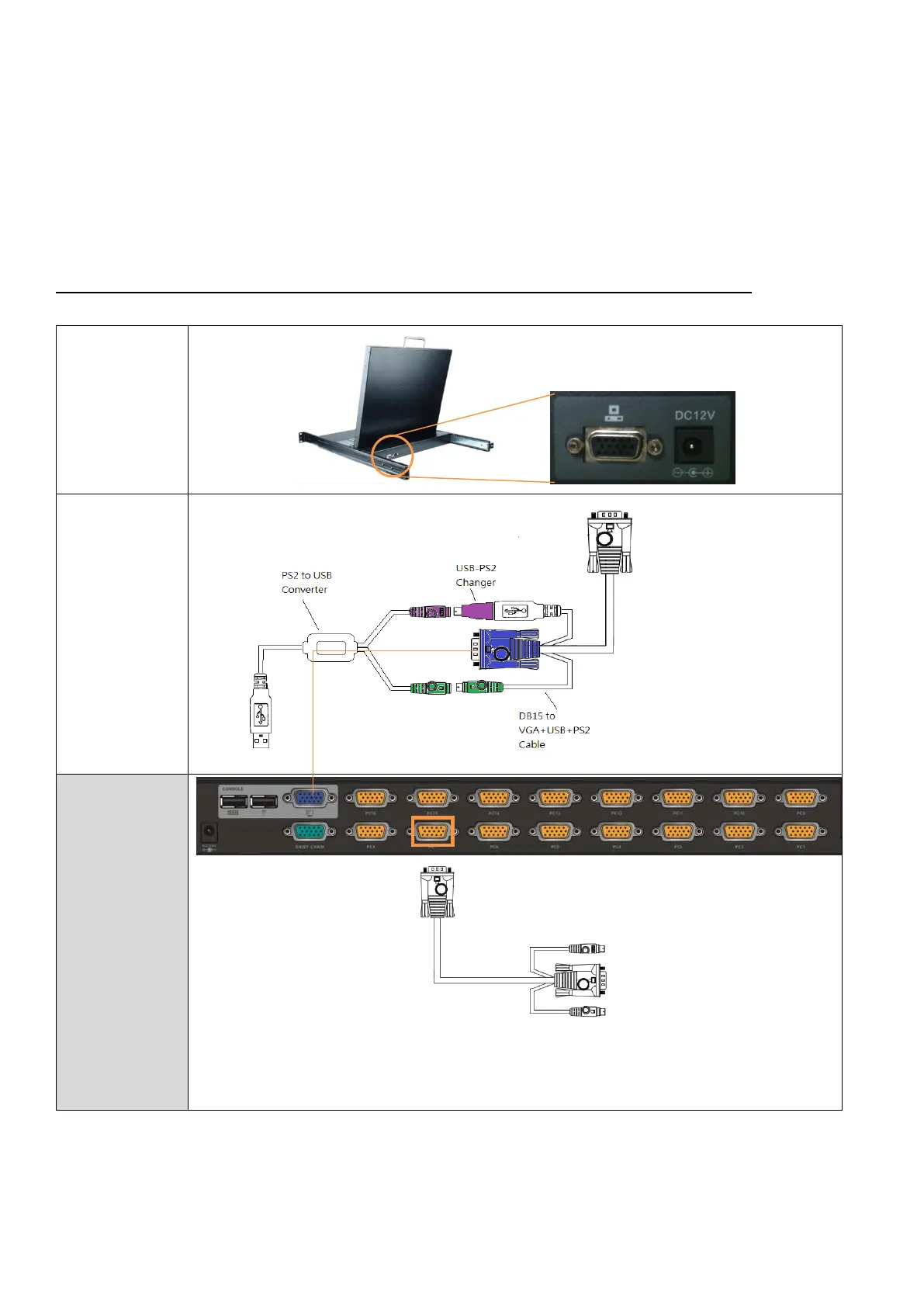
⚫ For 3-in-1 LCD Drawer (KVM8901) to external KVM Box
⚫ Plug the DC12V to the drawer.
⚫ Plug HDB-15 end of the KVM cable to the drawer and plug the other end of the cable (with the USB
and video) to the external KVM box’s console.
FIG.2 Single Console Connection between the drawer and the external KVM Module
1.8M cable
(DB15 to
DB15+USB+PS2)
USB to Ps2
changer
PS2 to USB
converter
*Since the signal from the drawer DB15 contains only VGA + PS2 signals, it’s essential to use a “PS2-to-USB” converter to connect
to USB interface KVM.
**The PS2.to USB conversion cable has embedded hotkey “CapsLock”. If connecting to other KVM, please be aware to change the
KVM’s hotkey other than “CapLock”



 To Next Page