EasyManua.ls Logo

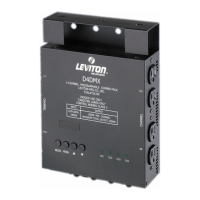
Leviton D4DMX - User Manual

Leviton D4DMX
4 pages
Print Icon
To Next Page IconTo Next Page
Loading...
XMD4D
1
eg
aP
20-XMD4D-000-ID
SEIRESD
SKCAPREMMIDETILLETAS
EDIUGRESU
ev
o
badna0
.
noisiv
e
RerawtfoS
0-13-1
:
desiveRtn
e
mucoD
3
0
02th
g
irypo
C
.cnI
,.o
Cgn
ir
u
t
cafunaM
n
o
t
ive
L
SNOISULCXEDNAYTNARRAWRAEYOWTDETIMIL
si
h
ttah
t
esl
e
enoyna
fo
tife
ne
b
eh
tro
f
tondnaresahcru
pre
musnoclanigiroeh
totst
na
rr
aw
n
o
tiveL
red
nu
p
ih
s
na
mkro
w
dnaslairetam
n
ist
c
efedfoeerf
s
i
no
tiveLyb
e
la
s
s
t
ifoemit
eh
ttatcudorp
tcer
r
o
c
ots
i
no
i
tag
il
boylno
s
’no
t
i
v
eL.
e
tadesahcrupeh
t
morfs
r
aey
o
wtrof
esur
epor
p
dnalamron
sitcudorpehtdoi
re
pr
a
ey
ow
t
hcu
s
nihtiwfi,noitpost
i
ta,tnemecal
p
erroriaper
y
bstcefedhcus
o
tme
l
bo
r
pe
h
tfo
n
oitpircse
d
adn
a
,
e
ta
d
esa
hc
ru
p
f
o
f
oo
r
p
h
t
iw,d
ia
perpd
e
n
r
ut
e
r no
t
iveL
n
o
g
e
rO,nital
a
uT,.ev
A
noteTWS79402,tnemtrapeDec
i
vreS:t
t
A,.c
n
I,.oCgni
rutcafunaM
26
07
9 .
ot
roi
r
pnruterr
o
f
no
ita
zir
ohtu
a
yr
ot
caf
ev
ah
t
sum
IS
N
-
noti
ve
L
ot
de
nrut
e
rst
cu
dorp
ll
A
fo
s
yad5
1
n
ih
t
iw,not
i
veLotgniliamdnagnit
e
lpmocrofelb
i
sn
o
ps
e
rsiresahcrupehT.g
n
ippihs
dn
ase
du
l
cxe
y
tna
r
raw
si
hT
.
tcud
o
rphcaeh
t
iwdesolcned
ra
cn
oi
ta
r
tsige
ry
tnar
r
aweh
t
,e
sa
h
c
rup
siy
t
narraws
i
hT
.
noit
a
llatsnierr
o
tcudorpsi
h
tfolav
omerrofrobalrofytilibaildemialcsidsiereht
,de
su
s
im,ded
ao
lre
vo,
tne
mno
r
i
vn
ere
po
rp
minani
royl
repo
rp
m
i
d
el
la
tsn
i
si
tcudo
rpsih
t
fid
io
v
tonrosno
i
tidn
o
cg
n
itar
e
polamronrednudesutonsiro,rennamynanideretlaro,desuba
,
den
epo
,dn
i
k
ynaf
o
se
i
tna
r
r
aw
d
ei
lp
mi
ro
reh
toon
er
ae
rehT
.sn
oi
t
c
u
r
tsni
rosl
ebaly
na
ht
iwecnad
roccani
deri
uqe
rsiy
tn
a
rrawdei
lp
miynafi
t
ub,esoprup
ra
lucitraparofssen
t
ifd
nay
til
i
batnahcremgnidulcni
y
b
y
t
i
l
iba
tnah
cre
mgn
idu
l
c
ni
,yt
nar
raw
d
eilp
m
ihcu
syna
fon
oi
tarud
eh
t
,noi
tcidsi
ruj
el
bacil
ppaeh
t
,latn
e
dicnirof
e
l
bailtonsi
n
ot
i
veL.sraeyo
w
totde
t
imi
ls
i,
e
so
p
rupraluci
t
raparo
fs
se
n
ti
f
dna
e
sufos
so
lr
o,otega
mad,no
i
ta
ti
m
iltuohtiwgnidu
l
c
ni,sega
madl
aitneuqesnocro,
laiceps,
tcer
idn
i
ehT.no
i
tag
i
l
b
oyt
na
rra
w
s
ih
tmro
f
repot
e
ruliafroy
a
led
ro
stiforprose
la
stsol,
tn
e
mpiuqe
y
n
a
,fo
,tca
r
tno
cnodesabreh
tehw
,
y
tna
r
ra
w
s
ih
trednuseideme
revisul
cx
eeh
teranie
rehdedi
vo
rp
seide
me
r
.esi
w
reh
to
rot
ro
t
:
l
l
a
Ce
c
n
at
s
i
ssAl
a
c
i
nhce
T
ro
F
2
0
52-
4
68-
0
08-1
moc.pro
c
i
s
n.www
mo
c
.
n
oti
v
e
l
.www
2
0
-X
M
D4D
-0
00-
I
D
10-26-05
5
2
B
B
Question and Answer IconNeed help?

Do you have a question about the Leviton D4DMX and is the answer not in the manual?

Leviton D4DMX Specifications

General IconGeneral
CategoryDimmer
Channels4
Load TypeIncandescent, Magnetic Low Voltage, Electronic Low Voltage, LED
Control ProtocolDMX512
ColorWhite
Warranty5 Years
Voltage120V
ControlDMX
CompatibilityDMX512 Controllers

Summary

Introduction

Specifications

Mounting

Details on how to mount the dimmer pack vertically using flanges or pipe clamps, ensuring proper airflow.

AC Power Cable

Information on connecting the main power cord to a suitable power source capable of supplying total power drawn.

AC Output Receptacles

Describes the two AC receptacles per channel for lamp connections and their power limits.

Operation

Function LED Indicators

Explains the function of front panel LEDs indicating channel activity and brightness levels.

Reset Breakers

Information on the 10-A reset breakers protecting each channel from overload and temporary shorts.

DMX512 Control Wiring

Details on connecting the DMX512 digital control signal for dimmers and daisy-chaining units.

Address Display

Explains the 'A' mode for controller input and setting DMX/Microplex addresses.

Dimmer Pack Channel Display

Shows how to set the number of channels the pack responds to (01, 02, 04).

Chase Mode Display

Details the 'P' mode for programmed chase operation and selecting from 16 chase styles.

Chase Speed Display

Explains the 'SP' setting for adjusting chase speed from 0.1 to 30 seconds.

Channel Level Display

Describes 'CL' mode for adjusting channel level or setting to relay mode.

Related product manuals