Procedure:
(a) This GFCI is shipped from the factory in the tripped condition and cannot be reset until it is wired
correctly and power is supplied to the device. Plug a lamp or radio into the GFCI (and leave it plugged in).
Turn the power ON at the service panel. Ensure that the GFCI is still in the tripped condition by pressing
the TEST button. If the lamp or radio is OFF, and the GFCI will not reset, go to the Troubleshooting
section as the Line and Load connections are reversed.
(b) Press the RESET button fully and release. If the Status Indicator Light turns Green and the lamp or radio
is ON, the GFCI has been installed correctly. If the Status Indicator Light turns or continuously blinks
Red, or the GFCI cannot be reset, go to the Self-Test Operation section.
(c) If you installed your GFCI using step 7B, plug a lamp or radio into surrounding receptacles to see which
one(s), in addition to the GFCI, lose power when you press the GFCI TEST button. Place a "GFCI
PROTECTED OUTLET" sticker on every receptacle that lost power, then press the RESET button to
reset the GFCI. DO NOT plug life saving devices into any of the receptacles that lost power.
(d) Press the TEST button (then RESET button) every month to assure proper operation. If the Status
Indicator Light does not turn Green when the RESET button is depressed and then released, or the GFCI
cannot be reset, it must be replaced.
SELF-TEST OPERATION
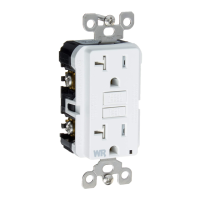
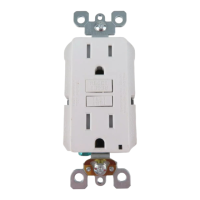
• A Self-Test GFCI receptacle has all the features of a conventional GFCI receptacle. In addition, this receptacle tests itself periodically to conrm
the GFCI electronics are functional. The Status Indicator Light will be solid green when the GFCI is powered from Line side and working correctly.
• Self-Test Indications: If the Status Indicator Light is solid or ashing RED a problem may exist. Press the TEST button to trip the GFCI. If unable
to Reset, replace the GFCI. NOTE: The status indicator may ash Red at power "ON" and Reset.
TROUBLESHOOTING
Turn the power OFF and check the wire connections against the appropriate wiring diagram in step 7A or 7B. Make sure that
there are no loose wires or loose connections. If the Status Indicator Light is not ON and the device is unable to reset this could
be a result of no power available.Start the test from the beginning of step 8 if you rewired any connections to the GFCI.
PK-93792-10-00-2H - Mobile Test - X0 AR 1723
© 2023 Leviton Mfg. Co., Inc.
This product is covered by U.S. Patent Nos. 6,040,967; 6,246,558**; 6,282,070; 6,381,112; 6,437,953; 6,646,838; 6,657,834; 6,788,173; 6,864,766**; 6,944,001; 7,336,458; 7,355,117*; 7,400,479;
7,463,124**; 7,697,252; 7,737,809**; 7,764,151**; 7,820,909*; 7,868,719
†
; 7,907,371; 8,004,804; 8,054,595; 8,130,480; 8,242,362*; 8,587,914**; 8,599,522; 8,944,859; 9,053,886 and corresponding
foreign patents (*applies only to Cat. Nos. GFTR1, GFTR2, GFWT1 & GFWT2,
†
applies only to Cat. Nos. GFTR2 & GFWT2, **does not apply to Cat. No. GFRBF).
FOR CANADA ONLY
For Technical Assistance Call: 1-800-824-3005 (USA Only) or 1-800-405-5320 (Canada Only)
www.leviton.com
SmartlockPro is a Trademark of Leviton Manufacturing Co., Inc. registered in the United
States, Canada, Mexico and China.
Self Test Cat. No. Description
GFNT1 15A-125VAC, 60Hz Non-Tamper Resistant GFCI
GFNT2 20A-125VAC, 60Hz Non-Tamper Resistant GFCI
GFTR1 15A-125VAC, 60Hz Tamper Resistant GFCI
GFTR2 20A-125VAC, 60Hz Tamper Resistant GFCI
GFWR1 15A-125VAC, 60Hz Weather Resistant GFCI
GFWR2 20A-125VAC, 60Hz Weather Resistant GFCI
GFWT1
15A-125VAC, 60Hz Weather/Tamper Resistant GFCI
GFWT2
20A-125VAC, 60Hz Weather/Tamper Resistant GFCI
GFRBF 20A-125VAC, 60Hz Blankface GFCI
All devices rated 20A feed-through
LIMITED 2 YEAR WARRANTY AND EXCLUSIONS
Leviton warrants to the original consumer purchaser and not for the benet of anyone else that this
product at the time of its sale by Leviton is free of defects in materials and workmanship under normal
and proper use for two years from the purchase date. Leviton’s only obligation is to correct such defects
by repair or replacement, at its option. For details visit www.leviton.com or call 1-800-824-3005. This
warranty excludes and there is disclaimed liability for labor for removal of this product or reinstallation.
This warranty is void if this product is installed improperly or in an improper environment, overloaded,
misused, opened, abused, or altered in any manner, or is not used under normal operating conditions or
not in accordance with any labels or instructions. There are no other or implied warranties of any kind,
including merchantability and tness for a particular purpose, but if any implied warranty is required by
the applicable jurisdiction, the duration of any such implied warranty, including merchantability and tness
for a particular purpose, is limited to two years. Leviton is not liable for incidental, indirect, special, or
consequential damages, including without limitation, damage to, or loss of use of, any equipment,
lost sales or prots or delay or failure to perform this warranty obligation. The remedies provided
herein are the exclusive remedies under this warranty, whether based on contract, tort or otherwise.
FCC STATEMENT
This equipment has been tested and found to comply with the limits for a Class B digital device, pursuant to part 15 of the FCC Rules. These limits are
designed to provide reasonable protection against harmful interference in a residential installation. This equipment generates, uses and can radiate radio
frequency energy and, if not installed and used in accordance with the instructions, may cause harmful interference to radio communications. However,
there is no guarantee that interference will not occur in a particular installation. If this equipment does cause harmful interference to radio or television
reception, which can be determined by turning the equipment off and on, the user is encouraged to try to correct the interference by one or more of the
following measures:
• Reorient or relocate the receiving antenna.
• Increase the separation between the equipment and receiver.
• Connect the equipment into an outlet on a circuit different from that to which the receiver is connected.
• Consult the dealer or an experienced radio/TV technician for help.
IC STATEMENT
This device complies with Industry Canada licence-exempt RSS standard(s). Operation is subject to the following two conditions: (1) this device may not
cause interference, and (2) this device must accept any interference, including interference that may cause undesired operation of the device.
For warranty information and/or product returns, residents of Canada should contact Leviton in writing at Leviton Manufacturing of Canada ULC to the attention
of the Quality Assurance Department, 165 Hymus Blvd, Pointe-Claire (Quebec), Canada H9R 1E9 or by telephone at 1 800 405-5320.


 To Previous Page
 Loading...