CHARGE
LOAD
LIGNE
LINE
WHITE WIRE
FIL BLANC
HOT WIRE
FIL ACTIF
Black
Black
White
CHARGE
LOAD
LIGNE
LINE
WHITE WIRE
FIL BLANC
HOT WIRE
FIL ACTIF
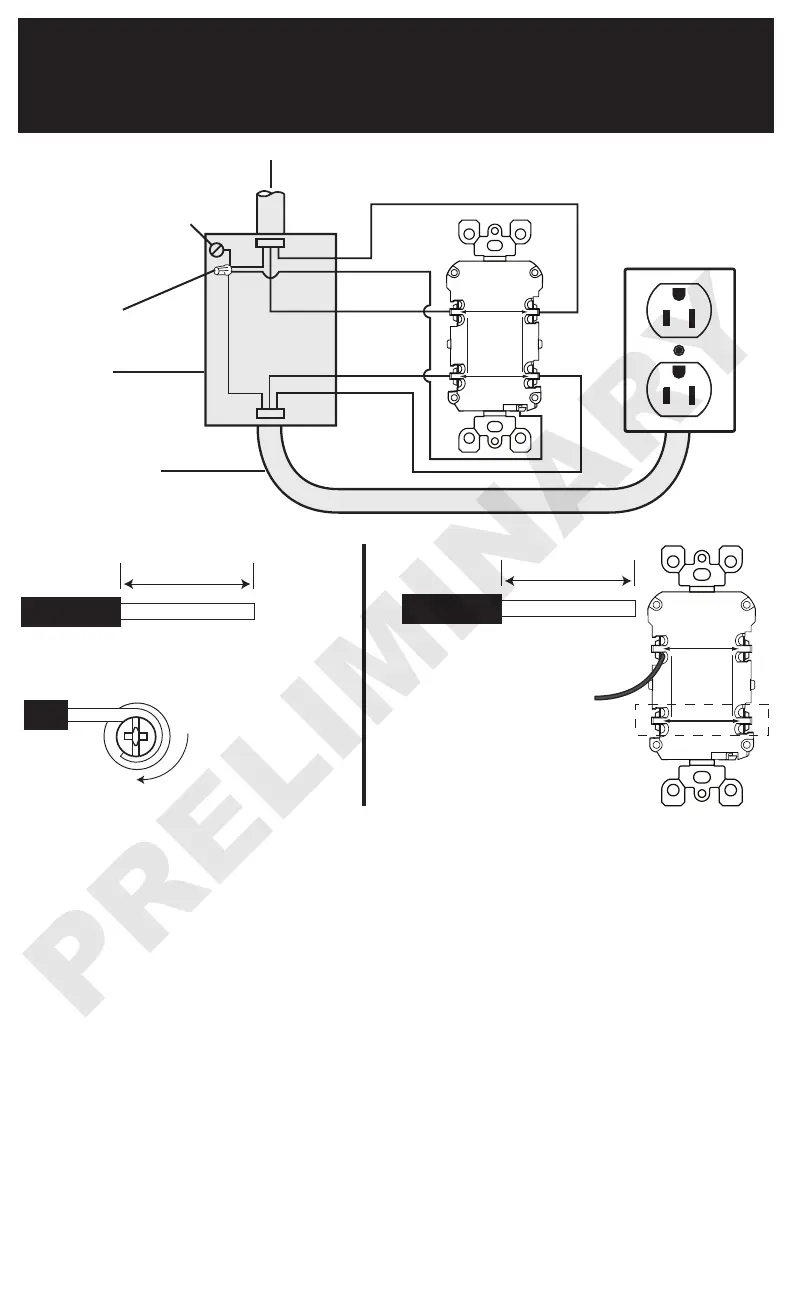
LINE cable brings power to the GFCI
Electrical
Box
Wire
Connector
Grounding connection
to box (if box has a
grounding terminal)
Connect the LINE cable wires to the LINE terminals:
• The white wire connects to the WHITE terminal (Silver)
• The black wire connects to the HOT terminal (Brass or Black)
Connect the LOAD cable wires to the LOAD terminals:
• Remove the YELLOW sticker to reveal the LOAD terminals
• The white wire connects to the WHITE terminal (Silver)
• The black wire connects to the HOT terminal (Brass or Black)
Connect the grounding wires (only if there is a grounding wire):
•
Connect a 6-inch bare copper (or GREEN) 12 or 14 AWG wire to the grounding terminal on the
GFCI. If the box has a grounding terminal, also connect a similar wire to the grounding terminal
on the box. Connect the ends of these wires to the LINE or LOAD cable's bare copper (or
GREEN) wire using a wire connector. If these wires are already in place, check the connections.
Complete the installation:
• Fold the wires into the box, keeping the grounding wire away from the WHITE and HOT
terminals. Screw the receptacle to the box and attach the faceplate.
• Go to step 8.
Back Wire:
For Back wire -
Insert bare wire fully and
tighten terminal clamp on
conductor ONLY.
Tighten screws to
14-18 in-lbs. Torque values
can also be found at
Leviton.com/torquevalue.
For Side wire -
Loop clockwise 2/3 of the way around screw.
Tighten screws over wire loops to 14-18 in-lbs.
About Wire Connections:
Side Wire:
LOAD cable feeds
power to other
receptacle(s)
8. Test your work
Why perform this test?
• If you miswired the GFCI it may not prevent personal injury or death due to a ground fault
(electrical shock).
• If you mistakenly connect the LINE wires to the LOAD terminals, the GFCI will not reset and will
not provide power to either the GFCI receptacle face or any receptacles fed from the GFCI.
Torque values can also be found at
Leviton.com/torquevalue.
7. Connect the wires (choose A or B)...
only after reading other side completely
B: Two cables (4 or 6 wires) entering the box


 To Next Page