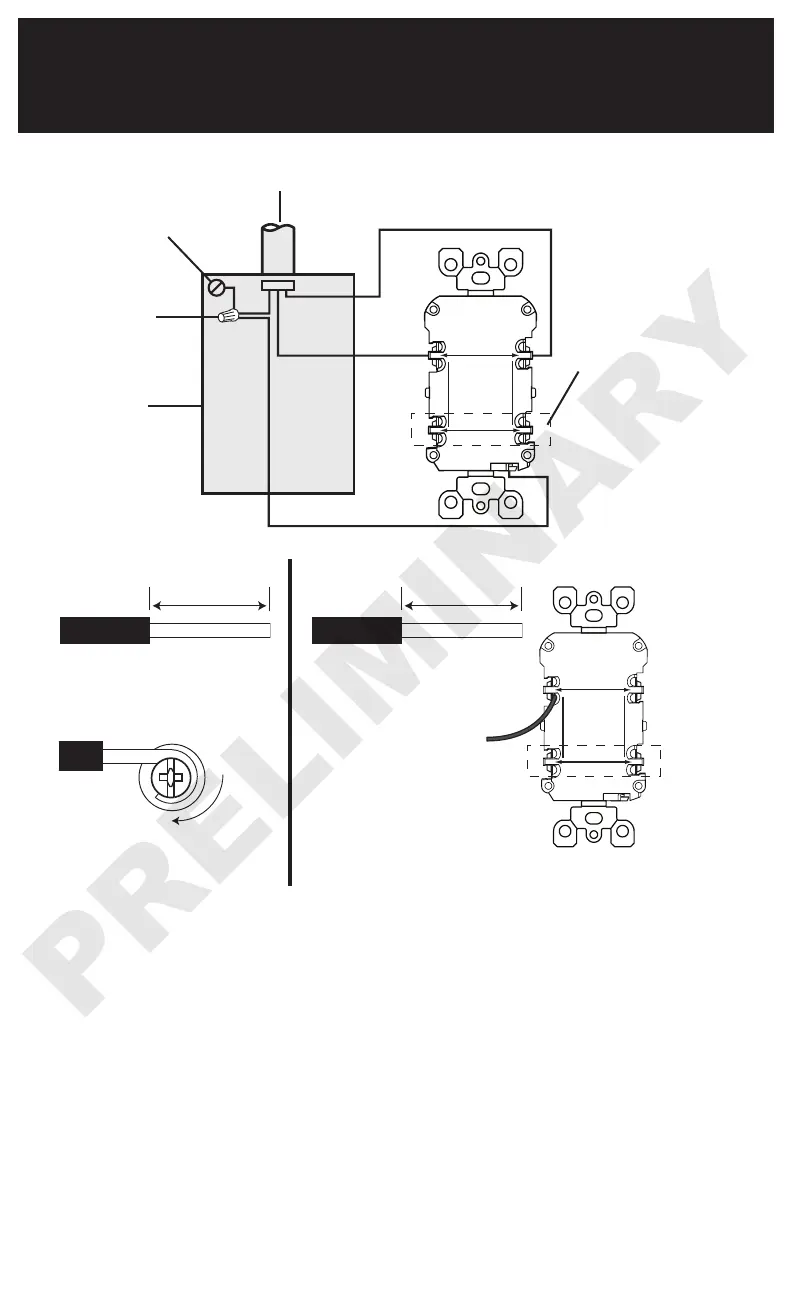
Black
CHARGE
LOAD
LIGNE
LINE
WHITE WIRE
FIL BLANC
HOT WIRE
FIL ACTIF
Grounding
connection to
box (if box has a
grounding terminal)
Wire
Connector
LINE cable brings
power to the GFCI
Electrical
Box
Yellow
sticker
remains
in place
to cover
the LOAD
terminals
7. Connect the wires (choose A or B)...
only after reading other side completely
About Wire Connections:
Side Wire:
CHARGE
LOAD
LIGNE
LINE
WHITE WIRE
FIL BLANC
HOT WIRE
FIL ACTIF
For Back wire -
Insert bare wire fully and
tighten terminal clamp on
conductor ONLY.
Tighten screws to
14-18 in-lbs. Torque values
can also be found at
Leviton.com/torquevalue.
Back Wire:
For Side wire -
Loop clockwise 2/3 of the way
around screw. Tighten screws
over wire loops to 14-18 in-lbs.
Connect the LINE cable wires to the LINE terminals:
• The white wire connects to the WHITE terminal (Silver)
• The black wire connects to the HOT terminal (Brass or Black)
Connect the grounding wire (only if there is a grounding wire):
• For a box with no grounding terminal (diagram not shown): Connect the
LINE cable's bare copper (or GREEN) wire directly to the grounding
terminal on the GFCI receptacle.
• For a box with a grounding terminal (diagram shown above): Connect
a 6-inch bare copper (or GREEN) 12 or 14 AWG wire to the grounding
terminal on the GFCI. Also connect a similar wire to the grounding
terminal on the box. Connect the ends of these wires to the LINE
cable's bare copper (or GREEN) wire using a wire connector.
If these wires are already in place, check the connections.
Complete the installation:
• Fold the wires into the box, keeping the grounding wire away from the
WHITE and HOT terminals. Screw the receptacle to the box and attach
the faceplate.
• Go to step 8.
Torque values can
also be found at
Leviton.com/torquevalue.
A: One Cable (2 or 3 wires) entering the box B: Two cables (4 or 6 wires) entering the box


 To Next Page