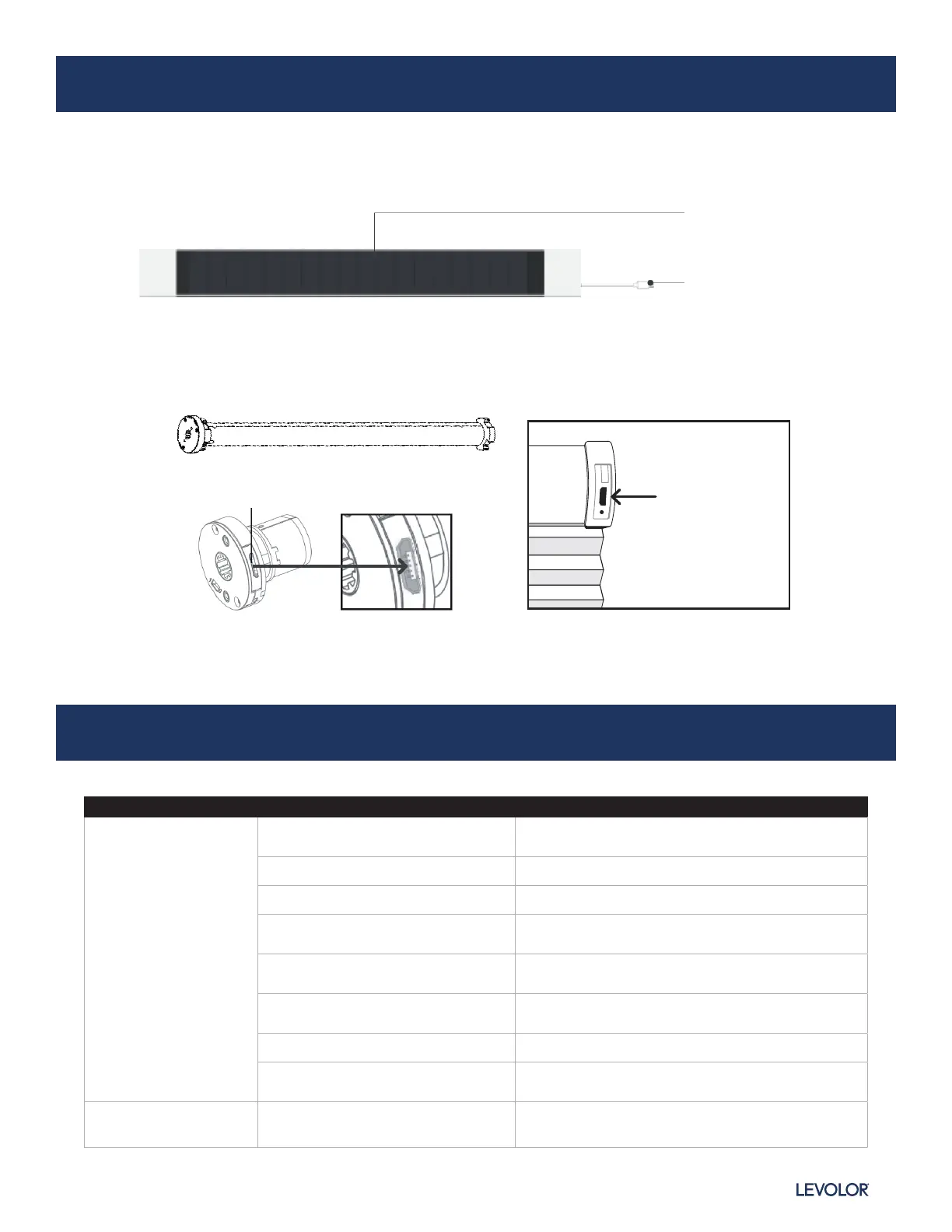
Solar Panel
USB Charging Cable
CONNECT WITH BUILT IN RECHARGEABLE BATTERY MOTOR
INMOTION
™
SOLAR PANEL INSTALLATION GUIDE
Issues Possible Causes Solution
The motor has no
response
Battery in motor is depleted
Recharge with compatible charger and check
connection and positioning of solar panel
Insufficient charging from solar panel Check connection and orientation of solar PV panel
Remote control battery is discharged Replace battery
Battery is inserted incorrectly into
remote control
Check battery polarity
Radio interference/shielding
Ensure remote control and the antenna on the motor
are positioned away from metal objects
Motor/receiver distance is too far
from remote control
Move remote control to a closer position
Power failure Check power supply to motor is connected and active
Incorrect wiring
Check that wiring is connected correctly (refer to
motor installation instructions)
Motor beeps 10 times
when in use
Battery voltage is low/PV
(solar panel issue)
Recharge with charger or check connection and
positioning of solar panel
TROUBLESHOOTING
9InMotion
™
Solar Panel
|
Reference Guide
Micro-USB
Charging Port
(Cellular, Natural,
and Roman Shades)
Micro-USB Charging Port


 To Next Page