EasyManua.ls Logo

LEXIBOOK BTL600 Series - User Manual

LEXIBOOK BTL600 Series
57 pages
Go to English
Print Icon
To Next Page IconTo Next Page
Loading...
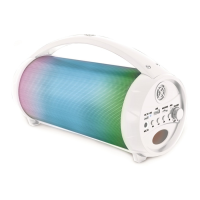
Flashboom Bluetooth
®
Speaker
Enceinte Bluetooth
®
Flashboom
BTL600series
Booklet: 105w x 148h mm
BTL600seriesIM1167_101_V08.indd 1 26/6/17 4:35 pm

Questions and Answers

  • T
    Trevor TorresAug 5, 2025
    What to do if there is no sound from my LEXIBOOK Speakers?
    • K
      Katrina ClarkAug 5, 2025
      If you're not getting any sound from your LEXIBOOK Speakers, first, check that the volume isn't set too low or muted. Also, make sure your Bluetooth device is correctly paired with the speakers.
  • A
    Andrew DavisAug 15, 2025
    What to do if my LEXIBOOK BTL600 have sound distortion?
    • J
      jonesmichaelAug 15, 2025
      If you notice sound distortion from your LEXIBOOK Speakers, the volume might be too high. Try pressing the button to reduce the volume.
  • P
    Peter DavisAug 25, 2025
    Why do my LEXIBOOK BTL600 Speakers keep losing pairing?
    • R
      Rachel ShermanAug 25, 2025
      If you are experiencing pairing lost issue with your LEXIBOOK Speakers, make sure the Bluetooth feature on your device is still activated. If not, you may need to repeat the pairing steps. Also, ensure that your device is within 10 meters (32 feet) of the Bluetooth speaker and that there are no obstructions between them.

Summary

Safety Instructions

Device Unpacking and Power

Unpacking the Device

Check the included components when unpacking the speaker.

Power Sources

Details on how to connect and charge the speaker using USB.

Speaker Operation

Location of Controls

Identification of all buttons and ports on the speaker unit.

Turning the Unit On and Off

Step-by-step guide for powering the speaker on and off.

Speaker Functions

Bluetooth Mode Operation

Connect and play audio wirelessly via Bluetooth.

AUX-in and Media Card Playback

Using AUX-in cable and micro SD/TF card for audio playback.

Playback Controls and Volume

Managing playback, volume, and track selection.

Bluetooth Setup and Lights

LED Lights Functionality

Description of speaker lights and how to control them.

Bluetooth Initial Pairing

Step-by-step guide to pair your device with the speaker.

Product Specifications

Compliance and Maintenance

EU Declaration of Conformity

Lexibook's declaration of compliance for the BTL600series with EU directives.

Product Maintenance

Guidelines for cleaning and caring for the speaker to prevent damage.

Warranty and Environmental

Product Warranty Information

Details on the product's 2-year warranty and after-sales service.

Environmental Protection and Battery Disposal

Information on recycling, proper battery disposal, and environmental care.

LEXIBOOK BTL600 Series Specifications

General IconGeneral
BrandLexibook
ModelBTL600 Series
CategorySpeakers
TypePortable Bluetooth Speaker
ConnectivityBluetooth
Power SourceRechargeable Battery
Input Voltage5V

Related product manuals