x
#Hearthedifference
GTX USER MANUAL
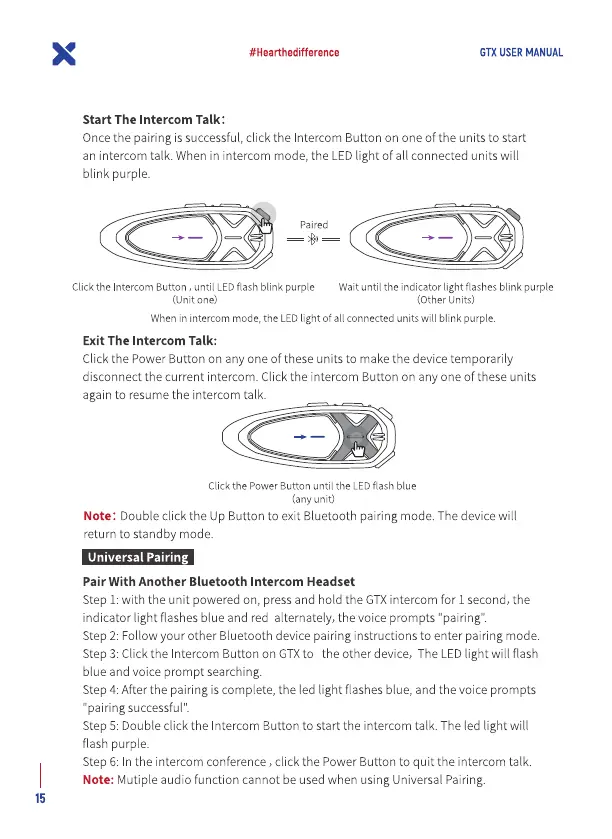
Start The Intercom Talk:
Oncethe pairing is successful,click the Intercom Button on one Ofthe units to start
an intercom talk. When in intercom mode, the LEDlight Ofall connected units will
blink purple.
Paired
Click the Intercom Button , until LED flash blink purple
(Unit one)
Wait until the indicator light flashes blink purple
(Other units)
Whenin intercommode, the LEDlight of all connectedunitswill blink purple.
Exit The Intercom Talk:
Click the Power Button on any one Ofthese units to make the device temporarily
disconnect the current intercom. Click the intercom Button on any one Ofthese units
again to resume the intercom talk.
Click the Power Button until the LED flash blue
(any unit)
Note: Double click the Up Button to exit Bluetooth pairing mode. The devicewill
return to standby mode.
Universal Pairing
Pair With Another Bluetooth Intercom Headset
Step 1:with the unit powered on, press and hold the GTXintercom for 1 second, the
indicator light flashes blue and red alternately, the voice prompts "pairing".
Step 2: Follow your other Bluetooth device pairing instructions to enter pairing mode.
Step 3: Click the Intercom Button on GTXto the other device, The LEDlight will flash
blue and voice prompt searching.
Step4: After the pairing is complete, the led light flashes blue, and the voice prompts
'pairing successful"
Step5: Double click the Intercom Button to start the intercom talk. The led light will
flash purple.
Step 6: In the intercom conference , click the Power Button to quit the intercom talk.
Note: Mutiple audio function cannot be used when using Universal Pairing.
15


 To Next Page
 Loading...