GTX USER MANUAL
#Hearthedifference
x
Note: Before Bluetooth group intercom pairing, the devices must be in the same mode
(four-way intercom mode or multi-way intercom mode). f the devices are not in the
same mode, they will not be able to pair.
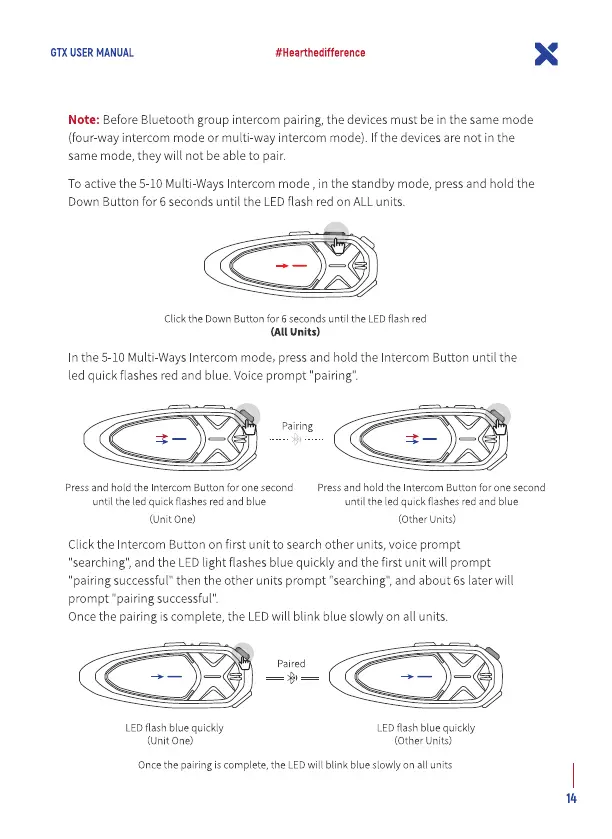
To activethe 5-10 Multi-Ways Intercom mode , in the standby mode, press and hold the
Down Button for 6 seconds until the LED flash red on ALL units.
Click the Down Button for 6 seconds until the LED flash red
(All Units)
n the 5-10 Multi-WaysIntercom mode, press and hold the Intercom Button until the
led quick flashes red and blue. Voice prompt "pairing'.
Pairing
Press and hold the Intercom Button for one second
until the led quick flashes red and blue
(unit One)
Press and hold the Intercom Button for one second
until the led quick flashes red and blue
(Other Units)
Click the Intercom Button on first unit to search other units, voice prompt
"searching",and the LEDlight flashes b ue quickly and the first unit will prompt
'pairing successful" then the other units prompt "searching", and about 6s later will
prompt "pairing successful"
Oncethe pairing is complete, the LEDwill blink blue slowly on all units.
LED flash blue quickly
(unit One)
LED flash blue quickly
(Other units)
Oncethe pairingis complete, the LEDwill blink blue slowlyon all units


 To Next Page
 Loading...