x
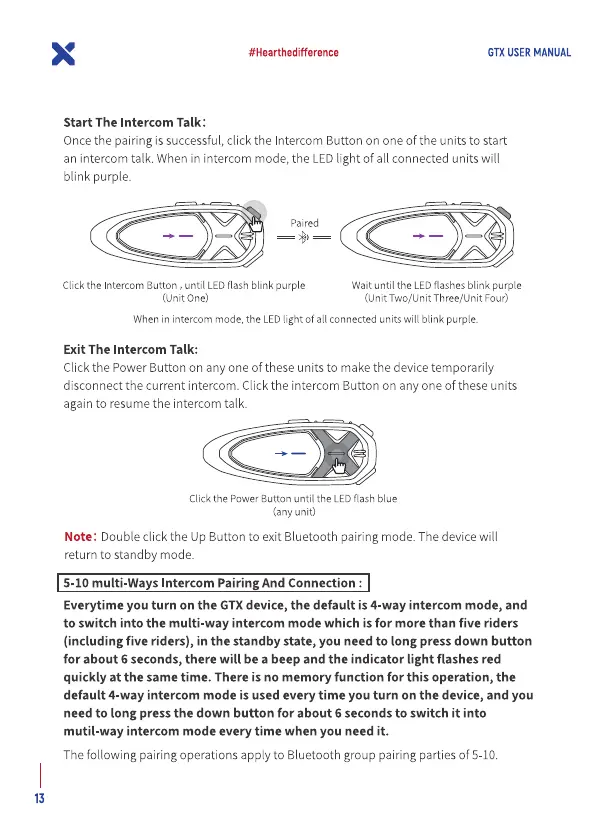
Start The Intercom Talk:
#Hearthedifference
GTX USER MANUAL
Oncethe pairing is successful,click the Intercom Button on one of the units to start
an intercom talk. When in intercom mode, the EDlight of all connected units will
blink purple.
Paired
Clickthe IntercomButton , until LEDflashblink purple
(unit One)
Waituntil the LEDflashesblink purple
(Unit Two/Unit Three/Unit Four)
Whenin intercom mode,the LEDlight ofall connectedunits will blink purple.
Exit The Intercom Talk:
Click the Power Button on any one of these units to makethe device temporarily
disconnect the current intercom. Click the intercom Button on any one of these units
again to resume the intercom talk.
Click the Power Button until the LED flash blue
(any unit)
Note: Double click the Up Button to exit Bluetooth pairing mode. The device will
return to standby mode.
5-10 mufti-Ways Intercom Pairing And Connection :
Everytime you turn on the GTXdevice, the default is 4-way intercom mode, and
to switch into the multi-way intercom mode which is for more than five riders
(including five riders), in the standby state, you need to long press down button
for about 6 seconds, there will be a beep and the indicator light flashes red
quickly at the same time. There is no memory function for this operation, the
default 4-way intercom mode is used every time you turn on the device, and you
need to long press the down button for about 6 seconds to switch it into
mutil-way intercom mode every time when you need it.
The following pairing operations apply to Bluetooth group pairing parties of 5-10.
13


 To Next Page
 Loading...