GTX USER MANUAL
#Hearthedifference
x
the same time. There is no memory function for this operation, the default 4-way
intercom mode is used every time you turn on the device, and you need to long
press the down button for about 6 seconds to switch it into mutil-way intercom
mode every time when you need it.
Note: Prior to pairing units for communications before riding, we strongly suggestthat
existing connections be cleared from unit. To clear existing connections, Pressand hold the
Up Button and the Down Button at the same time for 2 seconds.The indicator light flashes
red, all previous connections will be cleared from the unit.
Note: When 3 10 units are paired, due to the connection restriction only two Ofthe units
can connect with the mobile phone the Other units will not be able to connect with the
mobile phone.
2-4 Ways Intercom Pairing And Connection :
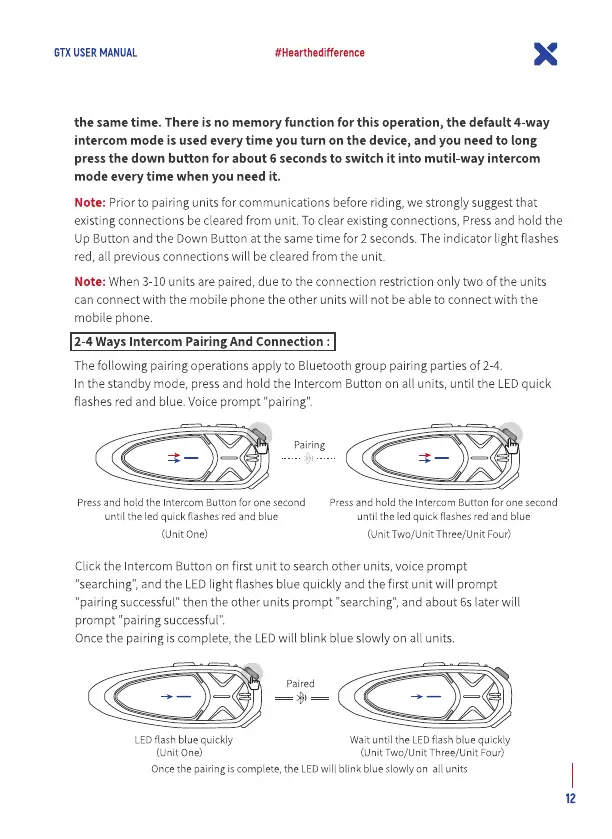
The following pairing operations apply to Bluetooth group pairing parties Of2-4
n the standby mode, press and hold the Intercom Button on all units, until the LEDquick
flashes red and blue. Voiceprompt "pairing'.
Pairing
Press and hold the Intercom Button for one second
until the led quick flashes red and blue
(unit One)
Press and hold the Intercom Button for one second
until the led quick flashes red and blue
(unit Two/lJnit Three/lJ nit Four)
Click the Intercom Button on first unit to searchother units, voice prompt
"searching",and the LEDlight flashes blue quickly and the first unit will prompt
pairing successful"then the other units prompt "searching", and about 6s later will
prompt "pairing successful
Once the pairing is complete, the LEDwill blink blue slowly on all units.
LEDflash bluequickly
(Unit One)
Wait until the LED flash blue quickly
(Unit Two/lJnit Three/unit Four)
Oncethe pairingis complete, the LEDwill blink blueslowly on all units
12


 To Next Page
 Loading...