x
#Hearthedifference
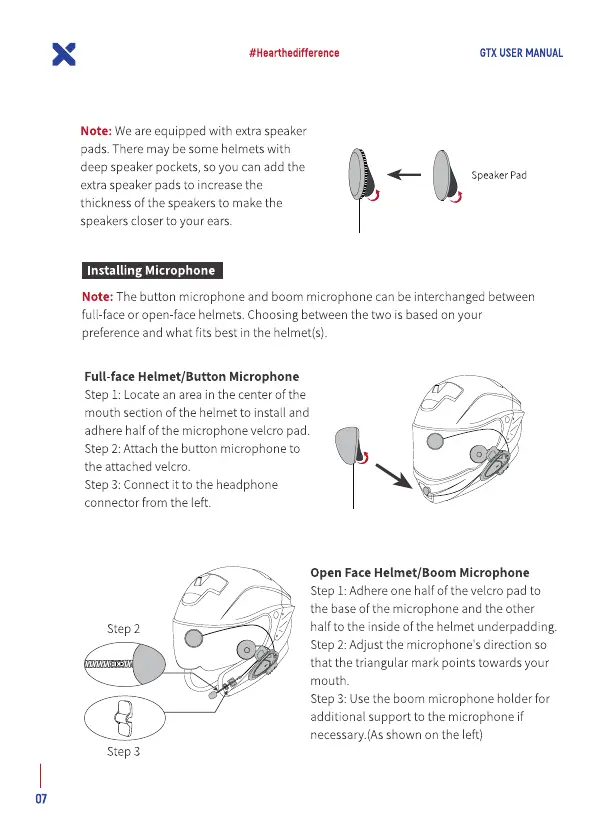
Note: We are equipped with extra speaker
pads. There may be some helmets with
deep speaker pockets, so you can add the
extra speaker pads to increase the
thickness Ofthe speakersto make the
speakers closer to your ears.
Installing Microphone
GTX USER MANUAL
Speaker pad
Note: The button microphone and boom microphone can be interchanged between
full-face or open-face helmets. Choosing between the two is basedon your
preference and what fits best in the helmet(s).
Full-face Helmet/Button Microphone
Step 1: Locate an area in the center of the
mouth section of the helmet to install and
adhere half of the microphone velcro pad.
Step 2: Attach the button microphone to
the attached velcro.
Step 3: Connect it to the headphone
connector from the left.
Step 2
Step 3
07
Open Face Helmet/Boom Microphone
Step 1:Adhere one half of the velcro pad to
the base of the microphone and the other
halfto the inside of the helmet underpadding.
Step 2: Adjust the microphone's direction so
that the triangular mark points towards your
mouth.
Step 3: Usethe boom microphone holder for
additional support to the microphone if
necessary.(Asshown on the left)


 To Next Page
 Loading...