Menu item Description
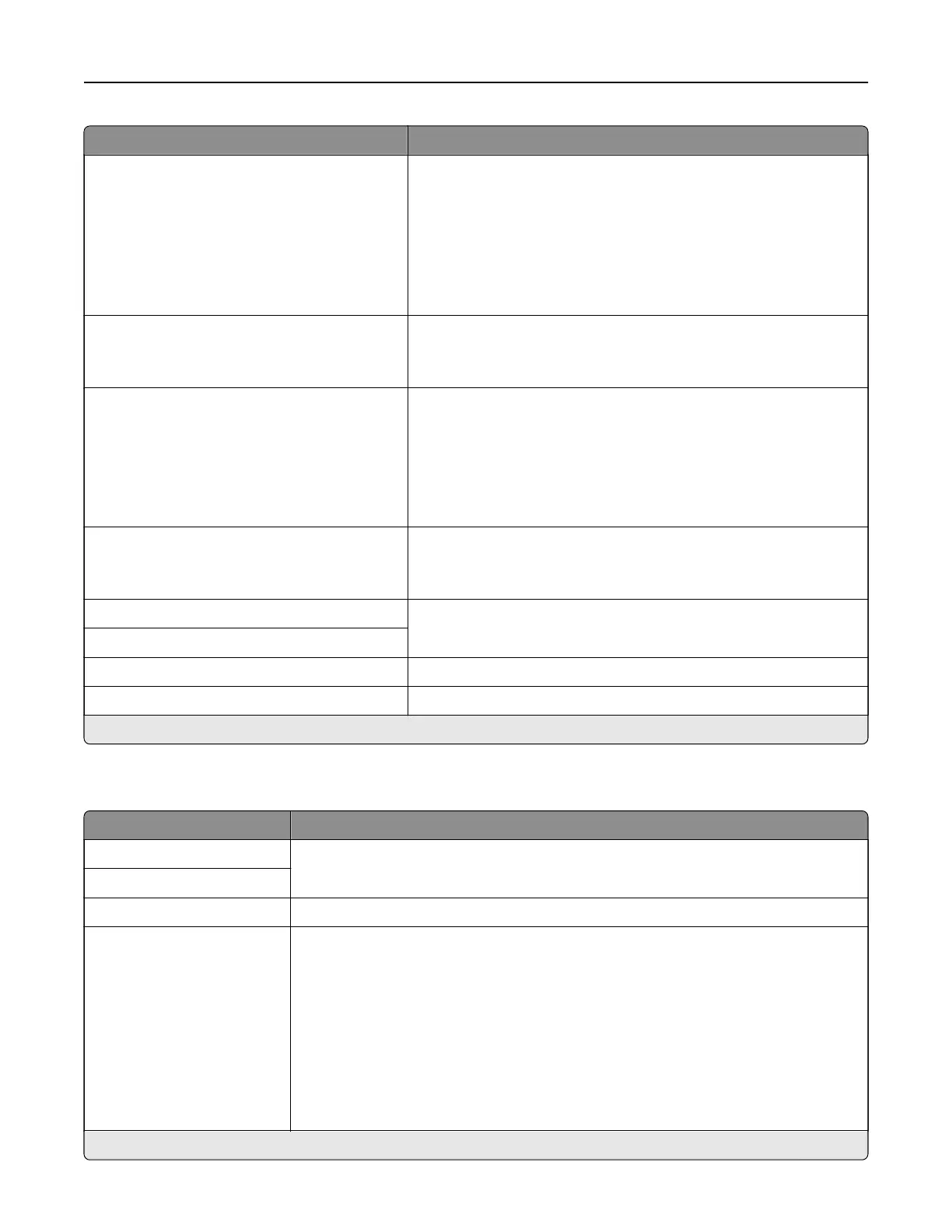
SMTP Server Authentication
No authentication required*
Login / Plain
NTLM
CRAM‑MD5
Digest‑MD5
Kerberos 5
Set the authentication type for the SMTP server.
Device‑Initiated E‑mail
None*
Use Device SMTP Credentials
Specify whether credentials are required for device‑initiated e‑mail.
User‑Initiated E‑mail
None*
Use Device SMTP Credentials
Use Session User ID and Password
Use Session E‑mail address and Password
Prompt user
Specify whether credentials are required for user‑initiated e‑mail.
Use Active Directory Device Credentials
O*
On
Specify whether credentials are required for user‑initiated e‑mail.
Device Userid Specify the user ID and password to connect to the SMTP server.
Device Password
Kerberos 5 REALM Specify the realm for the Kerberos 5 authentication protocol.
NTLM Domain Specify the domain name for the NTLM security protocol.
Note: An asterisk (*) next to a value indicates the factory default setting.
E‑mail Defaults
Menu item Description
Subject: Specify the e‑mail subject and message.
Message:
File Name Specify the filename for the scanned document.
Format
JPEG (.jpg)
PDF (.pdf)*
TIFF (.tif)
XPS (.xps)
TXT (.txt)
RTF (.rtf)
DOCX (.docx)
CSV (.csv)
Specify the file format of the scanned document.
Note: An asterisk (*) next to a value indicates the factory default setting.
Understanding the printer menus 115


 To Next Page