218
3-2. Using the audio system
Using the CD player
Loading CDs
■ Loading a CD
Press .
“WAIT” is shown on the display.
When the indicator on the slot turns from amber to green, insert a
CD.
The display changes from “WAIT” to “LOAD”.
■ Loading multiple CDs
Press and hold until you hear a beep.
“WAIT” is shown on the display.
When the indicator on the slot turns from amber to green, insert a
CD.
The display changes from “WAIT” to “LOAD”.
The indicator on the slot turns to amber when the CD is being inserted.
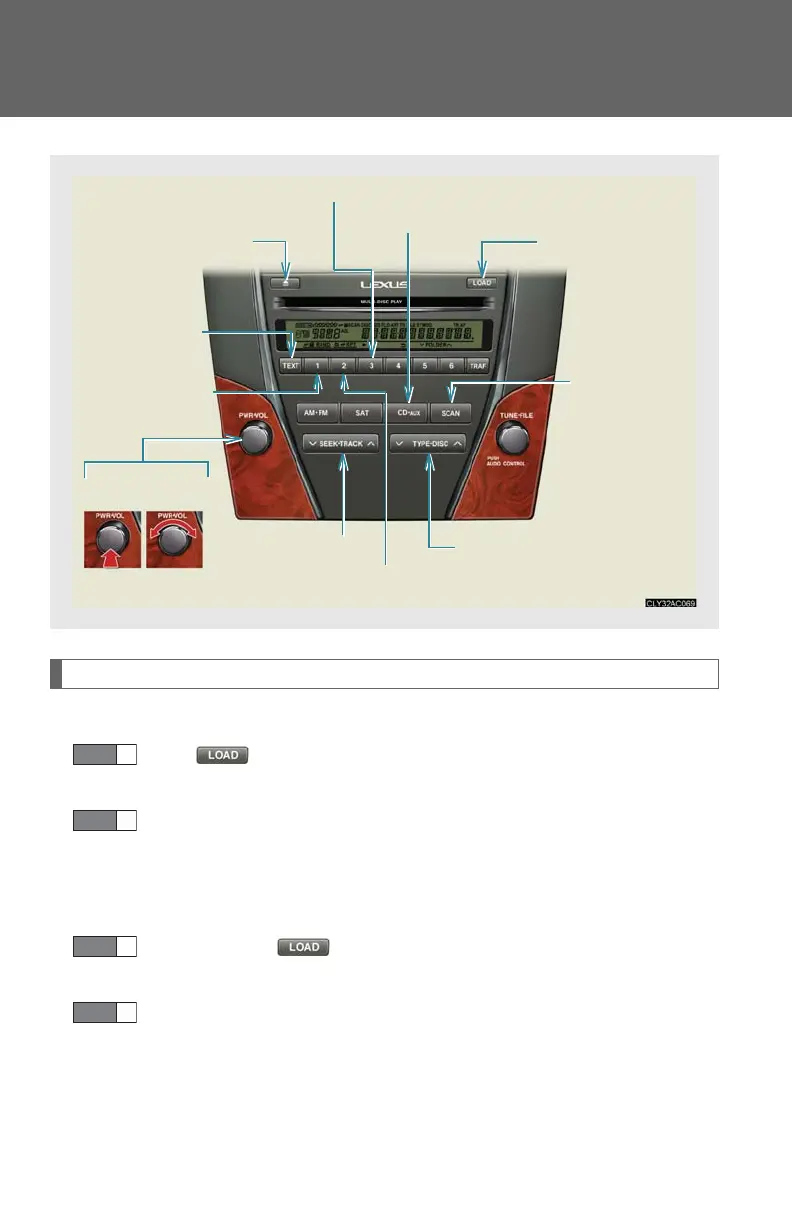
Power Vo lum e
Repeat play button
“PWR
VOL” knob
Eject button
Playback button
Random playback
button
Tex t butt o n
Playback/Pause button
Load button
Search
playback
button
Track selector button
CD selector button


 To Next Page