25
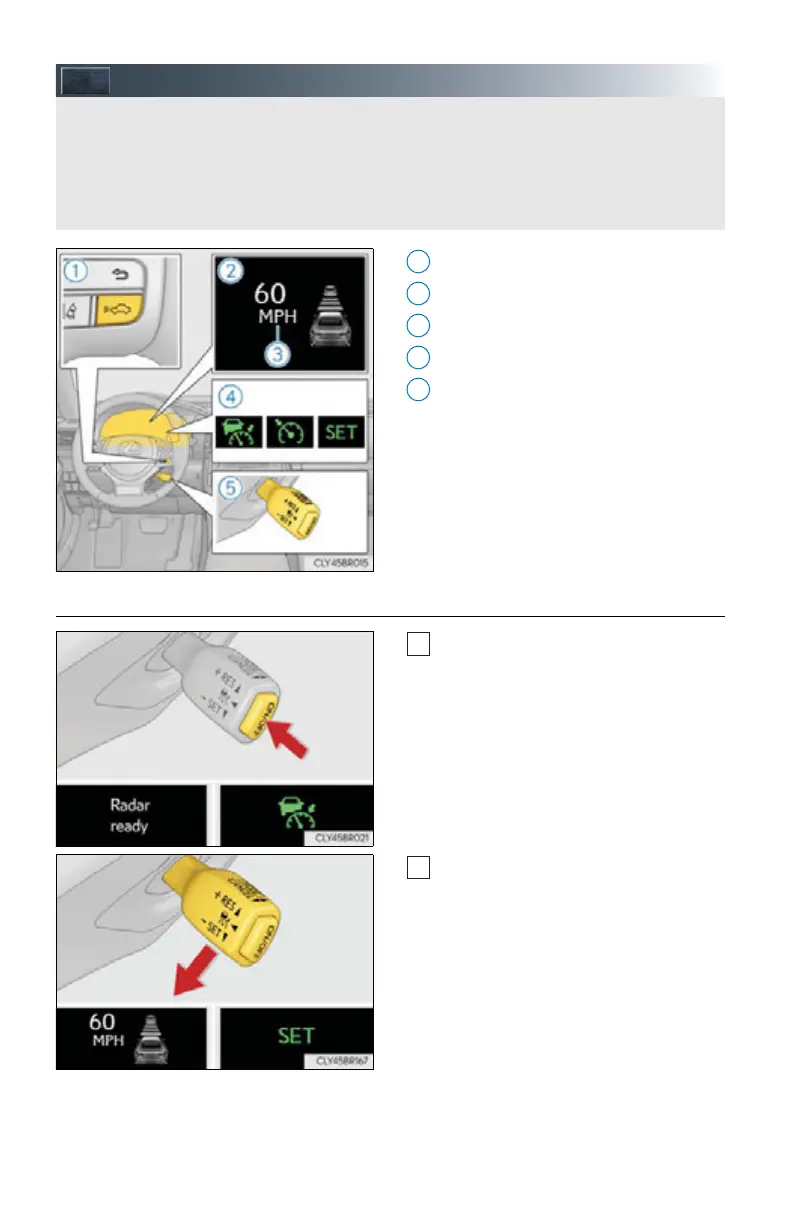
Dynamic Radar Cruise Control (if equipped)
Vehicle-to-vehicle distance button
Display
Set speed
Indicators
Cruise control switch
■ Setting the vehicle speed (vehicle-to-vehicle distance control mode)
Press the “ON/OFF” button to activate
the cruise control.
Radar cruise control indicator will
come on and a message will be dis-
played on the multi-information dis-
play.
Press the button again to deactivate
the cruise control.
Accelerate or decelerate, with accel-
erator pedal operation, to the desired
vehicle speed (above approximately
30 mph [50 km/h]) and push the lever
down to set the speed.
Cruise control “SET” indicator and set
speed will be displayed.
The vehicle speed at the moment the
lever is released becomes the set
speed.
Without accelerator pedal operation by the driver, in vehicle-to-vehicle distance control
mode, the vehicle automatically accelerates and decelerates in accordance to the
changes in speed of the preceding vehicle. In constant speed control mode, the vehicle
runs at a fixed speed.
Use the dynamic radar cruise control on freeways and highways.
1
2
3
4
5
1
2



 To Next Page