EasyManua.ls Logo

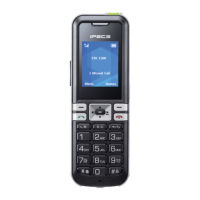
LG-Ericsson iPecs GDC-500H - User Manual

LG-Ericsson iPecs GDC-500H
67 pages
Print Icon
To Next Page IconTo Next Page
Loading...
GDC-500H
User Guide
Please read this guide carefully before
operating your new Wireless handset.
Retain the guide for future reference.

Table of Contents

Questions and Answers

  • T
    Tiffany WelchAug 19, 2025
    How to fix a blank LCD screen on LG-Ericsson Handsets?
    • R
      Robert DillonAug 19, 2025
      If the LCD is blank on your LG-Ericsson Handset, it could be due to a lack of power. Make sure the batteries are correctly installed and have enough charge. Also, try pressing and holding the End/Power button for one second to turn on the device.
  • C
    Charles ParkerAug 21, 2025
    What to do if LG-Ericsson iPecs GDC-500H Handsets display “NO CHANNEL”?
    • D
      Dale HendersonAug 21, 2025
      If your LG-Ericsson Handset displays “NO CHANNEL” when you press the TALK button, it means that all DECT channels are currently in use. You will need to wait until a channel becomes available before you can make a call.
  • D
    Dr. Fernando Grant IIIAug 23, 2025
    What does it mean when the low battery icon flashes on LG-Ericsson Handsets?
    • C
      cainloganAug 23, 2025
      If the battery level is low on your LG-Ericsson Handset, a low battery icon will flash on the LCD, accompanied by a warning tone. To resolve this, you need to recharge the battery.
  • F
    fbrooksAug 26, 2025
    Why does my LG-Ericsson Handset power off right after turning on?
    • A
      Amber MedinaAug 26, 2025
      If your LG-Ericsson Handset powers off immediately after being turned on, it indicates that the battery level is too low for operation. You should recharge the battery to resolve this issue.
  • C
    coxwilliamAug 28, 2025
    Why does my LG-Ericsson Handset have call failures?
    • M
      Matthew GentryAug 28, 2025
      If you're experiencing unexpected call disconnects or failures with your LG-Ericsson Handset, it could be due to a poor RF environment. Since RF conditions can change, try moving to a location where you can obtain a higher RSSI (Received Signal Strength Indicator).
  • L
    Lisa ReedAug 30, 2025
    How to adjust ringer volume on LG-Ericsson Handsets?
    • P
      pcobbAug 30, 2025
      If the ringer volume on your LG-Ericsson Handset is too low or too high, you need to adjust the ringer volume level. Refer to the Sound Section for instructions on how to do this.
  • J
    John WalkerSep 1, 2025
    How to adjust the volume on LG-Ericsson iPecs GDC-500H?
    • A
      Anita BridgesSep 1, 2025
      If the audio volume on your LG-Ericsson Handset is too low or too high, it means the volume needs adjustment. While you are connected to a call, press the Up or Down arrow on the Navigation button to adjust the volume to a comfortable level.
  • R
    Ronald AyalaSep 4, 2025
    What does “UNREGISTERED” mean on LG-Ericsson iPecs GDC-500H Handsets?
    • C
      Christopher JohnsonSep 4, 2025
      If your LG-Ericsson Handset displays “UNREGISTERED” on the LCD, it means there is no active subscription. You need to subscribe the handset. Refer to the section on subscribing the GDC-500H to a System for instructions.
  • M
    Megan JosephSep 6, 2025
    Why is the battery life short on LG-Ericsson iPecs GDC-500H Handsets?
    • D
      Dale Miller DDSSep 6, 2025
      If the battery duration of your LG-Ericsson Handset is less than specified, it could be due to failing batteries or poor battery charging habits. To improve battery life, charge the batteries fully and keep the handset in the cradle when it is not in use. Refer to the Installing the Batteries Section for more information.
  • J
    Justin StewartSep 8, 2025
    What causes subscription fails on LG-Ericsson iPecs GDC-500H Handsets?
    • R
      Robin BarajasSep 9, 2025
      If you are experiencing subscription failures with your LG-Ericsson Handset, it could be due to several reasons: interference from other DECT systems, being too far from the base station, no available channel, or selecting the wrong Base station (RFPI) or Auth code. Try turning off other DECT systems, ensure the handset is within range of the base station, verify that the RFPI and AC are correct, and wait for an available wireless channel.

Summary

Regulatory and Safety Notices

Radio Frequency Emissions Compliance

Details FCC and Canadian compliance statements for radio frequency emissions.

Product Safety Standards

Lists international product safety standards the product conforms to.

E-911 and MLTS Requirements

Explains E-911 requirements and purchaser responsibility for MLTS.

Important Care and Safety Guidelines

General Care and Precautions

General advice on connecting, using, and caring for the GDC-500H handset.

Battery Handling and Safety

Advises on safe handling, charging, and disposal of batteries, especially regarding children.

General Usage Safety Tips

Details safety precautions related to using the phone in various situations and environments.

Handset Hardware and Initial Setup

Battery Installation and Charging

Step-by-step instructions for installing and charging the handset batteries.

System Subscription and Authentication

Subscribing the GDC-500 H to a System

Details the process of subscribing the handset to the telephone system.

Using Basic Features

Adjusting Volume Levels

How to adjust audio and ringer volume levels.

Call Handling Basics

Steps to make, release, and answer incoming calls.

Advanced System Features

Call Forwarding Configuration

Instructions on how to redirect incoming calls to another destination.

GDC-500 H User Menu Features

Sound and Phonebook Management

Adjusting ring tones, melodies, and managing contact phonebook entries.

Troubleshooting Guide

Specifications

LG-Ericsson iPecs GDC-500H Specifications

General IconGeneral
Standby Time200 hours
Headset JackYes
Wi-FiNo
Headset Jack Size2.5 mm
FeaturesSpeakerphone
WeightApprox. 180g
Weight (Alternative)Approx. 180g

Related product manuals