Need help?
Do you have a question about the LG 16U70Q Series and is the answer not in the manual?
The components shown below are provided when you purchase the product. Check the components before use.
Information on registered trademarks, open source licenses, and obtaining source code.
Guidelines for recycling rechargeable batteries and proper disposal.
This document serves as the owner's manual for an LG Notebook from the 16U70Q Series, providing essential information for safe and convenient product use. It covers various aspects from initial setup and component identification to troubleshooting and important safety precautions.
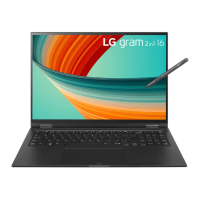
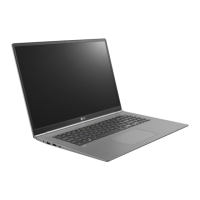
The notebook features a sleek design with clearly marked ports and indicators. On the front, it includes a built-in microphone, a webcam, and a webcam operation status lamp, facilitating video calls and recordings. The keyboard and touchpad are centrally located for user interaction, and a power button, which may also integrate a fingerprint sensor for enhanced security, is present.
The left side of the notebook houses a power port for connecting the AC adapter, an HDMI port for external display connections, and a USB-C™ port. This versatile USB-C™ port supports USB 3.2 Gen 2x1 standards, offers quick charging, and provides always-on charging functions for devices that support USB PD (Power Delivery). It can also be used to connect a LAN adapter for wired internet access. Additionally, a headphone port, supporting 4-pole ear microphones (US 4-pole standards), is available on this side. The right side of the notebook includes built-in speakers, a microSD card slot for expandable storage, a standard USB port (USB 3.2 Gen 2x1), and a security keyhole (Kensington Security Slot) for physical security.
For initial setup, users are advised to check all included components, which typically consist of the PC main body, an owner's manual, an AC adapter, and a power cable. When connecting to a wired LAN, a separate LAN adapter is required, which plugs into the USB-C™ port. The AC adapter is crucial for powering the PC and charging its built-in battery. It's important to use only the provided AC adapter and ensure firm connections to both the power outlet and the PC. The AC adapter lamp indicates the charging status: on when connected and fully charged, blinking when charging, and off when disconnected. If the system doesn't turn on after a low-battery alarm, connecting the AC adapter and allowing sufficient charge is necessary.
The manual emphasizes important safety precautions, categorized as 'WARNING' and 'CAUTION'. Warnings highlight risks of serious physical damage or fatal injuries, while cautions point to minor damage to the body or machine. Users are warned against using the product on soft surfaces like carpets or beds, or placing the adapter under blankets, as this can lead to overheating, malfunction, fire, or burns. Leaving the powered-on product in poorly ventilated spaces for extended periods is also discouraged due to the risk of overheating and fire. It is crucial to use only LG Electronics Inc. certified batteries to prevent explosions or fires. The battery should be kept away from heat and humidity above 140 °F (60 °C). Any leakage or bad odor from the battery warrants immediate contact with a service center. The battery should only be charged with the provided charger, and bending the AC adapter cable excessively should be avoided to prevent wire breakage, electric shock, or fire. Metallic objects should not come into contact with the battery terminals to prevent damage, fire, or overheating.
The notebook features a built-in battery pack that should be fully charged upon first use. The battery is considered a wearable good, meaning its capacity may decrease over time. It cannot be arbitrarily removed or replaced by the user, as this may void the warranty; battery removal or replacement should be done by a designated service center, potentially incurring a fee.
The manual also provides a pre-tech support checklist for troubleshooting common issues. For instance, if the screen color doesn't display properly, users should check if Reader Mode is on or if Night light settings are interfering. If the screen still malfunctions, contacting the LG Electronics service center is recommended. Reader mode is designed to adjust screen brightness and color for eye protection. If the power does not turn on, checking the power cord connection and performing a system reset by holding the power button for at least 6 seconds after disconnecting the adapter are suggested steps. If the system stops during use or doesn't shut down properly, a similar reset procedure is advised, with a caution that unsaved data may be lost.
Screen brightness changes during battery mode are attributed to the Vari-Bright™ function, which conserves battery life. Users can adjust or disable this function via the AMD Radeon Software. If the touchpad is not functioning correctly, users should check the touchpad settings in the LG Smart Assistant, ensuring it's not in 'Touchpad Off' or 'Touchpad Auto' (disabled when a mouse is connected) state.
For wireless network connection issues, users should verify that the wireless network device is not turned off (using Fn + F6) and that airplane mode is off. Reinstalling the wireless LAN driver is another troubleshooting step. If other drivers need reinstallation, the LG Update application can be used. Error messages might indicate a virus or malicious code infection, prompting a system check.
The manual also includes information on registered trademarks and open-source software. Microsoft™, MS™, WinPE™, and Windows® are trademarks of Microsoft Corporation™. USB Type-C™ and USB-C™ are trademarks of USB Implementers Forum. microSD® and its logo are trademarks of SD-3C, LLC. Wi-Fi® is a registered trademark of Wi-Fi Alliance Corporation. LG Electronics commits to providing open-source code for components under GPL, LGPL, MPL, and other licenses, accessible via their website or upon email request.
Finally, battery take-back information is provided, encouraging recycling of rechargeable batteries in compliance with standards. Users are directed to call a specific number or visit a website for proper disposal. The Supplier's Declaration of Conformity lists LG Electronics USA, Inc. as the responsible party, along with their address and email for environmental inquiries.
 General
| Display Size | 16 inches |
|---|---|
| Display Type | IPS LCD |
| Graphics | Intel Iris Xe Graphics |
| Model | 16U70Q Series |
| Display Resolution | 2560 x 1600 |
| Operating System | Windows 11 |
| Wireless | Wi-Fi 6E |
| Ports | 2x Thunderbolt 4, 1x USB-A 3.2, 1x HDMI, 1x 3.5mm headphone jack, 1x MicroSD card reader |


 To Next Page