- 9 -
LGE Internal Use Only
Copyright © LG Electronics. Inc. All right reserved.
Only for training and service purposes
4. Final Assembly Adjustment
4.1. White Balance Adjustment
4.1.1. Overview
▪ W/B adj. Objective & How-it-works
(1) Objective: To reduce each Panel's W/B deviation
(2) How-it-works : When R/G/B gain in the OSD is at 192, it
means the panel is at its Full Dynamic Range. In order to
prevent saturation of Full Dynamic range and data, one of
R/G/B is xed at 192, and the other two is lowered to nd
the desired value.
(3) Adjustment condition : normal temperature
1) Surrounding Temperature : 25 °C ± 5 °C
2) Warm-up time: About 5 Min
3) Surrounding Humidity : 20 % ~ 80 %
4) Before White balance adjustment, Keep power on
status, don’t power off
* Adj. condition and cautionary items
(1) Lighting condition in surrounding area surrounding lighting
should be lower 10 lux. Try to isolate adj. area into dark
surrounding.
(2) Probe location: Color Analyzer (CA-210) probe should
be within 10cm and perpendicular of the module surface
(80°~ 100°)
(3) Aging time
1) After Aging Start, Keep the Power ON status during
5 Minutes.
2) In case of LCD, Back-light on should be checked
using no signal or Full-white pattern.
4.1.2. Equipment
(1) Color Analyzer: CA-210 (NCG: CH 9 / WCG: CH12 / LED:
CH14)
(2) Adj. Computer (During auto adj., RS-232C protocol is
needed)
(3) Adjust Remocon
(4) Video Signal Generator MSPG-925F 720p/204-
Gray(Model: 217, Pattern: 49)
* Color Analyzer Matrix should be calibrated using CS-1000
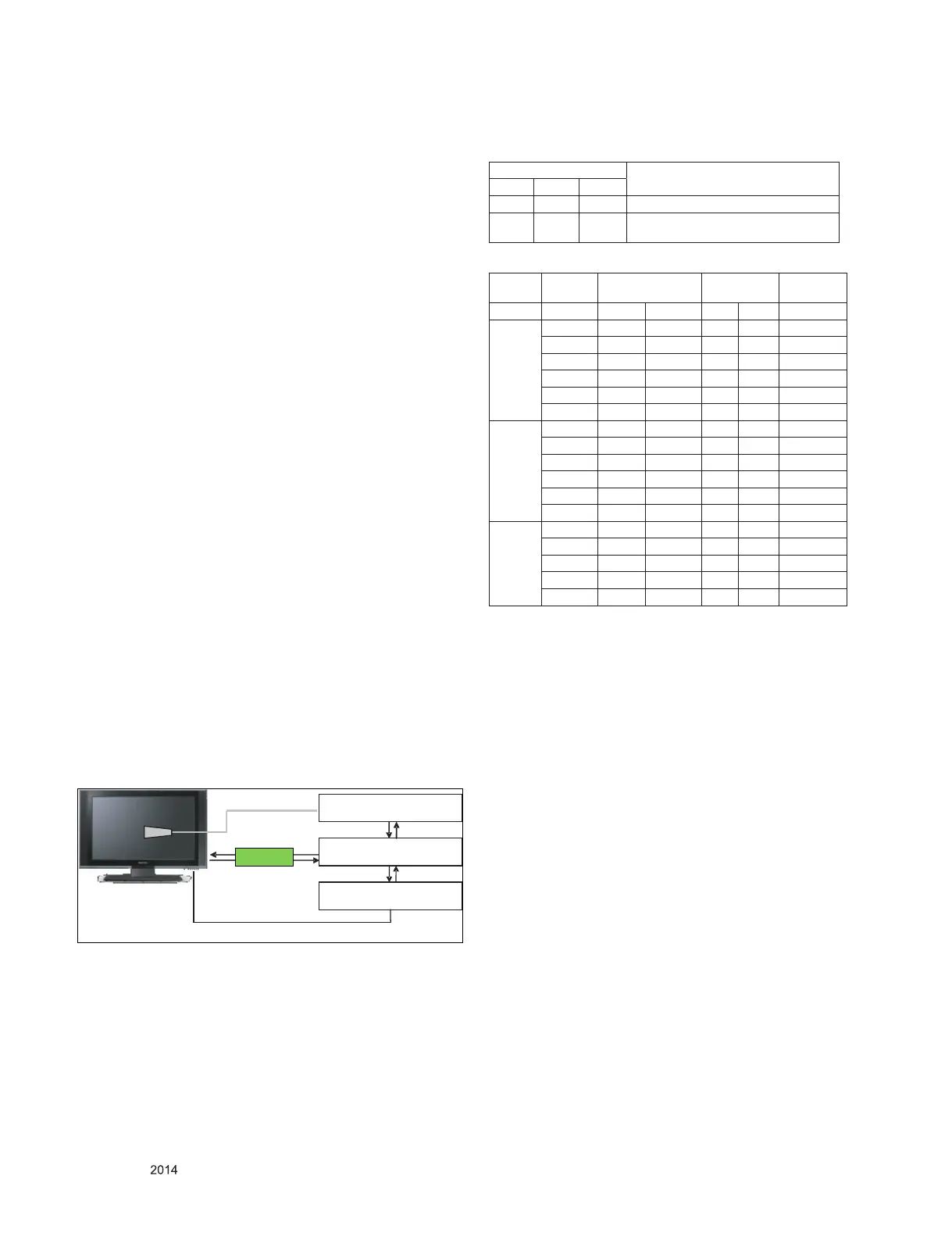
4.1.3. Equipment connection
4.1.4. Adjustment Command (Protocol)
(1) RS-232C Command used during auto-adj.
(2) Adjustment Map
RS-232C COMMAND
Explantion
CMD ID DATA
wb 00 00 Begin White Balance adjustment
wb 00 ff
End White Balance adjustment
(internal pattern disappears )
Adj. item
Command
(lower caseASCII)
Data Range
(Hex.)
Default
(Decimal)
CMD1 CMD2 MIN MAX
Cool
R Gain j g 00 C0
G Gain j h 00 C0
B Gain j i 00 C0
R Cut
G Cut
B Cut
Medium
R Gain j a 00 C0
G Gain j b 00 C0
B Gain j c 00 C0
R Cut
G Cut
B Cut
Warm
R Gain j d 00 C0
G Gain j e 00 C0
B Gain j f 00 C0
R Cut
G Cut
Co lo r Analyzer
Co m pu ter
Pattern Generator
RRGB Cable S-2 32C
RS-232C
RS-232C
Probe
Signal Source
* If TV internal pattern is used, not needed
DFT JIG


 To Next Page