LGE Internal Use OnlyCopyright © 2007 LG Electronics. Inc. All right reserved.
Only for training and service purposes
- 11 -
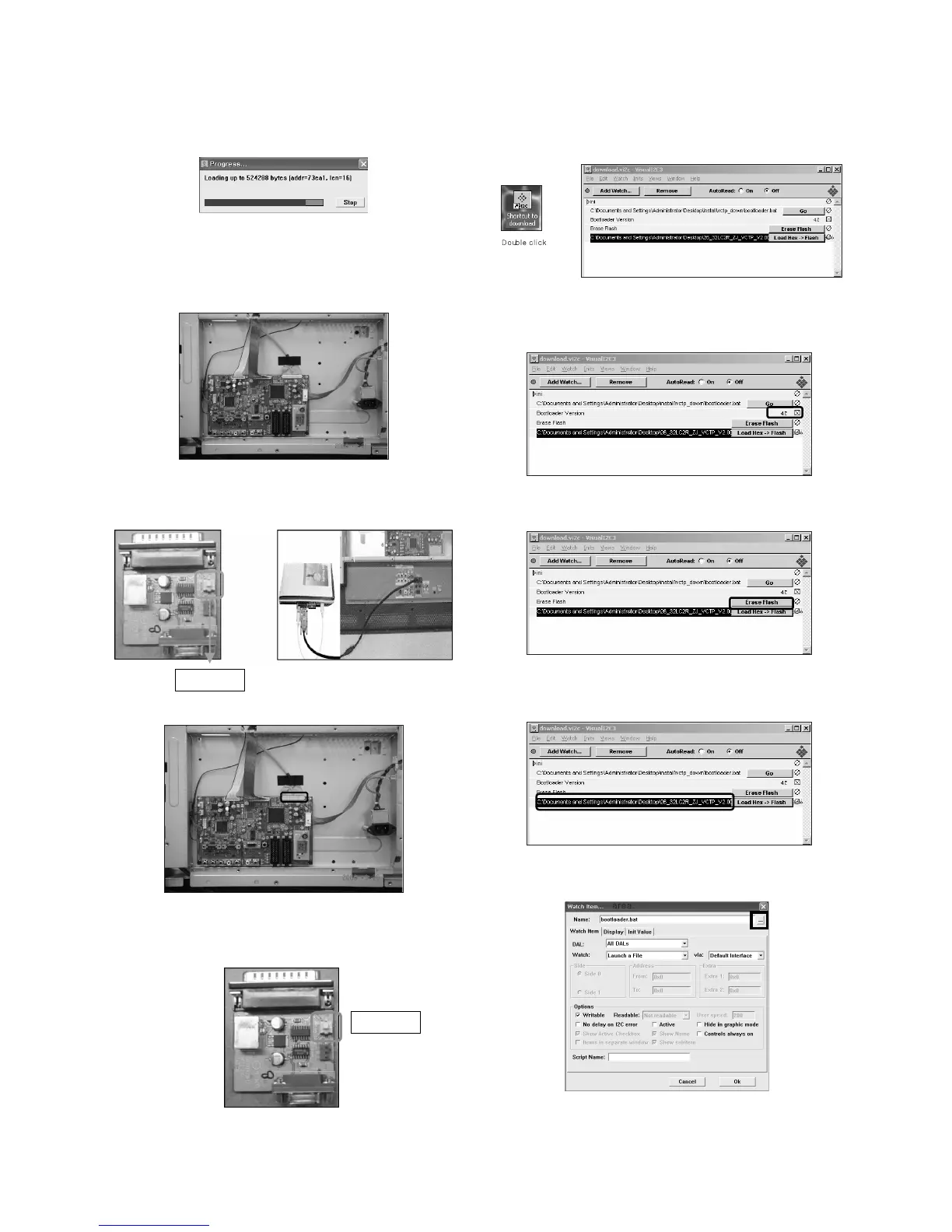
8) Click OK button at the "edit window".
9) Under Downloading process
10) If download is failed, for example "No acknowledge
from slave". Execute download again from(1).
(2) Download method 2 (AV Plate Ass’y)
1) Push S/W ‘ON’(connect SCL to GND using switch at Jig)
and connect the download jig to D-sub jack.
2) Supply the power (Stand-by 5V) and wait for 3 seconds.
3) Push the S/W off (Disconnect SCL to GND using switch
at jig).
4) Execute ‘Download.vi2c’ program in PC, then a main
widow will be opened.
5) Double click the blue box and confirm "Bootloader
Version" as 42.
6) Click the "Erase Flash" button.
7) Double click the download file low then, "edit" window
will be opened.
8) Chick the choice button I n the "edit window", then "file
choice window’ will be opened.
Push S/W
Push S/W


 To Next Page