NETCAST
NETCAST
16
In order to make rental/purchase transactions on the Vudu service, a user must create an account on
vudu.com. That account is linked to a specific device, via a process called “activation”. It is possible
to have multiple devices associated with a single Vudu account.
If newer software is needed, a software update screen will automatically appear.
Note that this service is provided by the Content Provider, Vudu. It is dependent on Vudu to provide the
data.
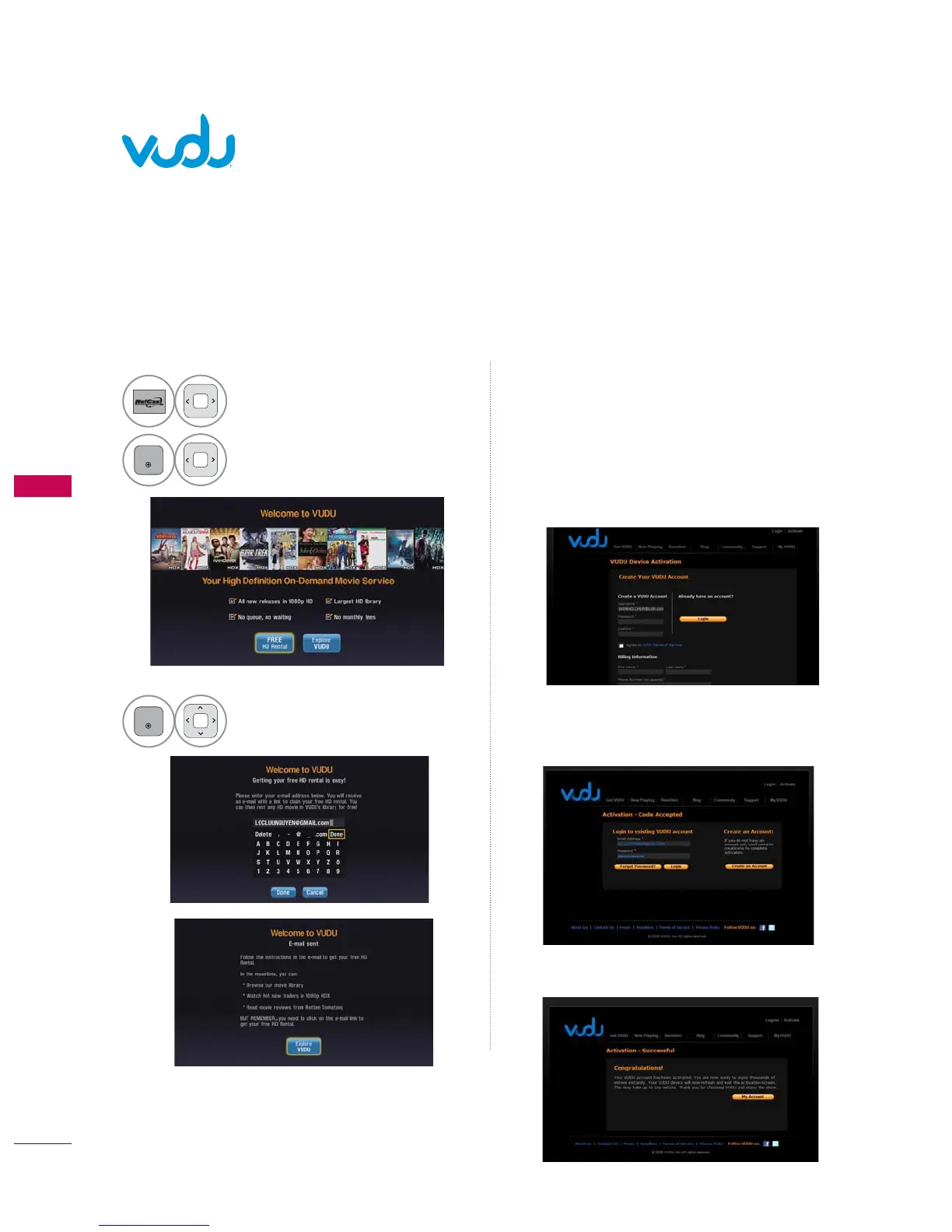
Activating the TV
4
You will receive an e-mail with a link.
Click the e-mail link.
5
Create your VUDU account to activate your
TV if you no have account.
If you have an existing account, log into your
account.
6
Enter your Sign in Email address and Password
to log into your account.
7
Your VUDU account has been activated.
1
Select VUDU.
2
Select FREE HD Rental.
3
Enter your e-mail address.


 To Next Page