53
EXTERNAL EQUIPMENT SETUP
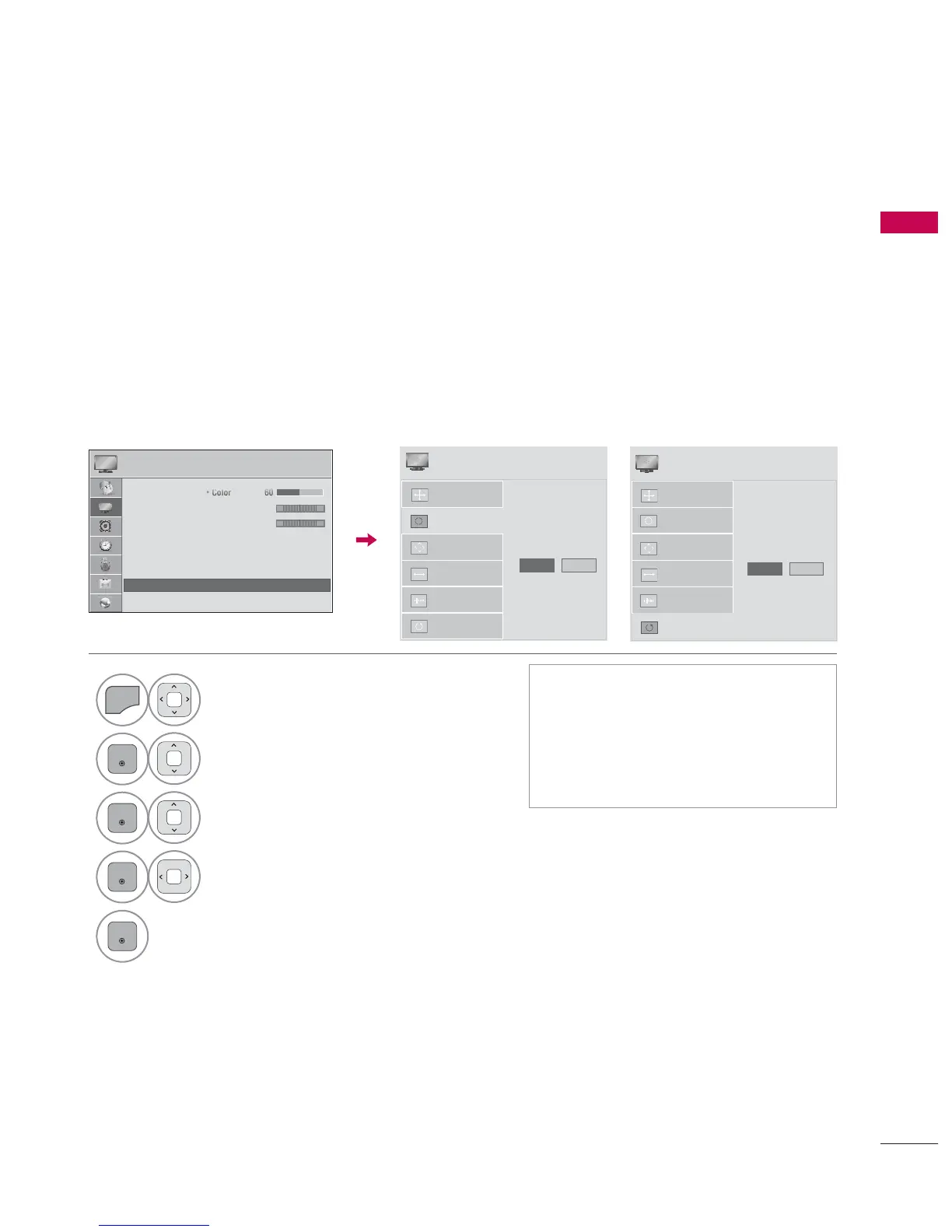
Automatically adjusts picture position and minimizes image instability. After adjustment, if the image
is still not correct, try using the manual settings or a different resolution or refresh rate on the PC.
Auto Configure
1
Select PICTURE.
2
Select Screen (RGB-PC).
3
Select Auto Config. or
Reset.
4
Select Yes.
5
ᯫ
If the position of the image is still not
correct, try Auto adjustment again.
ᯫ
If picture needs to be adjusted again
after Auto adjustment in RGB-PC,
you can adjust the Position, Size or
Phase.
$XWR&RQILJ
5HVROXWLRQ
3RVLWLRQ
6L]H
3KDVH
5HVHW
$XWR&RQILJ
<HV 1R
6&5((1
ᯒ0RYHᰙ3UHY
3,&785(
ᯒ0RYHᯙ(QWHU
ᯐ
ᯙ
ؒ7LQW
ؒ&RORU7HPS
ؒ$GYDQFHG&RQWURO
ؒ3LFWXUH5HVHW
ؒ7UX0RWLRQ
ؒ6FUHHQ5*%3&
ؒ/('/RFDO'LPPLQJ2Q
5*
:&
Returns Position, Size, and Phase to the default initial settings.
This feature operates only in RGB-PC mode.
Screen Reset (Reset to original initial values)
$XWR&RQILJ
3RVLWLRQ
5HVROXWLRQ
6L]H
3KDVH
5HVHW
7R6HW
<HV 1R
6&5((1
ᯒ0RYHᰙ3UHY


 To Next Page