Need help?
Do you have a question about the LG 32LG2000 and is the answer not in the manual?
Covers essential safety notices, general servicing advice, and AC leakage current testing procedures.
Details precautions for ES devices, soldering techniques, component removal, and circuit board foil repair methods.
Covers application range, test requirements, module details, environment, and power specifications.
Details supported broadcasting systems, input ports like SCART, RCA, HDMI, and their signal types.
Technical data for Component, RGB PC input modes, including resolution, frequency, and pixel clock.
Detailed specifications for HDMI DTV and PC input modes, covering resolution and pixel clock.
Outlines application range, designation, main PCB checks, and USB software update process.
Covers ADC adjustments for PC/Component, function checks, and total assembly line processes.
Details EDID/HDCP configuration, serial number setting, and outgoing condition checks.
Covers HDCP settings, outgoing condition configuration, and internal pressure testing.
Guides for diagnosing and resolving power failures, no raster, and various video display problems.
Addresses no sound issues and specific video problems across different input types.
Visual representation of the TV's internal components and their interconnections.
Diagram showing the TV's parts for assembly and disassembly.
Circuit schematics for main board, interfaces, tuner, HDMI, power, and other functional blocks.
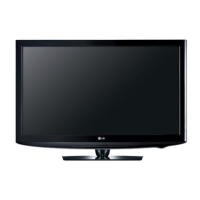
This document serves as a comprehensive service manual for the LG LCD TV models 32LG2000 and 32LG2000-ZA, operating on the LD84A chassis. It is intended for internal use by service personnel, providing detailed instructions and precautions for the maintenance and repair of these television sets.
The primary function of the device is to display video and audio content from various sources. It supports a wide range of broadcasting systems, including PAL-BG, PAL-DK, PAL-I/I', and SECAM L/L', as well as digital DVB-T. For external connections, the TV is equipped with multiple input options, including RCA, S-Video, Component (Y/Cb/Cr, Y/Pb/Pr), RGB-PC, and three HDMI inputs (HDMI1-DTV/DVI, HDMI2-DTV, HDMI3-DTV), supporting PC and HDCP for secure content. Audio inputs are available for RGB/DVI, Component, and AV sources, along with SPDIF out and an earphone jack. A USB port is also included, primarily for service functions such as software updates.
Usage features of the TV include its ability to receive and display DTV and Analog signals across various regions, including UK, France, Germany, Spain, Sweden, Finland, Italy, Netherlands, Belgium, Luxembourg, Greece, Denmark, Czech Republic, Austria, Hungary, Switzerland, Croatia, Turkey, Poland, Portugal, Norway, Bulgaria, Serbia, Slovenia, and Russia/Romania. The TV incorporates Scart jacks, with Scart 1 supporting full Scart and RF-OUT (analog), and Scart 2 supporting MNT/DTV-OUT. The display supports various resolutions and refresh rates for both Component Video Input (Y, Pb, Pr) and RGB PC Input modes, ranging from standard definition (480i/p) to high definition (1080i/p) and various PC resolutions like XGA, WXGA, and WUXGA. HDMI DTV and PC modes also support a similar range of resolutions, ensuring compatibility with a broad array of modern and legacy devices.
Maintenance features are extensively covered in this manual, emphasizing safety precautions and detailed adjustment instructions. Before any servicing, it is crucial to read and follow the safety precautions, which highlight the importance of using an isolation transformer to protect both the technician and the device from electrical shocks. Special safety-related parts, identified by a specific symbol in the schematic diagrams and exploded views, must be replaced with manufacturer-recommended components to prevent hazards like shock, fire, or other risks. Modifications to the original design are strictly prohibited without manufacturer permission.
General servicing guidance includes always unplugging the AC power cord before removing or reinstalling components, disconnecting electrical plugs, or connecting test substitutes. High voltage testing should only be done with appropriate meters and probes, avoiding "drawing an arc." Chemicals should not be sprayed on or near the receiver. Electrical contacts should be cleaned with a specific acetone and isopropyl alcohol mixture. Plug/socket B+ voltage interlocks should not be defeated, and AC power should not be applied unless all solid-state device heat sinks are correctly installed. Grounding procedures for test receivers are also specified.
The manual also provides detailed instructions for handling Electrostatically Sensitive (ES) Devices, such as integrated circuits and field-effect transistors. Technicians are advised to drain static charge from their bodies using a wrist strap, place ES devices on conductive surfaces after removal, and use grounded-tip soldering irons and anti-static solder removal devices. Freon-propelled chemicals should be avoided, and replacement ES devices should remain in their protective packaging until immediately before installation. Minimizing bodily motions during handling of unpackaged ES devices is also recommended to prevent static electricity buildup.
Soldering guidelines are provided, recommending a grounded-tip, low-wattage soldering iron with appropriate tip size and temperature, and RMA resin-core solder. The importance of keeping the soldering iron tip clean and well-tinned, and thoroughly cleaning surfaces to be soldered, is stressed. Specific unsoldering and soldering techniques are described to prevent overheating of circuit board foils.
Instructions for IC removal/replacement, "Small-Signal" Discrete Transistor removal/replacement, Power Output Transistor Device removal/replacement, Diode removal/replacement, and Fuse and Conventional Resistor removal/replacement are meticulously detailed. These procedures include steps for desoldering, straightening leads, crimping, and soldering, with emphasis on maintaining original spacing and avoiding excessive heat.
Circuit board foil repair techniques are also outlined for both IC connections and other connections, involving careful removal of damaged copper, scratching away solder resist, and installing jumper wires with proper crimping and soldering.
The adjustment instruction section covers the total assembly line process, including preparation for white balance (W/B) adjustment using specific equipment (CA-210 or CA-110) and test signals. It details the I2C command execution for adjustment and confirmation of color temperature settings (Cool, Medium, Warm). Manual W/B adjustment procedures using a service remote control are also described.
DDC EDID (Extended Display Identification Data) write procedures for RGB (128Byte) and HDMI (256Byte) are included, ensuring correct data is written to the EEPROM (24C02) via DDC2B protocol. Serial number writing via RS-232C and verification through the SET UP menu's Diagnostics are also part of the process. HDCP (High-Bandwidth Digital Contents Protection) setting for the scaler (Mstar) involves inputting the HDCP key and confirming picture display.
The manual also outlines an "Outgoing condition Configuration" procedure, where pressing the "IN-STOP" key on the service remote control causes the Red LED to blink alternatively before automatically turning off, indicating proper configuration. An internal pressure check confirms normal operation between the power board's AC block and GND.
Troubleshooting flowcharts are provided for common issues such as "No Power," "No Raster," "Unusual display from TV/CATV mode," "Unusual display from DTV mode," "Unusual display from AV1/AV2(SCART) mode," "Unusual display from AV3(SIDE AV) mode," "Unusual display from Component mode," "Unusual display from RGB mode," "Unusual display from HDMI 1/2/3 mode," and "No Sound." These flowcharts guide technicians through a series of checks, from basic connections and power supply to specific IC outputs and cable integrity, leading to potential solutions like replacing fuses, cables, or main boards. For "No Raster" and "No Sound" issues, a caution note advises checking the S/W version and White Balance value before changing the Main Board, and performing S/W download and setting White Balance value after a board change.
The document concludes with block diagrams of the main board, DDR memory, and various interface modules (Tuner, Scart, HDMI, Power, AMP), providing a visual representation of the TV's internal architecture and component interconnections. These diagrams are essential for understanding signal paths and identifying problematic areas during servicing.
 General
| Equalizer | Yes |
|---|---|
| Audio system | SRS TruSurround XT |
| RMS rated power | 20 W |
| Equalizer bands quantity | 5 |
| Speakers | 2 x 10W |
| Display panel size | 708 x 398 mm |
| Power requirements | 230V~ (100-240V~) |
| SCART ports quantity | 2 |
| Digital audio optical out | 1 |
| Product color | Black |
| LED indicators | Stand-by |
| Response time | 6 ms |
| Display diagonal | 32 \ |
| Display brightness | 500 cd/m² |
| Display resolution | 1366 x 768 pixels |
| Display technology | LCD |
| Native aspect ratio | 16:9 |
| Contrast ratio (dynamic) | 15000:1 |
| Power consumption (standby) | 1 W |
| Power consumption (typical) | 150 W |
 Weight and Dimensions
| Depth (with stand) | 227.3 mm |
|---|---|
| Width (with stand) | 801.8 mm |
| Height (with stand) | 604.2 mm |
| Weight (with stand) | 13900 g |
| Depth (without stand) | 79 mm |
| Height (without stand) | 544.4 mm |
| Weight (without stand) | 12400 g |


 To Next Page