8
ENGLISH
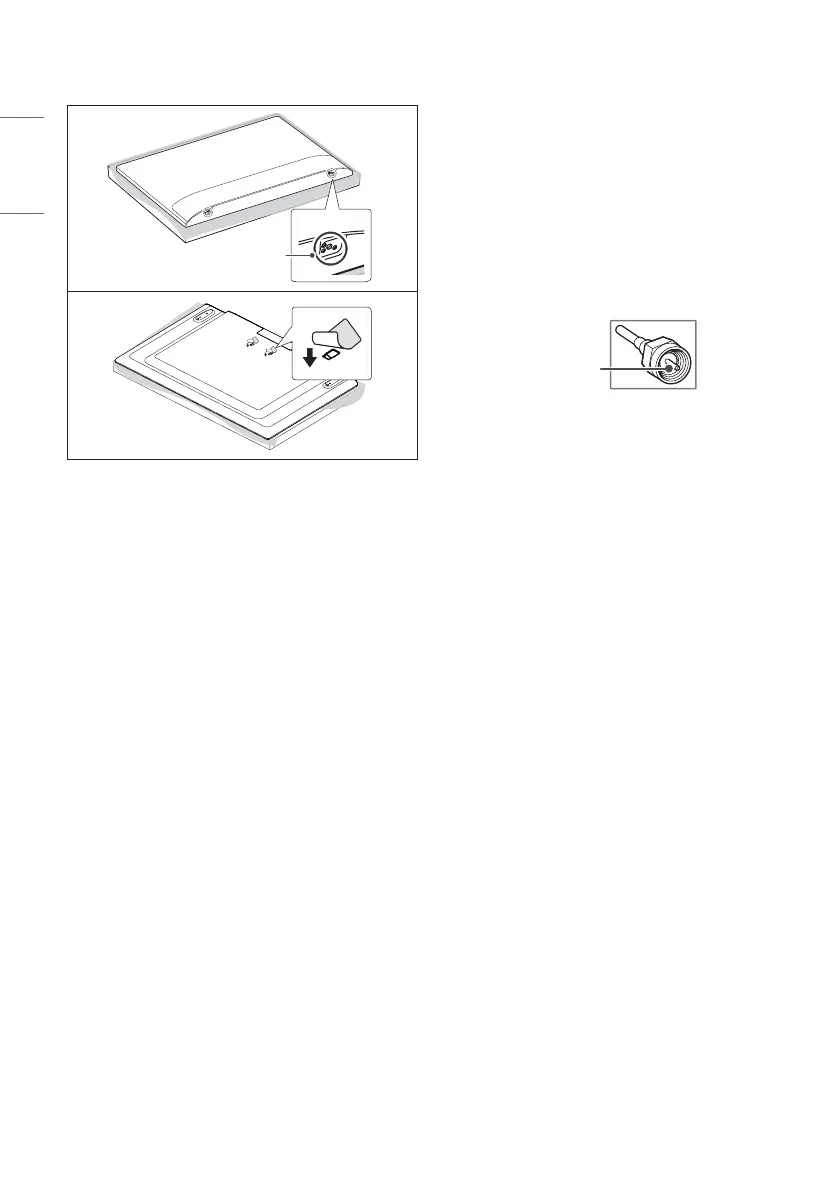
• When installing the wall mounting bracket, it is recommended to
cover the stand hole using tape, in order to prevent the inux of
dust and insects. (Depending upon model)
Stand hole
Connections
You can connect various external devices to the TV. For more
information on external device’s connection, refer to the manual
provided with each device.
Antenna/Cable
Connect an antenna, cable, or cable box to watch TV while referring to
the following. The illustrations may dier from the actual items and an
RF cable is optional.
• Make sure not to bend the copper wire of the RF cable.
Copper wire
• Complete all connections between devices, and then connect the
power cord to the power outlet to prevent damage to your TV.
• To improve the picture quality in a poor signal area, purchase a
signal amplier.
• Use a signal splitter to use 2 TVs or more.
• If the antenna is not installed properly, contact your dealer for
assistance.
Other connections
Connect your TV to external devices. For the best picture and audio
quality, connect the external device and the TV with the HDMI cable.
HDMI
• When connecting the HDMI cable, the product and external devices
should be turned o and unplugged.
• Supported HDMI Audio format :
(Depending upon model)
DTS (44.1 kHz / 48 kHz / 88.2 kHz / 96 kHz),
DTS HD
(44.1 kHz / 48 kHz / 88.2 kHz / 96 kHz / 176.4 kHz / 192 kHz),
Dolby Digital / Dolby Digital Plus (32 kHz / 44.1 kHz / 48 kHz),
PCM (32 kHz / 44.1 kHz / 48 kHz / 96 kHz / 192 kHz)



 To Next Page